<?xml version="1.0" encoding="utf-8"?>
<feed xmlns="http://www.w3.org/2005/Atom">
    <id>https://opensource.byjg.com/blog</id>
    <title>Opensource ByJG Blog</title>
    <updated>2026-10-07T00:00:00.000Z</updated>
    <generator>https://github.com/jpmonette/feed</generator>
    <link rel="alternate" href="https://opensource.byjg.com/blog"/>
    <subtitle>Opensource ByJG Blog</subtitle>
    <icon>https://opensource.byjg.com/img/favicon.ico</icon>
    <entry>
        <title type="html"><![CDATA[A Complete Ecosystem: From Code to Production, With the Same Method]]></title>
        <id>https://opensource.byjg.com/blog/byjg-engineering-ecosystem</id>
        <link href="https://opensource.byjg.com/blog/byjg-engineering-ecosystem"/>
        <updated>2026-10-07T00:00:00.000Z</updated>
        <summary type="html"><![CDATA[How independent projects, joined by automation, form a complete path: build, test locally, deploy and run in production with the same container. And where the method came from, starting with an index.asp in the year 2000.]]></summary>
        <content type="html"><![CDATA[<p>Today I can build an application, test it on my machine, deploy it and run it in production using only projects that I maintain, and the container I tested is the same one that goes to production. I never planned an "ecosystem". It is the result of a method I have been repeating for more than twenty years, and this article tells where that method came from and how it works today.</p>
<!-- -->
<h2 class="anchor anchorTargetStickyNavbar_Vzrq" id="it-all-started-with-an-indexasp">It all started with an index.asp<a href="https://opensource.byjg.com/blog/byjg-engineering-ecosystem#it-all-started-with-an-indexasp" class="hash-link" aria-label="Direct link to It all started with an index.asp" title="Direct link to It all started with an index.asp" translate="no">​</a></h2>
<p>It all started in the year 2000, when I worked at Unitech, an outsourcing company serving the government. I was part of the Research and Development group, and one of our missions was to validate whether .NET 1.0 was a good path to migrate from VB 6.0 to Web Forms. Unitech was a Microsoft partner, so we had access to the beta versions long before the release. We did the research, the tests and the proofs of concept, and we trained and followed a few teams.</p>
<p>The big change came when I was assigned to the SOMAR project (Sistema Organizado de Matrícula, the school enrolment system of the state of Bahia). Until then the system was 100% VB6 with Oracle 7.3 and stored procedures, but that year's public tender required a web version to be delivered, which was quite new at the time. I had already worked at a web design company and had written my own CGI in Delphi (CGI was the mechanism in which the web server ran a program on every request and sent back to the browser whatever that program wrote), so they put me on the project as Plan B. Plan A was to deliver the VB6 version, which was already done, and to have a web version only as a deliverable, with no expectation that it would be used.</p>
<p>We chose ASP 3.0, which came out in the same year as PHP 4, when both technologies were still very primitive: basically includes and commands to write text to the page, with a JavaScript that was also very limited. Even without the pressure of the delivery, I decided to create something that was easy for the developer and that hid the complexity of mixing HTML with code. I had already worked with ColdFusion and with CGI, and everything was very technical, with a steep learning curve.</p>
<p>I thought about how a C project is organized, with its <code>main.c</code> and its headers, and adapted the idea to our reality in ASP 3.0. Each page had its "headers" and a main function:</p>
<div class="language-asp codeBlockContainer_Ckt0 theme-code-block" style="--prism-color:#393A34;--prism-background-color:#f6f8fa"><div class="codeBlockContent_QJqH"><pre tabindex="0" class="prism-code language-asp codeBlock_bY9V thin-scrollbar" style="color:#393A34;background-color:#f6f8fa"><code class="codeBlockLines_e6Vv"><div class="token-line" style="color:#393A34"><span class="token plain">&lt;!-- #include file="bancodedados.inc" --&gt;</span><br></div><div class="token-line" style="color:#393A34"><span class="token plain">&lt;!-- #include file="seguranca.inc" --&gt;</span><br></div><div class="token-line" style="color:#393A34"><span class="token plain">&lt;!-- #include file="menu.inc" --&gt;</span><br></div><div class="token-line" style="color:#393A34"><span class="token plain">&lt;!-- #include virtual="design.inc" --&gt;   &lt;% ' draws the layout and calls Main %&gt;</span><br></div><div class="token-line" style="color:#393A34"><span class="token plain">&lt;%</span><br></div><div class="token-line" style="color:#393A34"><span class="token plain">Sub Main</span><br></div><div class="token-line" style="color:#393A34"><span class="token plain">    ' what this page does: a listing, a calculation, a download</span><br></div><div class="token-line" style="color:#393A34"><span class="token plain">End Sub</span><br></div><div class="token-line" style="color:#393A34"><span class="token plain">%&gt;</span><br></div></code></pre></div></div>
<p>The includes held the code specific to each subject, such as connecting to the database or checking whether the user had permission, and the <code>Main</code> of each page ran only what that page was supposed to do. The one calling <code>Main</code> was <code>design.inc</code>: it drew the layout, that big box with a header, a menu and a footer, and knew at which point of it the page's result should appear. With this technique, and reusing the stored procedures that already existed, our team of four people delivered the web system, which ended up being the protagonist of the project and the first web system at Unitech. Later I refined the technique and replicated it in other projects of the company, with a huge gain in productivity.</p>
<h2 class="anchor anchorTargetStickyNavbar_Vzrq" id="xmlnuke-and-what-it-taught-me">XMLNuke and what it taught me<a href="https://opensource.byjg.com/blog/byjg-engineering-ecosystem#xmlnuke-and-what-it-taught-me" class="hash-link" aria-label="Direct link to XMLNuke and what it taught me" title="Direct link to XMLNuke and what it taught me" translate="no">​</a></h2>
<p>When I left Unitech I decided to invest in my own "framework". At that time Java massively spread the use of XML, which had its formatting layer, XSL. With the two of them I could isolate the data layer from the presentation layer. It was a tempting idea, and there were few options back then; in the CMS wave there were PHP-Nuke and PostNuke.</p>
<p>So I created XMLNuke. The classes you wrote produced XML, and an XSL processing layer transformed that XML into HTML. The first version was in ASP, a natural continuation of what I had done at Unitech, and the project has been registered on SourceForge since May 2002. In 2003 came the versions in Java, C# and PHP, all with the same way of programming. PHP was where I ended up investing, because ASP was far more limited and because I had decided to bet on Linux. The 2003 version ran on PHP 4, then it sat idle for a long time, and I only picked it up again with PHP 5, in 2006, which was the version that matured. XMLNuke was also my first open source code: it started in CVS, moved to SVN on SourceForge and, many years later, went to GitHub.</p>
<p>In a way XMLNuke anticipated what we do today with REST APIs and JSON, where the code produces data and the presentation lives in another layer. The difference is that JSON is much simpler and needs no framework to be read.</p>
<p>XMLNuke was a huge monolith that needed a specific directory structure to run. With it I learned that a framework cannot be monolithic or rigid, that it is easier to maintain several small, cohesive components than a system in which everything is coupled, because there a small change ends up breaking parts that had nothing to do with it, and that a standard specification and good documentation are as important as the code. I killed XMLNuke and carried the lessons with me.</p>
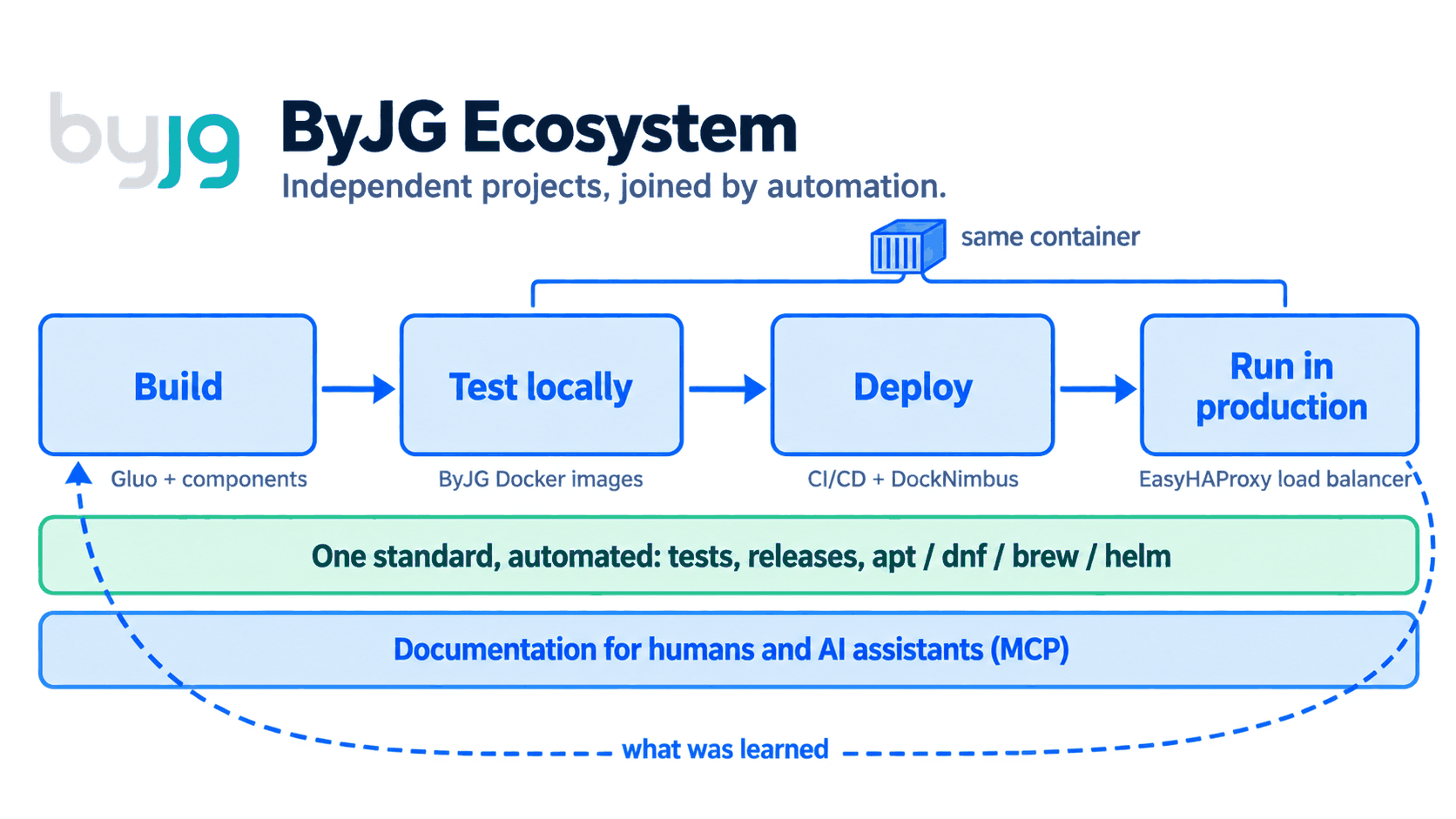
<p>Those lessons became smaller components. The components taught me how to reduce complexity and separate responsibilities, then they asked for Docker images to always run the same way, then they asked for automation to publish, and so on. In <a class="" href="https://opensource.byjg.com/blog/2025/11/09/how-i-manage-30-open-source-projects">How I Manage 30+ Open Source Projects</a> I told how this worked when there were two pillars, the PHP components and the Docker images. Since then DockNimbus, ByJG Docs MCP, Parolsh and the package repositories have joined, and the pieces now cover the whole path.</p>
<p><img decoding="async" loading="lazy" alt="The ByJG ecosystem: build with Gluo and components, test locally with the ByJG Docker images, deploy the same container with CI/CD and DockNimbus, and run in production behind EasyHAProxy. One automated standard covers tests, releases and publishing to apt, dnf, brew and helm. The documentation serves humans and AI assistants through MCP, and what is learned in production feeds back into the build." src="https://opensource.byjg.com/assets/images/byjg-ecosystem-61f542a40956188d1b9af7df4d76851b.png" width="1672" height="941" class="img_ev3q"></p>
<h2 class="anchor anchorTargetStickyNavbar_Vzrq" id="build-the-application">Build the application<a href="https://opensource.byjg.com/blog/byjg-engineering-ecosystem#build-the-application" class="hash-link" aria-label="Direct link to Build the application" title="Direct link to Build the application" translate="no">​</a></h2>
<p>After XMLNuke I was very reluctant to have a framework again. I kept only separate and completely independent components. The first ones I extracted from XMLNuke itself, back in my MaxMilhas days, and each of them took on a life of its own. Over time I noticed that, whenever I used those components, I followed the same methodology: my own way of writing and connecting the pieces.</p>
<p>First I recorded that way in the PHP Rest Reference Architecture, a reference architecture that defined the guidelines but still left a lot loose. It is what I used to build the KingPanda website (kingpanda.com.br). This year I finally turned the reference architecture into a framework called <a class="" href="https://opensource.byjg.com/docs/php/gluo">Gluo</a>, which means "glue" in Esperanto, because that is what it does with my components.</p>
<p>A <code>composer create-project byjg/gluo</code> creates a REST API project that is yours, already with authentication, migrations, ORM, OpenAPI documentation and the test structure. It is the same idea as the <code>index.asp</code> of 2000: the developer writes the business rule and finds the rest already solved. Today Gluo runs <a href="https://boletimdeurna.com/" target="_blank" rel="noopener noreferrer" class="">BoletimDeUrna.com</a>, the ByJG website (<a href="https://byjg.com.br/" target="_blank" rel="noopener noreferrer" class="">byjg.com.br</a>) and the Brazilian postal code (CEP) lookup service that lives in it.</p>
<p>The difference from XMLNuke is underneath. Gluo glues together components that remain independent, such as <a class="" href="https://opensource.byjg.com/docs/php/restserver">RestServer</a>, <a class="" href="https://opensource.byjg.com/docs/php/micro-orm">MicroOrm</a>, <a class="" href="https://opensource.byjg.com/docs/php/serializer">Serializer</a>, <a class="" href="https://opensource.byjg.com/docs/php/migration">Migration</a> and <a class="" href="https://opensource.byjg.com/docs/php/config">Config</a>. Each one has its own repository, its own tests and its own release cycle, and can be used on its own in a Laravel or Symfony project. The part of the framework that evolves lives in <code>vendor/</code> and is updated with a <code>composer update</code>, while the generated project can be changed freely.</p>
<h2 class="anchor anchorTargetStickyNavbar_Vzrq" id="test-locally-with-my-own-images">Test locally with my own images<a href="https://opensource.byjg.com/blog/byjg-engineering-ecosystem#test-locally-with-my-own-images" class="hash-link" aria-label="Direct link to Test locally with my own images" title="Direct link to Test locally with my own images" translate="no">​</a></h2>
<p>The project already comes with a <code>docker-compose.yml</code>, and a <code>docker compose up -d</code> brings up the API, the database and the frontend on my machine. The containers are built from the <a class="" href="https://opensource.byjg.com/docs/devops/docker-php">ByJG PHP images</a>, which exist in CLI, FPM, Nginx and Apache variants for each PHP version. I do not need to install anything besides Docker.</p>
<p>Those images were born from an old pain: every time I switched machines I reconfigured PHP, extensions and tools, and something was always missing, besides needing several PHP versions at the same time. There was also the day I needed PHP 5.6 for an old project and the Linux distributions no longer shipped it.</p>
<p><a href="https://shellscript.download/" target="_blank" rel="noopener noreferrer" class="">shellscript.download</a> comes from the same pain. With it I do not even need PHP installed: a <code>load.sh php-docker -- 8.4</code> creates on my machine a <code>php</code> command that, underneath, runs inside the container, and I simply enter the project and work. To have another version side by side I repeat the command with another number. Node works the same way, and for Java and other tools there are scripts that do the installation with one command. I told the details in <a class="" href="https://opensource.byjg.com/blog/2025/10/22/using-php-and-vscode-without-install">Easy PHP Development with Docker and VSCode</a>.</p>
<p>An important point is the OpenAPI contract, which I write only once. The code itself documents each endpoint, with attributes above the controller method. A <code>composer openapi</code> extracts those attributes into an <code>openapi.json</code> file, and from then on the same file does four jobs: <a class="" href="https://opensource.byjg.com/docs/php/restserver">RestServer</a> builds the API routes from it, Swagger UI serves the documentation pages where each endpoint can be tried out, the <code>#[ValidateRequest]</code> attribute validates the body of each request before the method runs and returns a 422 error when it does not follow the contract, and <a class="" href="https://opensource.byjg.com/docs/php/swagger-test">Swagger Test</a> runs the contract tests, comparing each response with what was declared. Route, documentation, validation and test come from the same source, with nothing rewritten or duplicated.</p>
<h2 class="anchor anchorTargetStickyNavbar_Vzrq" id="deploy-cicd-and-docknimbus">Deploy: CI/CD and DockNimbus<a href="https://opensource.byjg.com/blog/byjg-engineering-ecosystem#deploy-cicd-and-docknimbus" class="hash-link" aria-label="Direct link to Deploy: CI/CD and DockNimbus" title="Direct link to Deploy: CI/CD and DockNimbus" translate="no">​</a></h2>
<p>The same pipeline that runs the tests builds the application image. For the pipelines I maintain <a class="" href="https://opensource.byjg.com/docs/devops/k8s-ci">k8s-ci</a>, an image with the tools needed to build and deploy.</p>
<p>What was missing was the place to deploy to, and <a class="" href="https://opensource.byjg.com/docs/devops/nimbus">DockNimbus</a> came out of that need. Having VMs in a cloud is practical and very fast, especially in large projects. In small projects, however, it is cheaper to rent a small dedicated server, connected to the internet and unmanaged, where all you get is the machine. Every time I had to configure the network, protect what would be exposed, install Kubernetes and so on, and when there was more than one machine the communication between them also went over the internet.</p>
<p>DockNimbus does that configuration for me, with the security standards I would apply by hand. It turns physical machines and VMs, from a Raspberry Pi to an x86 server, into a platform with compute, storage and Docker Swarm and K3s clusters, all declared in a single manifest, and it links the machines through a WireGuard mesh, so the traffic between them stays encrypted even when crossing the internet. The documentation sums up the difference from Kubernetes like this: Kubernetes answers "I have a cluster, how do I orchestrate containers on it?", and DockNimbus answers "I have machines, how do I turn them into a working platform?".</p>
<p>It works well for small installations, which is my case. I use DockNimbus to manage my local environment and my two ASUS Spark GB10 machines, and it also deploys to production the ByJG website, BoletimDeUrna and the documentation MCP server.</p>
<h2 class="anchor anchorTargetStickyNavbar_Vzrq" id="production-the-same-docker-with-a-load-balancer">Production: the same Docker, with a load balancer<a href="https://opensource.byjg.com/blog/byjg-engineering-ecosystem#production-the-same-docker-with-a-load-balancer" class="hash-link" aria-label="Direct link to Production: the same Docker, with a load balancer" title="Direct link to Production: the same Docker, with a load balancer" translate="no">​</a></h2>
<p>The image that runs in production is the same one I tested locally and that went through CI, so there is no difference between environments to investigate when something goes wrong.</p>
<p>In front of the applications sits <a class="" href="https://opensource.byjg.com/docs/devops/docker-easy-haproxy">EasyHAProxy</a>. I like HAProxy a lot: it is very fast and also works at the TCP layer, so it can sit in front of a MySQL server, for example, and not only in front of web applications. Its configuration, however, is quite complicated. I wanted to automate it, and in 2018, when I started the project, the community version of HAProxy had nothing like it.</p>
<p>EasyHAProxy generates that configuration by itself. It discovers the services from Docker labels, Swarm services or Kubernetes Ingress, issues the TLS certificates and reloads HAProxy without dropping connections. DockNimbus itself uses EasyHAProxy as its load balancer.</p>
<h2 class="anchor anchorTargetStickyNavbar_Vzrq" id="independent-projects-centralized-by-automation">Independent projects, centralized by automation<a href="https://opensource.byjg.com/blog/byjg-engineering-ecosystem#independent-projects-centralized-by-automation" class="hash-link" aria-label="Direct link to Independent projects, centralized by automation" title="Direct link to Independent projects, centralized by automation" translate="no">​</a></h2>
<p>This is the point XMLNuke taught me the hard way. Each project has its own repository, its own tests and its own releases, and none of them depends on another to be published. What makes them an ecosystem is automation.</p>
<p>When a project is merged or tagged, automation publishes what it produces, with no manual step, and the documentation, the charts and the packages all go to the same site:</p>
<table><thead><tr><th>What is published</th><th>How</th><th>How you install it</th></tr></thead><tbody><tr><td>Documentation</td><td><code>add-doc</code> reusable workflow</td><td><a href="https://opensource.byjg.com/" target="_blank" rel="noopener noreferrer" class="">opensource.byjg.com</a></td></tr><tr><td>Helm charts</td><td><code>add-helm</code> reusable workflow</td><td><code>helm repo add byjg https://opensource.byjg.com/helm</code></td></tr><tr><td>DEB and RPM packages</td><td><code>add-pkg</code> reusable workflow, signed</td><td><code>apt install</code> and <code>dnf install</code></td></tr><tr><td>Homebrew formulas</td><td>a daily workflow in the tap follows the release tags</td><td><code>brew install byjg/tap/&lt;formula&gt;</code></td></tr><tr><td>Docker images</td><td>each project's <code>build.yml</code></td><td><code>docker pull byjg/&lt;image&gt;</code></td></tr><tr><td>PHP components</td><td>a Git tag</td><td><code>composer require byjg/&lt;component&gt;</code></td></tr></tbody></table>
<p>The standard is the same in every project and is described in the <a class="" href="https://opensource.byjg.com/docs/opensource/guidelines">Development Guidelines</a>: nothing is published before the tests pass, releases are tags with semantic versions, and CI is written once and called by each project. The reasons are in <a class="" href="https://opensource.byjg.com/blog/simple-principles-avoid-complexity">Simple Principles to Avoid Overcomplicating the Complex</a>.</p>
<h2 class="anchor anchorTargetStickyNavbar_Vzrq" id="documentation-for-humans-and-for-ai">Documentation for humans and for AI<a href="https://opensource.byjg.com/blog/byjg-engineering-ecosystem#documentation-for-humans-and-for-ai" class="hash-link" aria-label="Direct link to Documentation for humans and for AI" title="Direct link to Documentation for humans and for AI" translate="no">​</a></h2>
<p>The documentation lives in each project's repository, next to the code, and talks only about that project. Whoever documents MicroOrm writes about MicroOrm, without needing to know or describe the ecosystem. The complete documentation is generated by automation: on every merge the content of each project is copied to <a href="https://opensource.byjg.com/" target="_blank" rel="noopener noreferrer" class="">opensource.byjg.com</a>, which assembles the whole site, and <a class="" href="https://opensource.byjg.com/docs/ai/mcpserver-byjg-docs">ByJG Docs MCP</a> indexes the site with semantic and keyword search. Any assistant that speaks MCP queries that index and cites the page the answer came from.</p>
<p>This way the documentation is written once and gains two readers. An agent that needs to add persistence to a ByJG application finds MicroOrm and the intended way to use it, instead of inventing a data layer.</p>
<p>With XMLNuke I learned that specification and documentation matter. Today they are also the context the AI uses to work on my projects, and each documented change improves the next answer.</p>
<h2 class="anchor anchorTargetStickyNavbar_Vzrq" id="the-shell-and-the-agent-in-the-same-place-parolsh">The shell and the agent in the same place: Parolsh<a href="https://opensource.byjg.com/blog/byjg-engineering-ecosystem#the-shell-and-the-agent-in-the-same-place-parolsh" class="hash-link" aria-label="Direct link to The shell and the agent in the same place: Parolsh" title="Direct link to The shell and the agent in the same place: Parolsh" translate="no">​</a></h2>
<p><a class="" href="https://opensource.byjg.com/docs/ai/parolsh">Parolsh</a> was born for another reason. I prefer to work in the shell most of the time. When I want to see the logs of a pod, for example, I first have to list the pods and then run a <code>kubectl logs</code> for the first one, another for the second, the third, the fourth. Claude Code and Codex do this kind of investigation, but in them everything starts from natural language and the interface takes over the terminal, so the work ends up going entirely into the conversation and the shell becomes a supporting actor.</p>
<p>In Parolsh the two live in the same prompt. With <code>!+kubectl get pods</code> I run the command, see the result, and it already goes along with my next question. Then I ask for the logs, ask why the pods are restarting (what I would do with a <code>describe</code>) and can still ask for other analyses, which speeds up the process a lot. Parolsh runs inside the usual terminal, with no full-screen interface, and works with any ACP agent, such as Claude Code, Codex, Qwen Code and Gemini CLI.</p>
<h2 class="anchor anchorTargetStickyNavbar_Vzrq" id="the-method-for-anyone-who-wants-to-reproduce-it">The method, for anyone who wants to reproduce it<a href="https://opensource.byjg.com/blog/byjg-engineering-ecosystem#the-method-for-anyone-who-wants-to-reproduce-it" class="hash-link" aria-label="Direct link to The method, for anyone who wants to reproduce it" title="Direct link to The method, for anyone who wants to reproduce it" translate="no">​</a></h2>
<p>None of this depends on the ByJG tools. What I described is the result of a method that works for any set of projects:</p>
<ol>
<li class=""><strong>Automate what is repetitive.</strong> Tests, builds, releases, packages and documentation publishing run in CI.</li>
<li class=""><strong>Centralize what is shared.</strong> One set of workflows, one documentation site, one set of base images.</li>
<li class=""><strong>Isolate what is independent.</strong> Each component has its own repository, tests and release cycle, and only automation joins them.</li>
<li class=""><strong>Use the same container in every environment.</strong> Development, CI and production run the same image.</li>
<li class=""><strong>Write the documentation once, for two readers.</strong> Each project documents itself, and automation assembles the complete documentation. A person reads it on the site and an AI assistant reads it through MCP.</li>
</ol>
<h2 class="anchor anchorTargetStickyNavbar_Vzrq" id="from-indexasp-to-here">From index.asp to here<a href="https://opensource.byjg.com/blog/byjg-engineering-ecosystem#from-indexasp-to-here" class="hash-link" aria-label="Direct link to From index.asp to here" title="Direct link to From index.asp to here" translate="no">​</a></h2>
<p>What I wanted in 2000 with an <code>index.asp</code> and half a dozen includes is what I still want: that the developer writes what the page does and finds the rest already solved. What changed was the size of "the rest", which today includes the local environment, the pipeline, the platform, the load balancer, the packages and the documentation the AI consults.</p>
<p>Each project still works on its own, and nobody needs to adopt everything. To start with an API, see <a class="" href="https://opensource.byjg.com/docs/php/gluo">Gluo</a>. To put HTTPS in front of your services, <a class="" href="https://opensource.byjg.com/docs/devops/docker-easy-haproxy">EasyHAProxy</a>. To turn machines into a platform, <a class="" href="https://opensource.byjg.com/docs/devops/nimbus">DockNimbus</a>. To give context to your AI assistant, <a class="" href="https://opensource.byjg.com/docs/ai/mcpserver-byjg-docs">ByJG Docs MCP</a>. The complete map is in <a class="" href="https://opensource.byjg.com/docs/opensource/ecosystem">The ByJG Ecosystem</a>.</p>]]></content>
        <author>
            <name>Joao Gilberto Magalhaes</name>
            <uri>https://github.com/byjg</uri>
        </author>
        <category label="ai" term="ai"/>
        <category label="ecosystem" term="ecosystem"/>
        <category label="architecture" term="architecture"/>
        <category label="devops" term="devops"/>
        <category label="automation" term="automation"/>
        <category label="mcp" term="mcp"/>
        <category label="nimbus" term="nimbus"/>
    </entry>
    <entry>
        <title type="html"><![CDATA[Beyond Vibe Coding — AI as a Real Pair Programmer]]></title>
        <id>https://opensource.byjg.com/blog/beyond-vibe-coding</id>
        <link href="https://opensource.byjg.com/blog/beyond-vibe-coding"/>
        <updated>2026-02-28T00:00:00.000Z</updated>
        <summary type="html"><![CDATA[The "Vibe Coding" label doesn't do justice to real work. My experience using Claude Code, Lovable, and Emergent.sh to modernize a legacy project from 2010 — and why staying in control makes all the difference.]]></summary>
        <content type="html"><![CDATA[<p>I'm writing this article to explain my journey with what people call Vibe Coding. That's a terrible term, by the way. It always makes me think of doing something by "feel," just following the crowd — as if you're not really in control. In my work, I try to be pragmatic, and "coding by vibes" doesn't sound like something that produces lasting results. But before you jump to conclusions, let me explain a few things first.</p>
<!-- -->
<h2 class="anchor anchorTargetStickyNavbar_Vzrq" id="ai-productivity-what-actually-works">AI Productivity: What Actually Works<a href="https://opensource.byjg.com/blog/beyond-vibe-coding#ai-productivity-what-actually-works" class="hash-link" aria-label="Direct link to AI Productivity: What Actually Works" title="Direct link to AI Productivity: What Actually Works" translate="no">​</a></h2>
<p>Some time ago I decided to adopt AI coding assistants, and the productivity gain is absurd. I managed to document my libraries and projects in days, not months. I fixed bugs and resolved issues much faster. I even built a prompt automator: I have 50 projects, they all need documentation, and they all share the same prompt — so I wrote a script that goes into each project, documents it, checks that I'm following the right patterns, runs the tests, runs the linter, and fixes what needs fixing. Wonderful.</p>
<p>But I'm also very critical. I noticed that when I ask the AI to create a document without any initial draft, the result almost always has short sentences, lots of paragraphs, and several clichés like "The problem isn't... it's about...", "It's not that, it's this" — filler comments that leave the content hollow. Even though it bothers me, for technical documentation the HOW matters more than word count, so I let it go. The best workflow I found is: I write a rough draft and use the AI as my reviewer. It catches spelling and grammar errors, rewrites passages where I know what I mean but haven't said it clearly, and then I can give opinions, challenge suggestions, and improve.</p>
<h2 class="anchor anchorTargetStickyNavbar_Vzrq" id="pair-programming-with-ai-not-full-delegation">Pair Programming with AI, Not Full Delegation<a href="https://opensource.byjg.com/blog/beyond-vibe-coding#pair-programming-with-ai-not-full-delegation" class="hash-link" aria-label="Direct link to Pair Programming with AI, Not Full Delegation" title="Direct link to Pair Programming with AI, Not Full Delegation" translate="no">​</a></h2>
<p>Here's the first important point: I don't delegate 100% to the AI. I wish I could. But there's always a point where it loses the thread. It repeats code. When a test fails, it writes <code>assertTrue(true)</code> and happily announces you now have 1,000 passing tests. It keeps spawning cute little monsters, Gremlins-style. By the time you notice, it's consuming resources and burning through everything you have.</p>
<p>That's why my first rule with AI is: Pair Programming. I define the task — usually with a specification — throw it into Claude Code and ask for a plan. From there, I refine that plan until it gives me something I can work with. Once I approve, I watch exactly what's being coded, stop it, step in, ask why it did something a certain way, ask it to look at the spec, point it to the right documentation.</p>
<p>I can't sit back and "relax," but it's much faster, and I end up 90% happy with the result. To explain this outside of tech: if I hand a car to someone who just wants to drive, it doesn't matter what I give them, as long as they can drive. But I don't just want to drive — I want to tune the car, upgrade it, integrate systems. That's where being side by side helps a lot.</p>
<p>Of course, there are situations where how it was built doesn't matter much. I built some sites on Lovable (I'll get there) entirely through it — and that's it. I don't need anything else. But professionally, I want a product I can maintain, that I understand at the end, that I can evolve, that scales, and that I can rely on. At that point, I'm out of the Vibe. Real business isn't about shipping more for the sake of it — it's about shipping more with quality, where the result is solid and I am the OWNER of the process, not the AI.</p>
<h2 class="anchor anchorTargetStickyNavbar_Vzrq" id="the-real-project-modernizing-byjgcombr">The Real Project: Modernizing ByJG.com.br<a href="https://opensource.byjg.com/blog/beyond-vibe-coding#the-real-project-modernizing-byjgcombr" class="hash-link" aria-label="Direct link to The Real Project: Modernizing ByJG.com.br" title="Direct link to The Real Project: Modernizing ByJG.com.br" translate="no">​</a></h2>
<p>So I decided to test in practice a scenario where AI isn't just my pair programmer. I have the site ByJG.com.br, where I host my portfolio and some services — only the CEP WebService is still active today. It was written around 2010, originally deployed via <code>git pull</code>, and now runs on Kubernetes with CI/CD — but the code is the same as 2010. It used my old XMLNuke framework, which I retired in 2016, but whose code served as the foundation for my PHP Reference Architecture for REST projects.</p>
<p>My goals were:</p>
<ul>
<li class="">Migrate from PHP 5.6 to 8.5</li>
<li class="">MySQL 5.6 to 9.0</li>
<li class="">Modernize the layout using something like Vite or Next</li>
<li class="">Switch authentication to JWT</li>
<li class="">Keep the old APIs working, since I still have users who depend on the service</li>
</ul>
<p>Sounds simple, but if I were hiring a team I'd need:</p>
<ul>
<li class="">A backend developer able to work with both the legacy and the new code</li>
<li class="">A frontend developer who understands design, to build the site and wire up the APIs</li>
<li class="">A technical writer to help review the copy</li>
</ul>
<p>So I acted as a Hands-On Technical Product Manager and hired this team:</p>
<ul>
<li class=""><strong>Claude Code Max</strong> as my Backend (and FullStack)</li>
<li class=""><strong>Lovable Pro</strong> as my Frontend</li>
<li class=""><strong>Emergent.sh</strong> as my alternative Frontend</li>
<li class=""><strong>ChatGPT Pro</strong> as Solutions Architect, Reviewer, and Image Editor</li>
</ul>
<p>I paid for all of these services.</p>
<h2 class="anchor anchorTargetStickyNavbar_Vzrq" id="lovable-vs-emergentsh-the-frontend-showdown">Lovable vs Emergent.sh: The Frontend Showdown<a href="https://opensource.byjg.com/blog/beyond-vibe-coding#lovable-vs-emergentsh-the-frontend-showdown" class="hash-link" aria-label="Direct link to Lovable vs Emergent.sh: The Frontend Showdown" title="Direct link to Lovable vs Emergent.sh: The Frontend Showdown" translate="no">​</a></h2>
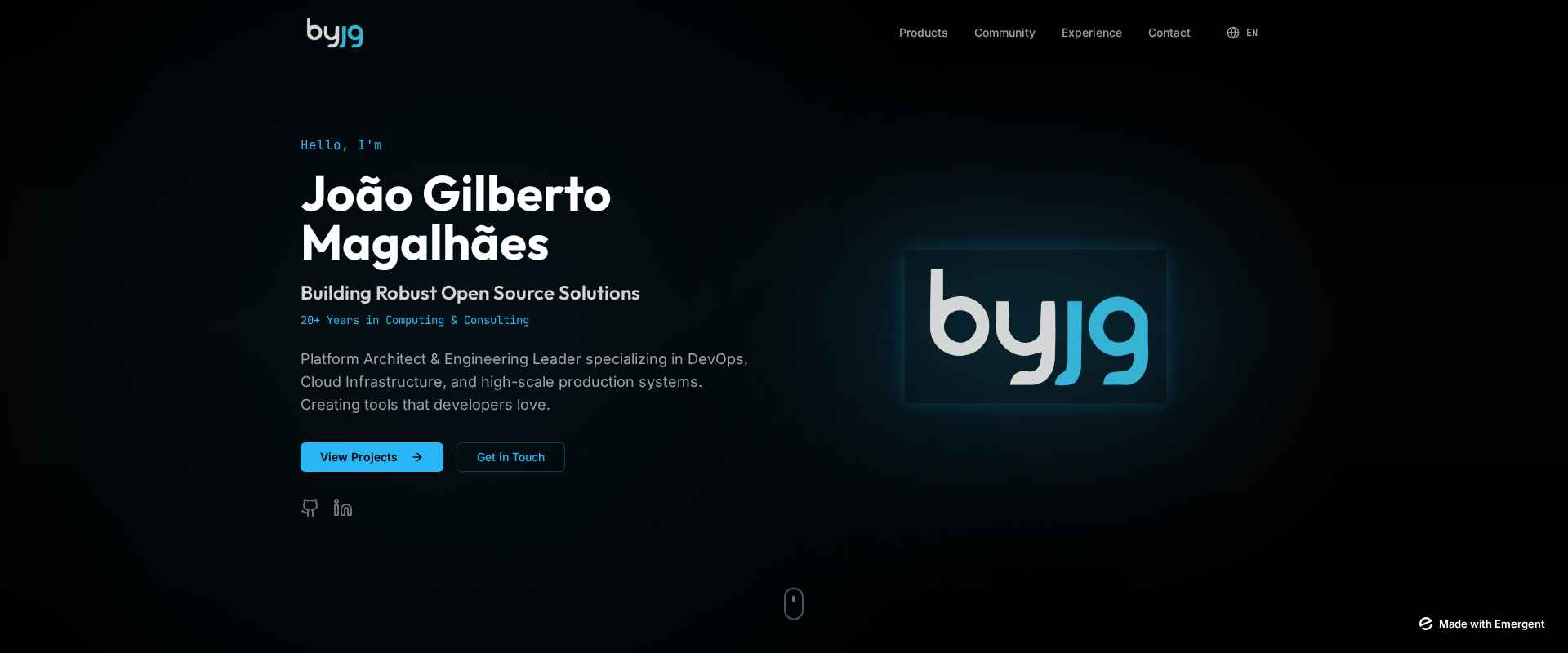
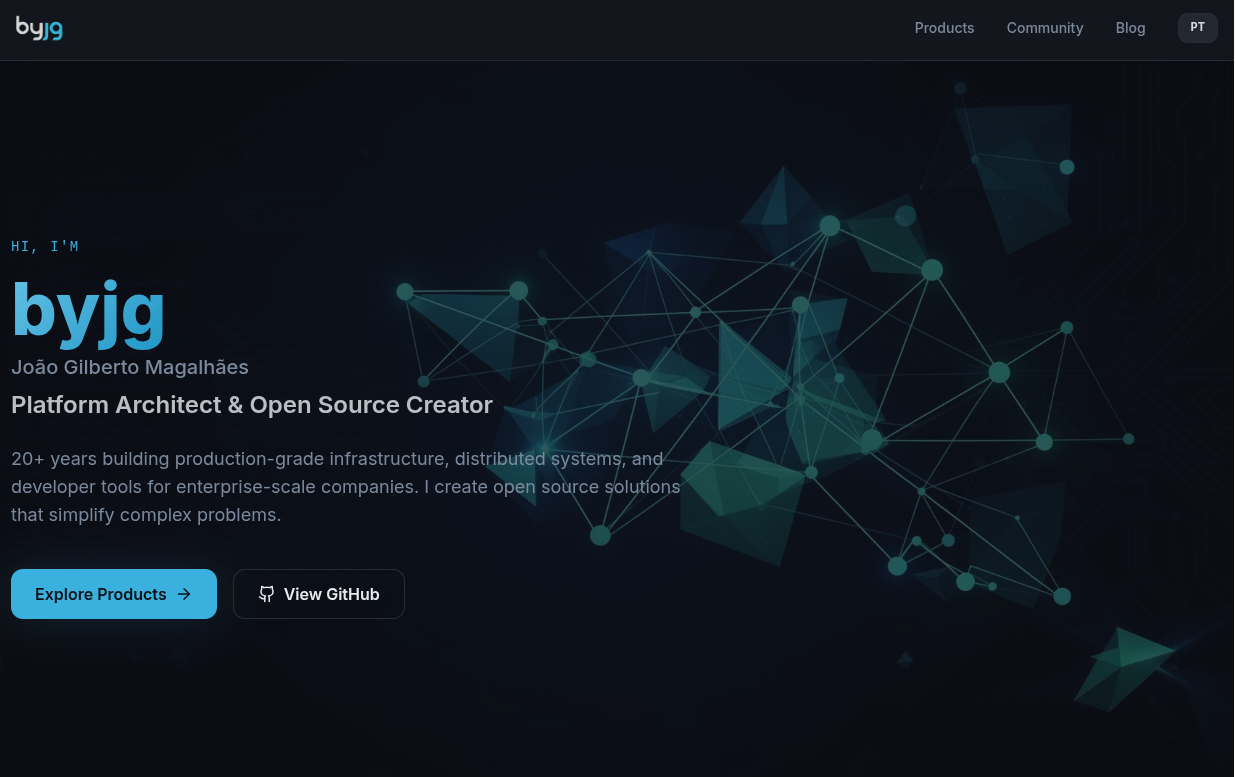
<p>Both Lovable and Emergent.sh handle design and implement the website. I gave them the same prompt. Emergent.sh performed better in the creation phase: it asked clarifying questions about things that weren't well defined, which I really appreciated. That helped me sharpen the prompt to be clearer and more specific, and I started a new project in both. The first version from Emergent, in every attempt, was excellent.</p>
<p><strong>Emergent.sh</strong>
<img decoding="async" loading="lazy" alt="Emergent Design" src="https://opensource.byjg.com/assets/images/emergent_design-31916b6b37488c95c46aa1437838a5a3.png" width="1920" height="800" class="img_ev3q"></p>
<p><strong>Lovable</strong>
<img decoding="async" loading="lazy" alt="Lovable Design" src="https://opensource.byjg.com/assets/images/lovable_design-b61cb803f930bebb7900a3164b73240c.png" width="1235" height="777" class="img_ev3q"></p>
<p>Points I evaluated in each:</p>
<table><thead><tr><th>Feature</th><th>Emergent.sh</th><th>Lovable</th></tr></thead><tbody><tr><td>Design</td><td>Excellent</td><td>Good</td></tr><tr><td>Generated Code</td><td>Poor (Craco)</td><td>Excellent (Vite)</td></tr><tr><td>Git Integration</td><td>Good</td><td>Very Good</td></tr><tr><td>Code Editing</td><td>Excellent (uses Coder)</td><td>Good (proprietary)</td></tr><tr><td>Project Continuity</td><td>Poor</td><td>Good</td></tr><tr><td>Deploy (front-end only tested)</td><td>Poor</td><td>Good</td></tr></tbody></table>
<p>The code generated by Emergent looks like it came from an old-school template: there's a <code>backend</code> folder, a <code>frontend</code> folder, and the whole thing requires that exact structure to work. The backend uses Python and the frontend uses Craco — an abandoned framework with several outdated dependencies and known vulnerabilities. When Emergent saved the code to git (to its credit, I could push to any repository and branch), the <code>yarn.lock</code> wasn't included. When I tried running <code>yarn install</code>, nothing installed because of the broken dependencies.</p>
<p>That's when I called in my backend Claude, and realized he was also Full-Stack. He recommended migrating to Vite, explained why, and executed the migration quickly. With Lovable, I couldn't specify WHICH git repository to use, but it keeps the project in sync whether I modify things outside of it or inside Lovable — and it handles any framework well, which makes for good project continuity. Deploying the front-end on Emergent.sh costs 50 credits; on Lovable it's free.</p>
<p><strong>My verdict</strong>: I still need to find a designer who works with Figma. And Lovable implements well. With the frontend MVP roughly in shape, I hand the integrations and heavier code to my FullStack, Claude, then go back to Lovable to publish. For the ByJG project specifically, I'll be publishing to Cloudflare — but that's another story.</p>
<h2 class="anchor anchorTargetStickyNavbar_Vzrq" id="migrating-the-legacy-code">Migrating the Legacy Code<a href="https://opensource.byjg.com/blog/beyond-vibe-coding#migrating-the-legacy-code" class="hash-link" aria-label="Direct link to Migrating the Legacy Code" title="Direct link to Migrating the Legacy Code" translate="no">​</a></h2>
<p>The second part was the conversion from legacy to new code. Before handing the mission to Claude, I had to set up the minimal infrastructure: I installed the Reference project with some classes and tests, got the environment running, and defined instructions for how to test and how the architecture was organized. With both environments running, I started giving Claude its instructions.</p>
<p>The initial instruction always goes in Planning mode. Instead of asking for a full conversion, I identified the common blocks and worked through them one at a time. First I asked it to build Login, Registration, and "Forgot my password." That was critical because it would define everything else. Once the API was implemented, I asked Claude to generate a Login Implementation Guide covering the flows and how to handle JWT. I used that guide to implement the frontend screens. It worked smoothly.</p>
<p>One important detail: each task was a separate Claude session. That forces it to search through the code from scratch, which, at least in my experience, produces better results. After that, I repeated the process for the other modules of the site.</p>
<p>Often, when it suggests a change I don't understand or don't think is efficient, I reject it and start like this: "Question: why did you use this instead of that?" or "Did you look at the documentation in folder X or in code ABC?" That's a way to push it to dig deeper into the codebase and suggest better solutions. There are situations where I Googled the topic to have a more technical discussion, especially when I wasn't sure. And many times I'd offer a solution but leave it open for the AI to suggest alternatives.</p>
<h2 class="anchor anchorTargetStickyNavbar_Vzrq" id="the-frustrating-situations">The Frustrating Situations<a href="https://opensource.byjg.com/blog/beyond-vibe-coding#the-frustrating-situations" class="hash-link" aria-label="Direct link to The Frustrating Situations" title="Direct link to The Frustrating Situations" translate="no">​</a></h2>
<p>There are some genuinely frustrating situations: 99% of the time it knows how to start the application and run tests, but in 1% of cases it gets lost and ends up in a loop trying to solve the problem the wrong way. When that happens, I stop it, close the session, and start a new one saying: "Investigate why this isn't working" or "The code at line X has an error; the expected behavior is A, B, C."</p>
<p>Sometimes it simply doesn't know what to do, claims to have finished a task when it actually hasn't (good thing it's not on payroll), and hacks something together to make the tests pass. In short — you have to keep watch.</p>
<h2 class="anchor anchorTargetStickyNavbar_Vzrq" id="conclusion">Conclusion<a href="https://opensource.byjg.com/blog/beyond-vibe-coding#conclusion" class="hash-link" aria-label="Direct link to Conclusion" title="Direct link to Conclusion" translate="no">​</a></h2>
<p>Either way, I'm very happy with the results. And I don't call this Vibe Coding — that would be unfair. It makes it sound like less than it is.</p>
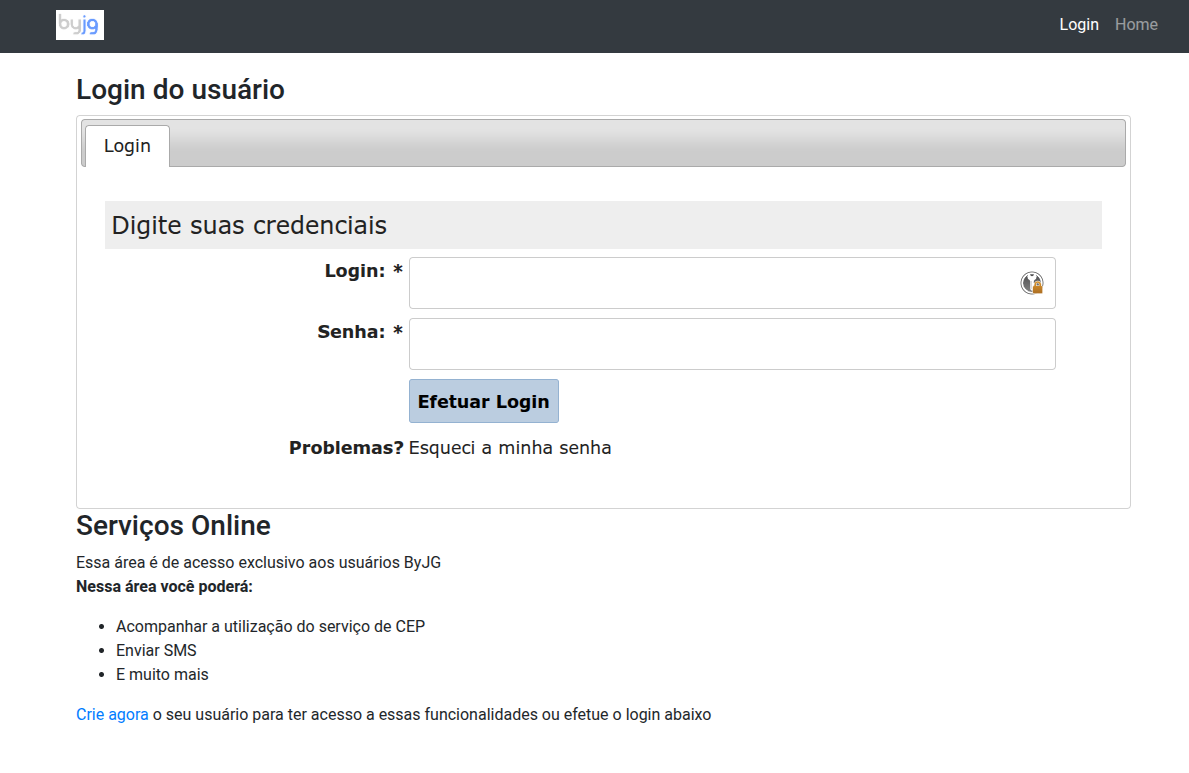
<p>In the end, I took a site that was completely behind the times and turned it into this:</p>
<h3 class="anchor anchorTargetStickyNavbar_Vzrq" id="before">Before<a href="https://opensource.byjg.com/blog/beyond-vibe-coding#before" class="hash-link" aria-label="Direct link to Before" title="Direct link to Before" translate="no">​</a></h3>
<p><img decoding="async" loading="lazy" alt="Old Home" src="https://opensource.byjg.com/assets/images/old_home-823c525eb1e69751d9ee91ac0cf65c11.png" width="1025" height="816" class="img_ev3q"> <img decoding="async" loading="lazy" alt="Old Login" src="https://opensource.byjg.com/assets/images/old_login-7704748d8f2fe4806afdcfa840484e4d.png" width="1189" height="773" class="img_ev3q"> <img decoding="async" loading="lazy" alt="Old SOAP Page" src="https://opensource.byjg.com/assets/images/old_soap_page-88576541f5cf202eec15d38378bd67b3.png" width="1642" height="455" class="img_ev3q"></p>
<h3 class="anchor anchorTargetStickyNavbar_Vzrq" id="after">After<a href="https://opensource.byjg.com/blog/beyond-vibe-coding#after" class="hash-link" aria-label="Direct link to After" title="Direct link to After" translate="no">​</a></h3>
<p><img decoding="async" loading="lazy" alt="New Home" src="https://opensource.byjg.com/assets/images/new_home-67d1f6c63000887c3231d4af836f1c6c.png" width="1320" height="755" class="img_ev3q"> <img decoding="async" loading="lazy" alt="New Login" src="https://opensource.byjg.com/assets/images/new_login-175857b9e808910f69a67ad1359b0c33.png" width="803" height="624" class="img_ev3q"> <img decoding="async" loading="lazy" alt="New SOAP Page" src="https://opensource.byjg.com/assets/images/new_soap_page-3b3e49220fcc5918cbe9836aeec43b48.png" width="1252" height="840" class="img_ev3q"></p>]]></content>
        <author>
            <name>Joao Gilberto Magalhaes</name>
            <uri>https://github.com/byjg</uri>
        </author>
        <category label="ai" term="ai"/>
        <category label="vibe-coding" term="vibe-coding"/>
        <category label="claude-code" term="claude-code"/>
        <category label="lovable" term="lovable"/>
        <category label="emergent" term="emergent"/>
        <category label="development" term="development"/>
        <category label="productivity" term="productivity"/>
    </entry>
    <entry>
        <title type="html"><![CDATA[Why I Created `n8n-gitops`]]></title>
        <id>https://opensource.byjg.com/blog/why-i-created-n8n-gitops</id>
        <link href="https://opensource.byjg.com/blog/why-i-created-n8n-gitops"/>
        <updated>2025-12-17T00:00:00.000Z</updated>
        <summary type="html"><![CDATA[n8n is an excellent workflow IDE, but its default production workflow relies on manual, UI-driven deployment. That approach breaks fundamental engineering principles around change control, auditability, and reproducibility.]]></summary>
        <content type="html"><![CDATA[<p>n8n is an excellent workflow IDE, but its default production workflow relies on manual, UI-driven deployment. That
approach breaks fundamental engineering principles around change control, auditability, and reproducibility.
<code>n8n-gitops</code> exists to close that gap by turning n8n workflows into versioned, reviewable, and reproducible artifacts
managed through Git and deployed through automation. It allows teams to keep n8n's visual productivity while enforcing
the same delivery standards used for any other production system.</p>
<!-- -->
<p>n8n is a genuinely strong tool. As a visual IDE for building workflows, it strikes a rare balance between accessibility
and power: you can model complex event-driven flows, react to webhooks and schedules, integrate with APIs, SaaS
platforms, and databases, and still drop down into real Python or JavaScript when the logic demands it. From a
productivity and expressiveness standpoint, it is very well designed.</p>
<p>The problem does not appear when you are creating workflows. It appears the moment you try to run them seriously in
production.</p>
<p>The first time I encountered the recommended promotion workflow build locally, copy the workflow, paste it into
production I immediately knew I could not accept that model. Not because it is inconvenient, but because it breaks some
of the most basic principles of operating production systems. Manual deployment is not a stylistic preference; it is a
systemic risk.</p>
<p>Once workflows are promoted by copy and paste, you lose control almost instantly. There is no reliable way to understand
exactly what changed, no meaningful diff, no authoritative record of who deployed what and when, and no reproducible
state you can point to as "the version currently running." Even worse, anyone with access to the production UI
implicitly gains the ability to deploy logic that can trigger external systems, move data, or execute arbitrary code.
That is not just uncomfortable; it is fundamentally incompatible with environments that value auditability,
traceability, and controlled change.</p>
<p>For me, this crosses a hard line. I operate under a very simple rule: nothing reaches production manually. Not
applications, not infrastructure, and not workflows. If a system cannot be deployed through a controlled, reviewable,
and repeatable process, then it is not a system I can confidently recommend or rely on for critical automation.</p>
<p>The frustrating part is that n8n is not far from doing this right. Under the hood, it exposes a capable API that allows
workflows to be listed, created, replaced, activated, and deactivated programmatically. That API is powerful enough to
build a proper delivery model one that does not rely on the UI as a deployment surface. Even the Git Sync feature
available in business and enterprise plans hints in this direction, but it remains largely UI-driven and does not fully
embrace Git as the control plane.</p>
<p>What I wanted was straightforward and unremarkable by modern engineering standards. I wanted to use local n8n as an IDE,
not as a deployment mechanism. I wanted Git to be the source of truth. I wanted workflow logic especially Python and
JavaScript to live in real files instead of being buried inside escaped JSON blobs. I wanted pull requests, code review,
version tags, and CI/CD-driven promotion across environments. Most importantly, I wanted deployments to be boring,
deterministic, and reversible.</p>
<p>That combination did not exist, so I built it.</p>
<p><code>n8n-gitops</code> is not an alternative to n8n; it is a control layer around it. The visual editor remains exactly where it
shines designing workflows. From there, workflows are exported in mirror mode, ensuring that the repository always
reflects the true state of the instance and that drift is eliminated rather than tolerated. Code is externalized into
proper source files, making reviews readable, tooling effective, and changes understandable by humans. Git becomes the
place where decisions are discussed, approvals happen, and versions are defined.</p>
<p>Deployment then stops being an act performed by a person clicking buttons and becomes an operation executed by a
pipeline. A specific tag, branch, or commit is deployed to a target instance via the API. Rollback is no longer a
special procedure; it is simply redeploying a previous reference. There is no ambiguity about what is running, how it
got there, or how to undo it.</p>
<p>This shift is what made n8n usable for me in real environments. Before this, n8n felt like a powerful prototyping and
automation tool with production caveats. After this, it becomes a workflow runtime that can be governed with the same
discipline as any other production system.</p>
<p>The intent of this project is not to compete with n8n or criticize its focus on usability. It exists to bridge two
worlds that often collide: low-code productivity and infrastructure rigor. n8n optimizes for speed and approachability;
GitOps optimizes for safety, visibility, and trust. <code>n8n-gitops</code> exists to connect those priorities without forcing you
to give one up for the other.</p>
<p>If a workflow engine can trigger money movement, call external systems, mutate data, or execute arbitrary code, then it
deserves the same delivery standards as any service you deploy. This project is simply an enforcement of that reality.</p>]]></content>
        <author>
            <name>Joao Gilberto Magalhaes</name>
            <uri>https://github.com/byjg</uri>
        </author>
        <category label="n8n" term="n8n"/>
        <category label="gitops" term="gitops"/>
        <category label="devops" term="devops"/>
        <category label="automation" term="automation"/>
        <category label="workflow" term="workflow"/>
        <category label="ci-cd" term="ci-cd"/>
        <category label="deployment" term="deployment"/>
        <category label="engineering" term="engineering"/>
    </entry>
    <entry>
        <title type="html"><![CDATA[Earning Confidence When It's Questioned]]></title>
        <id>https://opensource.byjg.com/blog/earning-confidence-when-questioned</id>
        <link href="https://opensource.byjg.com/blog/earning-confidence-when-questioned"/>
        <updated>2025-12-16T00:00:00.000Z</updated>
        <summary type="html"><![CDATA[A 17-year-old instructor walks into a director's office to teach DOS, WordStar, SuperCalc, and dBASE - and has to earn the right to stay.]]></summary>
        <content type="html"><![CDATA[<p><img decoding="async" loading="lazy" alt="Seventeen Teaching DOS cover" src="https://opensource.byjg.com/assets/images/image-b16eb1f86f664f8f0a20e8faf35347e0.png" width="1856" height="2304" class="img_ev3q"></p>
<p>My first professional job was as an instructor in a small computer school, teaching DOS, WordStar, SuperCalc, and dBASE.
One day I was sent to train a company director. He looked at me - a 17-year-old kid -
and asked: "You're here to train me? Don't you think you're too young?"</p>
<!-- -->
<p>I took a breath and answered: "They sent me because they believe I'm capable. Let's do this:
I'm already here and you blocked the time. I'll teach today's lesson.
If you don't like it, you don't pay and someone else comes next week. If you like it, I'll be back."</p>
<p>He looked surprised, smirked, and said: "Deal!" At the end I asked, "Can I come next week?" His answer: "Yes."</p>
<p>That day I learned how to turn a difficult moment into an opportunity to prove my value.
I could have accepted his doubt as defeat; instead, I used it to show what I could do.</p>
<p>When we're hunting for a new job, bills to pay and family responsibilities can make every challenge feel like a threat.
It's easy to shrink. But the world doesn't get to define our limits: we do.
The confidence to stand your ground, deliver, and let the result speak for itself is a muscle.
We all forget it sometimes. I did. Revisiting that memory reminds me that courage and preparation beat doubt every time.</p>]]></content>
        <author>
            <name>Joao Gilberto Magalhaes</name>
            <uri>https://github.com/byjg</uri>
        </author>
        <category label="career" term="career"/>
        <category label="teaching" term="teaching"/>
        <category label="confidence" term="confidence"/>
        <category label="soft-skills" term="soft-skills"/>
        <category label="early-career" term="early-career"/>
        <category label="mindset" term="mindset"/>
    </entry>
    <entry>
        <title type="html"><![CDATA[Understanding the ByJG PHP Components Versioning System]]></title>
        <id>https://opensource.byjg.com/blog/2025/11/22/understanding-php-components-versioning</id>
        <link href="https://opensource.byjg.com/blog/2025/11/22/understanding-php-components-versioning"/>
        <updated>2025-11-22T00:00:00.000Z</updated>
        <summary type="html"><![CDATA[A comprehensive guide to understanding how ByJG PHP components are versioned and how to use them effectively in your projects]]></summary>
        <content type="html"><![CDATA[<p><img decoding="async" loading="lazy" alt="Understanding the ByJG PHP Components Versioning System" src="https://opensource.byjg.com/assets/images/frontpage-8b52bb8d8f2a3f9ee3d9ed4a6486c159.png" width="2848" height="1504" class="img_ev3q"></p>
<p>Managing dependencies across multiple PHP components used to be a nightmare.
When you have an ecosystem of 30+ interconnected packages, keeping track of which version works with which PHP version — and which versions are compatible with each other — can quickly become overwhelming.</p>
<p>That's why I completely redesigned the versioning strategy for all ByJG PHP components.
This post explains the evolution of the versioning system, how it works today, and how you can use it effectively in your projects.</p>
<!-- -->
<h2 class="anchor anchorTargetStickyNavbar_Vzrq" id="the-problem-before-php-74">The Problem: Before PHP 7.4<a href="https://opensource.byjg.com/blog/2025/11/22/understanding-php-components-versioning#the-problem-before-php-74" class="hash-link" aria-label="Direct link to The Problem: Before PHP 7.4" title="Direct link to The Problem: Before PHP 7.4" translate="no">​</a></h2>
<p>Before PHP 7.4, each component in the ByJG ecosystem had <strong>its own independent versioning scheme</strong>.</p>
<p>This created several challenges:</p>
<ul>
<li class=""><strong>Dependency Hell</strong>: It was extremely difficult to identify which versions of different components were compatible with each other</li>
<li class=""><strong>PHP Version Confusion</strong>: There was no clear way to know which PHP versions a specific component version supported</li>
<li class=""><strong>Maintenance Nightmare</strong>: Managing patches and updates across components with different version numbers was complex and error-prone</li>
<li class=""><strong>Poor Developer Experience</strong>: Users had to manually research compatibility matrices before installing components</li>
</ul>
<p>For example, you might have:</p>
<ul>
<li class=""><code>byjg/anydataset</code> at version 3.2.1</li>
<li class=""><code>byjg/serializer</code> at version 2.5.0</li>
<li class=""><code>byjg/migration</code> at version 4.1.2</li>
</ul>
<p>And trying to figure out which versions worked together — and with which PHP version — required digging through documentation or trial and error.</p>
<hr>
<h2 class="anchor anchorTargetStickyNavbar_Vzrq" id="the-solution-standardized-versioning">The Solution: Standardized Versioning<a href="https://opensource.byjg.com/blog/2025/11/22/understanding-php-components-versioning#the-solution-standardized-versioning" class="hash-link" aria-label="Direct link to The Solution: Standardized Versioning" title="Direct link to The Solution: Standardized Versioning" translate="no">​</a></h2>
<p>Starting with <strong>PHP 7.4</strong>, I introduced a <strong>standardized versioning system</strong> across all ByJG components.</p>
<p>The key principle is simple:</p>
<blockquote>
<p><strong>The component major version indicates which PHP versions it supports.</strong></p>
</blockquote>
<p>This creates a clear, predictable pattern that makes dependency management significantly easier.</p>
<h3 class="anchor anchorTargetStickyNavbar_Vzrq" id="version-to-php-support-matrix">Version to PHP Support Matrix<a href="https://opensource.byjg.com/blog/2025/11/22/understanding-php-components-versioning#version-to-php-support-matrix" class="hash-link" aria-label="Direct link to Version to PHP Support Matrix" title="Direct link to Version to PHP Support Matrix" translate="no">​</a></h3>
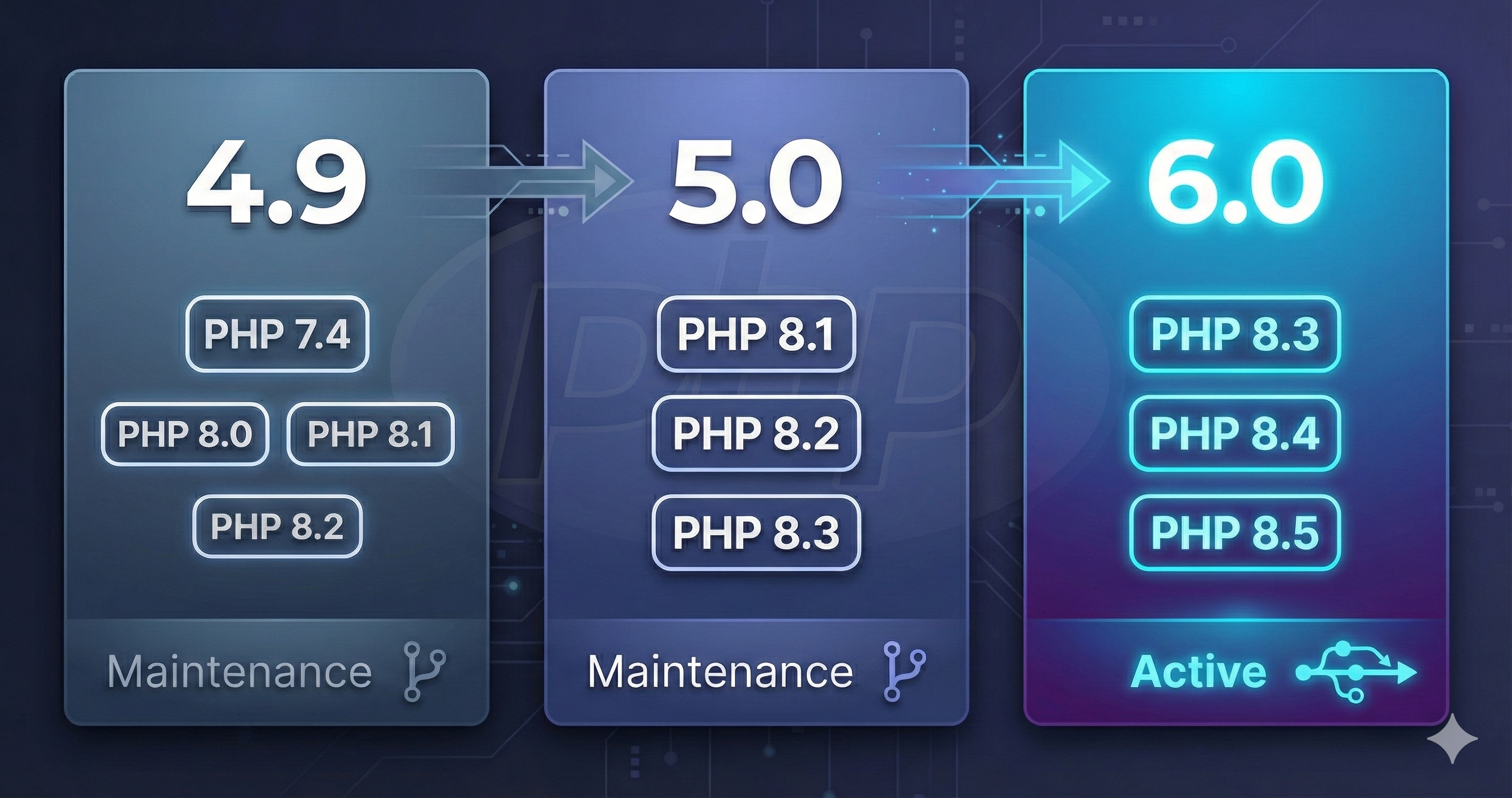
<table><thead><tr><th>Component Version</th><th>Supported PHP Versions</th><th>Status</th></tr></thead><tbody><tr><td><strong>4.9.x</strong></td><td>PHP 7.4, 8.0, 8.1, 8.2</td><td>Maintenance only (patches)</td></tr><tr><td><strong>5.0.x</strong></td><td>PHP 8.1, 8.2, 8.3</td><td>Maintenance only (patches)</td></tr><tr><td><strong>6.0.x</strong></td><td>PHP 8.3, 8.4, 8.5</td><td>Active development</td></tr></tbody></table>
<p>This means:</p>
<ul>
<li class="">If you're running <strong>PHP 8.4</strong>, you should use version <strong>6.0</strong> of ByJG components</li>
<li class="">If you're still on <strong>PHP 8.2</strong>, you can use version <strong>4.9</strong> or <strong>5.0</strong></li>
<li class="">If you need to support <strong>PHP 7.4</strong>, version <strong>4.9</strong> is your only option</li>
</ul>
<h3 class="anchor anchorTargetStickyNavbar_Vzrq" id="benefits-of-this-approach">Benefits of This Approach<a href="https://opensource.byjg.com/blog/2025/11/22/understanding-php-components-versioning#benefits-of-this-approach" class="hash-link" aria-label="Direct link to Benefits of This Approach" title="Direct link to Benefits of This Approach" translate="no">​</a></h3>
<ol>
<li class=""><strong>Instant Clarity</strong>: Just by looking at the version number, you know which PHP versions are supported</li>
<li class=""><strong>Consistent Dependencies</strong>: All components with the same major version are designed to work together</li>
<li class=""><strong>Simplified Upgrades</strong>: When upgrading PHP, you upgrade all components to the corresponding version</li>
<li class=""><strong>Better Maintenance</strong>: Clear separation between version lines makes patching specific versions straightforward</li>
</ol>
<hr>
<h2 class="anchor anchorTargetStickyNavbar_Vzrq" id="development-workflow-and-branch-strategy">Development Workflow and Branch Strategy<a href="https://opensource.byjg.com/blog/2025/11/22/understanding-php-components-versioning#development-workflow-and-branch-strategy" class="hash-link" aria-label="Direct link to Development Workflow and Branch Strategy" title="Direct link to Development Workflow and Branch Strategy" translate="no">​</a></h2>
<p>Understanding how releases and patches work is crucial for both contributors and users of the ecosystem.</p>
<h3 class="anchor anchorTargetStickyNavbar_Vzrq" id="the-main-branch-strategy">The Main Branch Strategy<a href="https://opensource.byjg.com/blog/2025/11/22/understanding-php-components-versioning#the-main-branch-strategy" class="hash-link" aria-label="Direct link to The Main Branch Strategy" title="Direct link to The Main Branch Strategy" translate="no">​</a></h3>
<p>The development workflow follows a straightforward pattern:</p>
<div class="language-text codeBlockContainer_Ckt0 theme-code-block" style="--prism-color:#393A34;--prism-background-color:#f6f8fa"><div class="codeBlockContent_QJqH"><pre tabindex="0" class="prism-code language-text codeBlock_bY9V thin-scrollbar" style="color:#393A34;background-color:#f6f8fa"><code class="codeBlockLines_e6Vv"><div class="token-line" style="color:#393A34"><span class="token plain">main/master branch</span><br></div><div class="token-line" style="color:#393A34"><span class="token plain">    ↓</span><br></div><div class="token-line" style="color:#393A34"><span class="token plain">Always contains the latest version (currently 6.0.x)</span><br></div><div class="token-line" style="color:#393A34"><span class="token plain">    ↓</span><br></div><div class="token-line" style="color:#393A34"><span class="token plain">Releases are tagged directly from this branch</span><br></div></code></pre></div></div>
<p><strong>Key Points</strong>:</p>
<ul>
<li class="">The <code>main</code> (or <code>master</code>) branch <strong>always</strong> contains the latest version of the component</li>
<li class="">All new feature development happens on the main branch</li>
<li class="">When a release is ready, it's tagged directly from main (e.g., <code>v6.0.0</code>, <code>v6.0.1</code>, etc.)</li>
<li class="">This ensures the main branch is always stable and ready for release</li>
</ul>
<h3 class="anchor anchorTargetStickyNavbar_Vzrq" id="version-specific-branches-for-patches">Version-Specific Branches for Patches<a href="https://opensource.byjg.com/blog/2025/11/22/understanding-php-components-versioning#version-specific-branches-for-patches" class="hash-link" aria-label="Direct link to Version-Specific Branches for Patches" title="Direct link to Version-Specific Branches for Patches" translate="no">​</a></h3>
<p>When a bug is discovered in an older version that still needs support, we use <strong>version-specific branches</strong>:</p>
<div class="language-text codeBlockContainer_Ckt0 theme-code-block" style="--prism-color:#393A34;--prism-background-color:#f6f8fa"><div class="codeBlockContent_QJqH"><pre tabindex="0" class="prism-code language-text codeBlock_bY9V thin-scrollbar" style="color:#393A34;background-color:#f6f8fa"><code class="codeBlockLines_e6Vv"><div class="token-line" style="color:#393A34"><span class="token plain">Branch 4.9  →  For patching version 4.9.x (PHP 7.4-8.2)</span><br></div><div class="token-line" style="color:#393A34"><span class="token plain">Branch 5.0  →  For patching version 5.0.x (PHP 8.1-8.3)</span><br></div><div class="token-line" style="color:#393A34"><span class="token plain">Branch 6.0  →  For patching version 6.0.x (PHP 8.3-8.5)</span><br></div></code></pre></div></div>
<p><strong>Workflow Example</strong>:</p>
<ol>
<li class="">A critical bug is found in version 5.0.x</li>
<li class="">Create a fix branch from the <code>5.0</code> branch</li>
<li class="">Apply the fix and merge it back to the <code>5.0</code> branch</li>
<li class="">Tag a new patch release (e.g., <code>v5.0.8</code>)</li>
<li class="">If applicable, port the fix to newer versions (<code>6.0</code> or <code>main</code>)</li>
</ol>
<p>This approach ensures:</p>
<ul>
<li class=""><strong>Older versions remain stable</strong> and can receive critical fixes</li>
<li class=""><strong>No interference</strong> with active development on the main branch</li>
<li class=""><strong>Clear separation</strong> between maintenance and new features</li>
</ul>
<hr>
<h2 class="anchor anchorTargetStickyNavbar_Vzrq" id="best-practices-using-components-in-your-project">Best Practices: Using Components in Your Project<a href="https://opensource.byjg.com/blog/2025/11/22/understanding-php-components-versioning#best-practices-using-components-in-your-project" class="hash-link" aria-label="Direct link to Best Practices: Using Components in Your Project" title="Direct link to Best Practices: Using Components in Your Project" translate="no">​</a></h2>
<h3 class="anchor anchorTargetStickyNavbar_Vzrq" id="recommendation-1-use-the-same-version-across-all-components">Recommendation #1: Use the Same Version Across All Components<a href="https://opensource.byjg.com/blog/2025/11/22/understanding-php-components-versioning#recommendation-1-use-the-same-version-across-all-components" class="hash-link" aria-label="Direct link to Recommendation #1: Use the Same Version Across All Components" title="Direct link to Recommendation #1: Use the Same Version Across All Components" translate="no">​</a></h3>
<p>To ensure maximum compatibility and avoid dependency conflicts, <strong>always use components from the same major version</strong>.</p>
<p><strong>Bad Practice</strong> ❌:</p>
<div class="language-json codeBlockContainer_Ckt0 theme-code-block" style="--prism-color:#393A34;--prism-background-color:#f6f8fa"><div class="codeBlockContent_QJqH"><pre tabindex="0" class="prism-code language-json codeBlock_bY9V thin-scrollbar" style="color:#393A34;background-color:#f6f8fa"><code class="codeBlockLines_e6Vv"><div class="token-line" style="color:#393A34"><span class="token punctuation" style="color:#393A34">{</span><span class="token plain"></span><br></div><div class="token-line" style="color:#393A34"><span class="token plain">    </span><span class="token property" style="color:#36acaa">"require"</span><span class="token operator" style="color:#393A34">:</span><span class="token plain"> </span><span class="token punctuation" style="color:#393A34">{</span><span class="token plain"></span><br></div><div class="token-line" style="color:#393A34"><span class="token plain">        </span><span class="token property" style="color:#36acaa">"byjg/anydataset"</span><span class="token operator" style="color:#393A34">:</span><span class="token plain"> </span><span class="token string" style="color:#e3116c">"^5.0"</span><span class="token punctuation" style="color:#393A34">,</span><span class="token plain"></span><br></div><div class="token-line" style="color:#393A34"><span class="token plain">        </span><span class="token property" style="color:#36acaa">"byjg/serializer"</span><span class="token operator" style="color:#393A34">:</span><span class="token plain"> </span><span class="token string" style="color:#e3116c">"^6.0"</span><span class="token punctuation" style="color:#393A34">,</span><span class="token plain"></span><br></div><div class="token-line" style="color:#393A34"><span class="token plain">        </span><span class="token property" style="color:#36acaa">"byjg/migration"</span><span class="token operator" style="color:#393A34">:</span><span class="token plain"> </span><span class="token string" style="color:#e3116c">"^4.9"</span><span class="token plain"></span><br></div><div class="token-line" style="color:#393A34"><span class="token plain">    </span><span class="token punctuation" style="color:#393A34">}</span><span class="token plain"></span><br></div><div class="token-line" style="color:#393A34"><span class="token plain"></span><span class="token punctuation" style="color:#393A34">}</span><br></div></code></pre></div></div>
<p><strong>Good Practice</strong> ✅:</p>
<div class="language-json codeBlockContainer_Ckt0 theme-code-block" style="--prism-color:#393A34;--prism-background-color:#f6f8fa"><div class="codeBlockContent_QJqH"><pre tabindex="0" class="prism-code language-json codeBlock_bY9V thin-scrollbar" style="color:#393A34;background-color:#f6f8fa"><code class="codeBlockLines_e6Vv"><div class="token-line" style="color:#393A34"><span class="token punctuation" style="color:#393A34">{</span><span class="token plain"></span><br></div><div class="token-line" style="color:#393A34"><span class="token plain">    </span><span class="token property" style="color:#36acaa">"require"</span><span class="token operator" style="color:#393A34">:</span><span class="token plain"> </span><span class="token punctuation" style="color:#393A34">{</span><span class="token plain"></span><br></div><div class="token-line" style="color:#393A34"><span class="token plain">        </span><span class="token property" style="color:#36acaa">"byjg/anydataset"</span><span class="token operator" style="color:#393A34">:</span><span class="token plain"> </span><span class="token string" style="color:#e3116c">"^6.0"</span><span class="token punctuation" style="color:#393A34">,</span><span class="token plain"></span><br></div><div class="token-line" style="color:#393A34"><span class="token plain">        </span><span class="token property" style="color:#36acaa">"byjg/serializer"</span><span class="token operator" style="color:#393A34">:</span><span class="token plain"> </span><span class="token string" style="color:#e3116c">"^6.0"</span><span class="token punctuation" style="color:#393A34">,</span><span class="token plain"></span><br></div><div class="token-line" style="color:#393A34"><span class="token plain">        </span><span class="token property" style="color:#36acaa">"byjg/migration"</span><span class="token operator" style="color:#393A34">:</span><span class="token plain"> </span><span class="token string" style="color:#e3116c">"^6.0"</span><span class="token plain"></span><br></div><div class="token-line" style="color:#393A34"><span class="token plain">    </span><span class="token punctuation" style="color:#393A34">}</span><span class="token plain"></span><br></div><div class="token-line" style="color:#393A34"><span class="token plain"></span><span class="token punctuation" style="color:#393A34">}</span><br></div></code></pre></div></div>
<h3 class="anchor anchorTargetStickyNavbar_Vzrq" id="recommendation-2-use-the-caret-operator-">Recommendation #2: Use the Caret Operator (^)<a href="https://opensource.byjg.com/blog/2025/11/22/understanding-php-components-versioning#recommendation-2-use-the-caret-operator-" class="hash-link" aria-label="Direct link to Recommendation #2: Use the Caret Operator (^)" title="Direct link to Recommendation #2: Use the Caret Operator (^)" translate="no">​</a></h3>
<p>The <strong>caret operator</strong> (<code>^</code>) is the recommended way to specify version constraints:</p>
<div class="language-json codeBlockContainer_Ckt0 theme-code-block" style="--prism-color:#393A34;--prism-background-color:#f6f8fa"><div class="codeBlockContent_QJqH"><pre tabindex="0" class="prism-code language-json codeBlock_bY9V thin-scrollbar" style="color:#393A34;background-color:#f6f8fa"><code class="codeBlockLines_e6Vv"><div class="token-line" style="color:#393A34"><span class="token punctuation" style="color:#393A34">{</span><span class="token plain"></span><br></div><div class="token-line" style="color:#393A34"><span class="token plain">    </span><span class="token property" style="color:#36acaa">"require"</span><span class="token operator" style="color:#393A34">:</span><span class="token plain"> </span><span class="token punctuation" style="color:#393A34">{</span><span class="token plain"></span><br></div><div class="token-line" style="color:#393A34"><span class="token plain">        </span><span class="token property" style="color:#36acaa">"byjg/anydataset"</span><span class="token operator" style="color:#393A34">:</span><span class="token plain"> </span><span class="token string" style="color:#e3116c">"^6.0"</span><span class="token plain"></span><br></div><div class="token-line" style="color:#393A34"><span class="token plain">    </span><span class="token punctuation" style="color:#393A34">}</span><span class="token plain"></span><br></div><div class="token-line" style="color:#393A34"><span class="token plain"></span><span class="token punctuation" style="color:#393A34">}</span><br></div></code></pre></div></div>
<p><strong>What <code>^6.0</code> means</strong>:</p>
<ul>
<li class="">Allows any version <code>&gt;= 6.0.0</code> and <code>&lt; 7.0.0</code></li>
<li class="">You'll receive <strong>patch updates</strong> (6.0.1, 6.0.2, etc.) automatically</li>
<li class="">You'll receive <strong>minor updates</strong> (6.1.0, 6.2.0, etc.) automatically</li>
<li class="">You <strong>won't</strong> automatically upgrade to version 7.0.0, which would be a breaking change</li>
</ul>
<p>This gives you the best balance of:</p>
<ul>
<li class=""><strong>Stability</strong>: No breaking changes from major version upgrades</li>
<li class=""><strong>Security</strong>: Automatic patch updates for bug fixes</li>
<li class=""><strong>Features</strong>: Access to new minor version features without manual intervention</li>
</ul>
<hr>
<h2 class="anchor anchorTargetStickyNavbar_Vzrq" id="testing-development-versions">Testing Development Versions<a href="https://opensource.byjg.com/blog/2025/11/22/understanding-php-components-versioning#testing-development-versions" class="hash-link" aria-label="Direct link to Testing Development Versions" title="Direct link to Testing Development Versions" translate="no">​</a></h2>
<p>Sometimes you need to test unreleased features or help with development. There are two approaches:</p>
<h3 class="anchor anchorTargetStickyNavbar_Vzrq" id="option-1-set-minimum-stability-project-wide">Option 1: Set Minimum Stability (Project-Wide)<a href="https://opensource.byjg.com/blog/2025/11/22/understanding-php-components-versioning#option-1-set-minimum-stability-project-wide" class="hash-link" aria-label="Direct link to Option 1: Set Minimum Stability (Project-Wide)" title="Direct link to Option 1: Set Minimum Stability (Project-Wide)" translate="no">​</a></h3>
<p>This approach tells Composer to allow development versions for <strong>all</strong> packages:</p>
<div class="language-json codeBlockContainer_Ckt0 theme-code-block" style="--prism-color:#393A34;--prism-background-color:#f6f8fa"><div class="codeBlockContent_QJqH"><pre tabindex="0" class="prism-code language-json codeBlock_bY9V thin-scrollbar" style="color:#393A34;background-color:#f6f8fa"><code class="codeBlockLines_e6Vv"><div class="token-line" style="color:#393A34"><span class="token punctuation" style="color:#393A34">{</span><span class="token plain"></span><br></div><div class="token-line" style="color:#393A34"><span class="token plain">    </span><span class="token property" style="color:#36acaa">"require"</span><span class="token operator" style="color:#393A34">:</span><span class="token plain"> </span><span class="token punctuation" style="color:#393A34">{</span><span class="token plain"></span><br></div><div class="token-line" style="color:#393A34"><span class="token plain">        </span><span class="token property" style="color:#36acaa">"byjg/anydataset"</span><span class="token operator" style="color:#393A34">:</span><span class="token plain"> </span><span class="token string" style="color:#e3116c">"^6.0"</span><span class="token punctuation" style="color:#393A34">,</span><span class="token plain"></span><br></div><div class="token-line" style="color:#393A34"><span class="token plain">        </span><span class="token property" style="color:#36acaa">"byjg/serializer"</span><span class="token operator" style="color:#393A34">:</span><span class="token plain"> </span><span class="token string" style="color:#e3116c">"^6.0"</span><span class="token plain"></span><br></div><div class="token-line" style="color:#393A34"><span class="token plain">    </span><span class="token punctuation" style="color:#393A34">}</span><span class="token punctuation" style="color:#393A34">,</span><span class="token plain"></span><br></div><div class="token-line" style="color:#393A34"><span class="token plain">    </span><span class="token property" style="color:#36acaa">"minimum-stability"</span><span class="token operator" style="color:#393A34">:</span><span class="token plain"> </span><span class="token string" style="color:#e3116c">"dev"</span><span class="token punctuation" style="color:#393A34">,</span><span class="token plain"></span><br></div><div class="token-line" style="color:#393A34"><span class="token plain">    </span><span class="token property" style="color:#36acaa">"prefer-stable"</span><span class="token operator" style="color:#393A34">:</span><span class="token plain"> </span><span class="token boolean" style="color:#36acaa">false</span><span class="token plain"></span><br></div><div class="token-line" style="color:#393A34"><span class="token plain"></span><span class="token punctuation" style="color:#393A34">}</span><br></div></code></pre></div></div>
<p><strong>How it works</strong>:</p>
<ul>
<li class=""><code>"minimum-stability": "dev"</code> allows Composer to install dev versions</li>
<li class=""><code>"prefer-stable": false"</code> tells Composer to prefer development versions over stable ones when available</li>
<li class="">The <code>^6.0</code> constraint will now match <code>6.0.x-dev</code> branches</li>
</ul>
<p><strong>When to use</strong>:</p>
<ul>
<li class="">When you're actively developing or testing multiple components</li>
<li class="">When you want to test the bleeding edge of the entire ecosystem</li>
</ul>
<p><strong>Caution</strong>: This affects <strong>all</strong> dependencies, not just ByJG components. Use with care in production environments.</p>
<h3 class="anchor anchorTargetStickyNavbar_Vzrq" id="option-2-pin-specific-components-to-dev-versions">Option 2: Pin Specific Components to Dev Versions<a href="https://opensource.byjg.com/blog/2025/11/22/understanding-php-components-versioning#option-2-pin-specific-components-to-dev-versions" class="hash-link" aria-label="Direct link to Option 2: Pin Specific Components to Dev Versions" title="Direct link to Option 2: Pin Specific Components to Dev Versions" translate="no">​</a></h3>
<p>This approach is more targeted and only affects specific packages:</p>
<div class="language-json codeBlockContainer_Ckt0 theme-code-block" style="--prism-color:#393A34;--prism-background-color:#f6f8fa"><div class="codeBlockContent_QJqH"><pre tabindex="0" class="prism-code language-json codeBlock_bY9V thin-scrollbar" style="color:#393A34;background-color:#f6f8fa"><code class="codeBlockLines_e6Vv"><div class="token-line" style="color:#393A34"><span class="token punctuation" style="color:#393A34">{</span><span class="token plain"></span><br></div><div class="token-line" style="color:#393A34"><span class="token plain">    </span><span class="token property" style="color:#36acaa">"require"</span><span class="token operator" style="color:#393A34">:</span><span class="token plain"> </span><span class="token punctuation" style="color:#393A34">{</span><span class="token plain"></span><br></div><div class="token-line" style="color:#393A34"><span class="token plain">        </span><span class="token property" style="color:#36acaa">"byjg/anydataset"</span><span class="token operator" style="color:#393A34">:</span><span class="token plain"> </span><span class="token string" style="color:#e3116c">"6.0.x-dev"</span><span class="token punctuation" style="color:#393A34">,</span><span class="token plain"></span><br></div><div class="token-line" style="color:#393A34"><span class="token plain">        </span><span class="token property" style="color:#36acaa">"byjg/serializer"</span><span class="token operator" style="color:#393A34">:</span><span class="token plain"> </span><span class="token string" style="color:#e3116c">"^6.0"</span><span class="token punctuation" style="color:#393A34">,</span><span class="token plain"></span><br></div><div class="token-line" style="color:#393A34"><span class="token plain">        </span><span class="token property" style="color:#36acaa">"byjg/migration"</span><span class="token operator" style="color:#393A34">:</span><span class="token plain"> </span><span class="token string" style="color:#e3116c">"^6.0"</span><span class="token plain"></span><br></div><div class="token-line" style="color:#393A34"><span class="token plain">    </span><span class="token punctuation" style="color:#393A34">}</span><span class="token plain"></span><br></div><div class="token-line" style="color:#393A34"><span class="token plain"></span><span class="token punctuation" style="color:#393A34">}</span><br></div></code></pre></div></div>
<p><strong>How it works</strong>:</p>
<ul>
<li class=""><code>"6.0.x-dev"</code> explicitly requests the development version of the <code>6.0</code> branch</li>
<li class="">Other packages continue to use stable versions</li>
<li class="">You can mix and match: test one component's dev version while keeping others stable</li>
</ul>
<p><strong>When to use</strong>:</p>
<ul>
<li class="">When testing a specific feature or bug fix in a single component</li>
<li class="">When contributing to a specific component</li>
<li class="">When you need more control over which packages use dev versions</li>
</ul>
<h3 class="anchor anchorTargetStickyNavbar_Vzrq" id="composer-update-commands">Composer Update Commands<a href="https://opensource.byjg.com/blog/2025/11/22/understanding-php-components-versioning#composer-update-commands" class="hash-link" aria-label="Direct link to Composer Update Commands" title="Direct link to Composer Update Commands" translate="no">​</a></h3>
<p>After changing version constraints:</p>
<div class="language-bash codeBlockContainer_Ckt0 theme-code-block" style="--prism-color:#393A34;--prism-background-color:#f6f8fa"><div class="codeBlockContent_QJqH"><pre tabindex="0" class="prism-code language-bash codeBlock_bY9V thin-scrollbar" style="color:#393A34;background-color:#f6f8fa"><code class="codeBlockLines_e6Vv"><div class="token-line" style="color:#393A34"><span class="token plain"># Update all packages</span><br></div><div class="token-line" style="color:#393A34"><span class="token plain">composer update</span><br></div><div class="token-line" style="color:#393A34"><span class="token plain" style="display:inline-block"></span><br></div><div class="token-line" style="color:#393A34"><span class="token plain"># Update only specific packages</span><br></div><div class="token-line" style="color:#393A34"><span class="token plain">composer update byjg/anydataset</span><br></div><div class="token-line" style="color:#393A34"><span class="token plain" style="display:inline-block"></span><br></div><div class="token-line" style="color:#393A34"><span class="token plain"># Update all byjg packages</span><br></div><div class="token-line" style="color:#393A34"><span class="token plain">composer update byjg/*</span><br></div></code></pre></div></div>
<hr>
<h2 class="anchor anchorTargetStickyNavbar_Vzrq" id="migration-strategy-between-versions">Migration Strategy Between Versions<a href="https://opensource.byjg.com/blog/2025/11/22/understanding-php-components-versioning#migration-strategy-between-versions" class="hash-link" aria-label="Direct link to Migration Strategy Between Versions" title="Direct link to Migration Strategy Between Versions" translate="no">​</a></h2>
<p>When it's time to upgrade to a new PHP version (and consequently a new component version), follow this approach:</p>
<h3 class="anchor anchorTargetStickyNavbar_Vzrq" id="step-1-check-your-current-php-version">Step 1: Check Your Current PHP Version<a href="https://opensource.byjg.com/blog/2025/11/22/understanding-php-components-versioning#step-1-check-your-current-php-version" class="hash-link" aria-label="Direct link to Step 1: Check Your Current PHP Version" title="Direct link to Step 1: Check Your Current PHP Version" translate="no">​</a></h3>
<div class="language-bash codeBlockContainer_Ckt0 theme-code-block" style="--prism-color:#393A34;--prism-background-color:#f6f8fa"><div class="codeBlockContent_QJqH"><pre tabindex="0" class="prism-code language-bash codeBlock_bY9V thin-scrollbar" style="color:#393A34;background-color:#f6f8fa"><code class="codeBlockLines_e6Vv"><div class="token-line" style="color:#393A34"><span class="token plain">php -v</span><br></div></code></pre></div></div>
<h3 class="anchor anchorTargetStickyNavbar_Vzrq" id="step-2-update-your-composerjson">Step 2: Update Your composer.json<a href="https://opensource.byjg.com/blog/2025/11/22/understanding-php-components-versioning#step-2-update-your-composerjson" class="hash-link" aria-label="Direct link to Step 2: Update Your composer.json" title="Direct link to Step 2: Update Your composer.json" translate="no">​</a></h3>
<p>Change all ByJG component versions to match your target PHP version:</p>
<div class="language-json codeBlockContainer_Ckt0 theme-code-block" style="--prism-color:#393A34;--prism-background-color:#f6f8fa"><div class="codeBlockContent_QJqH"><pre tabindex="0" class="prism-code language-json codeBlock_bY9V thin-scrollbar" style="color:#393A34;background-color:#f6f8fa"><code class="codeBlockLines_e6Vv"><div class="token-line" style="color:#393A34"><span class="token punctuation" style="color:#393A34">{</span><span class="token plain"></span><br></div><div class="token-line" style="color:#393A34"><span class="token plain">    </span><span class="token property" style="color:#36acaa">"require"</span><span class="token operator" style="color:#393A34">:</span><span class="token plain"> </span><span class="token punctuation" style="color:#393A34">{</span><span class="token plain"></span><br></div><div class="token-line" style="color:#393A34"><span class="token plain">        </span><span class="token property" style="color:#36acaa">"php"</span><span class="token operator" style="color:#393A34">:</span><span class="token plain"> </span><span class="token string" style="color:#e3116c">"^8.4"</span><span class="token punctuation" style="color:#393A34">,</span><span class="token plain"></span><br></div><div class="token-line" style="color:#393A34"><span class="token plain">        </span><span class="token property" style="color:#36acaa">"byjg/anydataset"</span><span class="token operator" style="color:#393A34">:</span><span class="token plain"> </span><span class="token string" style="color:#e3116c">"^6.0"</span><span class="token punctuation" style="color:#393A34">,</span><span class="token plain"></span><br></div><div class="token-line" style="color:#393A34"><span class="token plain">        </span><span class="token property" style="color:#36acaa">"byjg/serializer"</span><span class="token operator" style="color:#393A34">:</span><span class="token plain"> </span><span class="token string" style="color:#e3116c">"^6.0"</span><span class="token punctuation" style="color:#393A34">,</span><span class="token plain"></span><br></div><div class="token-line" style="color:#393A34"><span class="token plain">        </span><span class="token property" style="color:#36acaa">"byjg/migration"</span><span class="token operator" style="color:#393A34">:</span><span class="token plain"> </span><span class="token string" style="color:#e3116c">"^6.0"</span><span class="token punctuation" style="color:#393A34">,</span><span class="token plain"></span><br></div><div class="token-line" style="color:#393A34"><span class="token plain">        </span><span class="token property" style="color:#36acaa">"byjg/rest"</span><span class="token operator" style="color:#393A34">:</span><span class="token plain"> </span><span class="token string" style="color:#e3116c">"^6.0"</span><span class="token plain"></span><br></div><div class="token-line" style="color:#393A34"><span class="token plain">    </span><span class="token punctuation" style="color:#393A34">}</span><span class="token plain"></span><br></div><div class="token-line" style="color:#393A34"><span class="token plain"></span><span class="token punctuation" style="color:#393A34">}</span><br></div></code></pre></div></div>
<h3 class="anchor anchorTargetStickyNavbar_Vzrq" id="step-3-run-composer-update">Step 3: Run Composer Update<a href="https://opensource.byjg.com/blog/2025/11/22/understanding-php-components-versioning#step-3-run-composer-update" class="hash-link" aria-label="Direct link to Step 3: Run Composer Update" title="Direct link to Step 3: Run Composer Update" translate="no">​</a></h3>
<div class="language-bash codeBlockContainer_Ckt0 theme-code-block" style="--prism-color:#393A34;--prism-background-color:#f6f8fa"><div class="codeBlockContent_QJqH"><pre tabindex="0" class="prism-code language-bash codeBlock_bY9V thin-scrollbar" style="color:#393A34;background-color:#f6f8fa"><code class="codeBlockLines_e6Vv"><div class="token-line" style="color:#393A34"><span class="token plain">composer update</span><br></div></code></pre></div></div>
<h3 class="anchor anchorTargetStickyNavbar_Vzrq" id="step-4-test-your-application">Step 4: Test Your Application<a href="https://opensource.byjg.com/blog/2025/11/22/understanding-php-components-versioning#step-4-test-your-application" class="hash-link" aria-label="Direct link to Step 4: Test Your Application" title="Direct link to Step 4: Test Your Application" translate="no">​</a></h3>
<p>Run your test suite to catch any breaking changes:</p>
<div class="language-bash codeBlockContainer_Ckt0 theme-code-block" style="--prism-color:#393A34;--prism-background-color:#f6f8fa"><div class="codeBlockContent_QJqH"><pre tabindex="0" class="prism-code language-bash codeBlock_bY9V thin-scrollbar" style="color:#393A34;background-color:#f6f8fa"><code class="codeBlockLines_e6Vv"><div class="token-line" style="color:#393A34"><span class="token plain">./vendor/bin/phpunit</span><br></div></code></pre></div></div>
<h3 class="anchor anchorTargetStickyNavbar_Vzrq" id="step-5-review-changelogs">Step 5: Review Changelogs<a href="https://opensource.byjg.com/blog/2025/11/22/understanding-php-components-versioning#step-5-review-changelogs" class="hash-link" aria-label="Direct link to Step 5: Review Changelogs" title="Direct link to Step 5: Review Changelogs" translate="no">​</a></h3>
<p>Check the changelogs of each component for breaking changes:</p>
<div class="language-text codeBlockContainer_Ckt0 theme-code-block" style="--prism-color:#393A34;--prism-background-color:#f6f8fa"><div class="codeBlockContent_QJqH"><pre tabindex="0" class="prism-code language-text codeBlock_bY9V thin-scrollbar" style="color:#393A34;background-color:#f6f8fa"><code class="codeBlockLines_e6Vv"><div class="token-line" style="color:#393A34"><span class="token plain">https://opensource.byjg.com/docs/php/[component-name]/</span><br></div></code></pre></div></div>
<hr>
<h2 class="anchor anchorTargetStickyNavbar_Vzrq" id="version-support-lifecycle">Version Support Lifecycle<a href="https://opensource.byjg.com/blog/2025/11/22/understanding-php-components-versioning#version-support-lifecycle" class="hash-link" aria-label="Direct link to Version Support Lifecycle" title="Direct link to Version Support Lifecycle" translate="no">​</a></h2>
<p>Understanding the support lifecycle helps you plan upgrades:</p>
<table><thead><tr><th>Version</th><th>Release Date</th><th>Active Development</th><th>Security Patches</th><th>End of Life</th></tr></thead><tbody><tr><td>4.9.x</td><td>2020</td><td>❌ Ended</td><td>✅ No</td><td>2023</td></tr><tr><td>5.0.x</td><td>2022</td><td>❌ Ended</td><td>✅ No</td><td>2025</td></tr><tr><td>6.0.x</td><td>2025</td><td>✅ Active</td><td>✅ Yes</td><td>TBD</td></tr></tbody></table>
<p><strong>Active Development</strong>: New features, improvements, and optimizations
<strong>Security Patches</strong>: Critical bug fixes and security updates only</p>
<hr>
<h2 class="anchor anchorTargetStickyNavbar_Vzrq" id="real-world-example">Real-World Example<a href="https://opensource.byjg.com/blog/2025/11/22/understanding-php-components-versioning#real-world-example" class="hash-link" aria-label="Direct link to Real-World Example" title="Direct link to Real-World Example" translate="no">​</a></h2>
<p>Let's say you're building a new REST API application:</p>
<h3 class="anchor anchorTargetStickyNavbar_Vzrq" id="your-php-version">Your PHP Version<a href="https://opensource.byjg.com/blog/2025/11/22/understanding-php-components-versioning#your-php-version" class="hash-link" aria-label="Direct link to Your PHP Version" title="Direct link to Your PHP Version" translate="no">​</a></h3>
<div class="language-bash codeBlockContainer_Ckt0 theme-code-block" style="--prism-color:#393A34;--prism-background-color:#f6f8fa"><div class="codeBlockContent_QJqH"><pre tabindex="0" class="prism-code language-bash codeBlock_bY9V thin-scrollbar" style="color:#393A34;background-color:#f6f8fa"><code class="codeBlockLines_e6Vv"><div class="token-line" style="color:#393A34"><span class="token plain">$ php -v</span><br></div><div class="token-line" style="color:#393A34"><span class="token plain">PHP 8.4.1</span><br></div></code></pre></div></div>
<h3 class="anchor anchorTargetStickyNavbar_Vzrq" id="your-composerjson">Your composer.json<a href="https://opensource.byjg.com/blog/2025/11/22/understanding-php-components-versioning#your-composerjson" class="hash-link" aria-label="Direct link to Your composer.json" title="Direct link to Your composer.json" translate="no">​</a></h3>
<div class="language-json codeBlockContainer_Ckt0 theme-code-block" style="--prism-color:#393A34;--prism-background-color:#f6f8fa"><div class="codeBlockContent_QJqH"><pre tabindex="0" class="prism-code language-json codeBlock_bY9V thin-scrollbar" style="color:#393A34;background-color:#f6f8fa"><code class="codeBlockLines_e6Vv"><div class="token-line" style="color:#393A34"><span class="token punctuation" style="color:#393A34">{</span><span class="token plain"></span><br></div><div class="token-line" style="color:#393A34"><span class="token plain">    </span><span class="token property" style="color:#36acaa">"name"</span><span class="token operator" style="color:#393A34">:</span><span class="token plain"> </span><span class="token string" style="color:#e3116c">"mycompany/api"</span><span class="token punctuation" style="color:#393A34">,</span><span class="token plain"></span><br></div><div class="token-line" style="color:#393A34"><span class="token plain">    </span><span class="token property" style="color:#36acaa">"require"</span><span class="token operator" style="color:#393A34">:</span><span class="token plain"> </span><span class="token punctuation" style="color:#393A34">{</span><span class="token plain"></span><br></div><div class="token-line" style="color:#393A34"><span class="token plain">        </span><span class="token property" style="color:#36acaa">"php"</span><span class="token operator" style="color:#393A34">:</span><span class="token plain"> </span><span class="token string" style="color:#e3116c">"^8.4"</span><span class="token punctuation" style="color:#393A34">,</span><span class="token plain"></span><br></div><div class="token-line" style="color:#393A34"><span class="token plain">        </span><span class="token property" style="color:#36acaa">"byjg/rest"</span><span class="token operator" style="color:#393A34">:</span><span class="token plain"> </span><span class="token string" style="color:#e3116c">"^6.0"</span><span class="token punctuation" style="color:#393A34">,</span><span class="token plain"></span><br></div><div class="token-line" style="color:#393A34"><span class="token plain">        </span><span class="token property" style="color:#36acaa">"byjg/anydataset"</span><span class="token operator" style="color:#393A34">:</span><span class="token plain"> </span><span class="token string" style="color:#e3116c">"^6.0"</span><span class="token punctuation" style="color:#393A34">,</span><span class="token plain"></span><br></div><div class="token-line" style="color:#393A34"><span class="token plain">        </span><span class="token property" style="color:#36acaa">"byjg/migration"</span><span class="token operator" style="color:#393A34">:</span><span class="token plain"> </span><span class="token string" style="color:#e3116c">"^6.0"</span><span class="token punctuation" style="color:#393A34">,</span><span class="token plain"></span><br></div><div class="token-line" style="color:#393A34"><span class="token plain">        </span><span class="token property" style="color:#36acaa">"byjg/jwt-session"</span><span class="token operator" style="color:#393A34">:</span><span class="token plain"> </span><span class="token string" style="color:#e3116c">"^6.0"</span><span class="token punctuation" style="color:#393A34">,</span><span class="token plain"></span><br></div><div class="token-line" style="color:#393A34"><span class="token plain">        </span><span class="token property" style="color:#36acaa">"byjg/authuser"</span><span class="token operator" style="color:#393A34">:</span><span class="token plain"> </span><span class="token string" style="color:#e3116c">"^6.0"</span><span class="token plain"></span><br></div><div class="token-line" style="color:#393A34"><span class="token plain">    </span><span class="token punctuation" style="color:#393A34">}</span><span class="token punctuation" style="color:#393A34">,</span><span class="token plain"></span><br></div><div class="token-line" style="color:#393A34"><span class="token plain">    </span><span class="token property" style="color:#36acaa">"require-dev"</span><span class="token operator" style="color:#393A34">:</span><span class="token plain"> </span><span class="token punctuation" style="color:#393A34">{</span><span class="token plain"></span><br></div><div class="token-line" style="color:#393A34"><span class="token plain">        </span><span class="token property" style="color:#36acaa">"phpunit/phpunit"</span><span class="token operator" style="color:#393A34">:</span><span class="token plain"> </span><span class="token string" style="color:#e3116c">"^11.0"</span><span class="token plain"></span><br></div><div class="token-line" style="color:#393A34"><span class="token plain">    </span><span class="token punctuation" style="color:#393A34">}</span><span class="token plain"></span><br></div><div class="token-line" style="color:#393A34"><span class="token plain"></span><span class="token punctuation" style="color:#393A34">}</span><br></div></code></pre></div></div>
<h3 class="anchor anchorTargetStickyNavbar_Vzrq" id="install-dependencies">Install Dependencies<a href="https://opensource.byjg.com/blog/2025/11/22/understanding-php-components-versioning#install-dependencies" class="hash-link" aria-label="Direct link to Install Dependencies" title="Direct link to Install Dependencies" translate="no">​</a></h3>
<div class="language-bash codeBlockContainer_Ckt0 theme-code-block" style="--prism-color:#393A34;--prism-background-color:#f6f8fa"><div class="codeBlockContent_QJqH"><pre tabindex="0" class="prism-code language-bash codeBlock_bY9V thin-scrollbar" style="color:#393A34;background-color:#f6f8fa"><code class="codeBlockLines_e6Vv"><div class="token-line" style="color:#393A34"><span class="token plain">composer install</span><br></div></code></pre></div></div>
<p><strong>Result</strong>: Composer installs the latest 6.0.x versions of all components, ensuring:</p>
<ul>
<li class="">✅ Full compatibility with PHP 8.4</li>
<li class="">✅ All components work together seamlessly</li>
<li class="">✅ Automatic updates for patches and minor versions</li>
<li class="">✅ Stable, tested ecosystem</li>
</ul>
<hr>
<h2 class="anchor anchorTargetStickyNavbar_Vzrq" id="conclusion">Conclusion<a href="https://opensource.byjg.com/blog/2025/11/22/understanding-php-components-versioning#conclusion" class="hash-link" aria-label="Direct link to Conclusion" title="Direct link to Conclusion" translate="no">​</a></h2>
<p>The standardized versioning system for ByJG PHP components transforms dependency management from a complex puzzle into a straightforward process.</p>
<p><strong>Key Takeaways</strong>:</p>
<ol>
<li class=""><strong>Component version = PHP version compatibility</strong> — Version 6.0 = PHP 8.3/8.4/8.5</li>
<li class=""><strong>Always use the same major version</strong> across all ByJG components</li>
<li class=""><strong>Use the caret operator</strong> (<code>^6.0</code>) for optimal stability and updates</li>
<li class=""><strong>Main branch = latest version</strong>, version branches for patches</li>
<li class=""><strong>Two ways to test dev versions</strong>: project-wide stability settings or per-package pinning</li>
</ol>
<p>By following these guidelines, you'll have a maintainable, predictable dependency setup that scales with your application.</p>
<p>Want to explore the entire ecosystem?
👉 Visit <a href="https://opensource.byjg.com/" target="_blank" rel="noopener noreferrer" class="">https://opensource.byjg.com</a></p>
<p>Need to check which components are available?
👉 Browse the <a href="https://opensource.byjg.com/docs/php/" target="_blank" rel="noopener noreferrer" class="">component catalog</a></p>]]></content>
        <author>
            <name>Joao Gilberto Magalhaes</name>
            <uri>https://github.com/byjg</uri>
        </author>
        <category label="php" term="php"/>
        <category label="versioning" term="versioning"/>
        <category label="composer" term="composer"/>
        <category label="best-practices" term="best-practices"/>
        <category label="ecosystem" term="ecosystem"/>
    </entry>
    <entry>
        <title type="html"><![CDATA[Building a Complete PHP Application: From Zero to Production]]></title>
        <id>https://opensource.byjg.com/blog/2025/11/17/complete-php-ecosystem-zero-to-production</id>
        <link href="https://opensource.byjg.com/blog/2025/11/17/complete-php-ecosystem-zero-to-production"/>
        <updated>2025-11-17T00:00:00.000Z</updated>
        <summary type="html"><![CDATA[A comprehensive guide to building production-ready PHP applications using the ByJG ecosystem - from installing Docker on a blank machine to deploying a complete API application with authentication, logging, and CI/CD]]></summary>
        <content type="html"><![CDATA[<p>Have you ever wondered how to go from a completely blank machine to a fully functional, production-ready PHP application? Maybe you inherited an empty VPS, or your team wants to spin up a greenfield service without spending weeks assembling tooling. In this article, I'll walk you through the entire ByJG PHP ecosystem—a comprehensive set of tools and components that work together seamlessly to help you build modern PHP applications with confidence.</p>
<p>Whether you're working with Laravel, Symfony, or building from scratch, these components can help you accelerate development while maintaining production-grade quality. Think of it as a curated pit crew: each utility is lightweight on its own, yet designed to snap together when you need the whole pipeline.</p>
<h3 class="anchor anchorTargetStickyNavbar_Vzrq" id="what-well-cover">What We'll Cover<a href="https://opensource.byjg.com/blog/2025/11/17/complete-php-ecosystem-zero-to-production#what-well-cover" class="hash-link" aria-label="Direct link to What We'll Cover" title="Direct link to What We'll Cover" translate="no">​</a></h3>
<ul>
<li class="">Standing up a workstation on a blank Linux machine (or WSL) in minutes</li>
<li class="">Understanding the PHP component catalog and when to reach for each piece</li>
<li class="">Using the PHP REST Reference Architecture to bootstrap an API</li>
<li class="">Selecting hardened Docker images for production workloads</li>
<li class="">Operating a realistic workflow from day zero to ongoing maintenance</li>
</ul>
<!-- -->
<h2 class="anchor anchorTargetStickyNavbar_Vzrq" id="the-journey-from-blank-machine-to-production">The Journey: From Blank Machine to Production<a href="https://opensource.byjg.com/blog/2025/11/17/complete-php-ecosystem-zero-to-production#the-journey-from-blank-machine-to-production" class="hash-link" aria-label="Direct link to The Journey: From Blank Machine to Production" title="Direct link to The Journey: From Blank Machine to Production" translate="no">​</a></h2>
<p>Let's start from the very beginning - a machine with nothing installed - and work our way up to a complete, production-ready API application.</p>
<h3 class="anchor anchorTargetStickyNavbar_Vzrq" id="step-1-setting-up-your-development-environment">Step 1: Setting Up Your Development Environment<a href="https://opensource.byjg.com/blog/2025/11/17/complete-php-ecosystem-zero-to-production#step-1-setting-up-your-development-environment" class="hash-link" aria-label="Direct link to Step 1: Setting Up Your Development Environment" title="Direct link to Step 1: Setting Up Your Development Environment" translate="no">​</a></h3>
<p>When you have a blank Linux machine (or WSL on Windows), the first challenge is getting Docker and PHP installed without spending an afternoon copying snippets from blog posts. This is where <a href="https://shellscript.download/" target="_blank" rel="noopener noreferrer" class="">shellscript.download</a> comes in. It's a single loader script that ships opinionated installers so your team can standardize the whole stack with one-liners.</p>
<p><strong>First, install the loader script (idempotent and safe to rerun):</strong></p>
<div class="language-bash codeBlockContainer_Ckt0 theme-code-block" style="--prism-color:#393A34;--prism-background-color:#f6f8fa"><div class="codeBlockContent_QJqH"><pre tabindex="0" class="prism-code language-bash codeBlock_bY9V thin-scrollbar" style="color:#393A34;background-color:#f6f8fa"><code class="codeBlockLines_e6Vv"><div class="token-line" style="color:#393A34"><span class="token plain">/bin/bash -c "$(curl -fsSL https://shellscript.download/install/loader)"</span><br></div></code></pre></div></div>
<p>With <code>load.sh</code> in place you can install tools in separate steps. Each command checks pre-requisites, pins known-good versions, and configures services the same way on every server.</p>
<p><strong>Installing Docker:</strong></p>
<div class="language-bash codeBlockContainer_Ckt0 theme-code-block" style="--prism-color:#393A34;--prism-background-color:#f6f8fa"><div class="codeBlockContent_QJqH"><pre tabindex="0" class="prism-code language-bash codeBlock_bY9V thin-scrollbar" style="color:#393A34;background-color:#f6f8fa"><code class="codeBlockLines_e6Vv"><div class="token-line" style="color:#393A34"><span class="token plain">load.sh docker</span><br></div></code></pre></div></div>
<p><strong>Installing PHP 8.4 via Docker:</strong></p>
<div class="language-bash codeBlockContainer_Ckt0 theme-code-block" style="--prism-color:#393A34;--prism-background-color:#f6f8fa"><div class="codeBlockContent_QJqH"><pre tabindex="0" class="prism-code language-bash codeBlock_bY9V thin-scrollbar" style="color:#393A34;background-color:#f6f8fa"><code class="codeBlockLines_e6Vv"><div class="token-line" style="color:#393A34"><span class="token plain">load.sh php-docker -- 8.4</span><br></div></code></pre></div></div>
<p><strong>Installing Node.js 22 (for modern development tools like Claude Code, Codex, etc.):</strong></p>
<div class="language-bash codeBlockContainer_Ckt0 theme-code-block" style="--prism-color:#393A34;--prism-background-color:#f6f8fa"><div class="codeBlockContent_QJqH"><pre tabindex="0" class="prism-code language-bash codeBlock_bY9V thin-scrollbar" style="color:#393A34;background-color:#f6f8fa"><code class="codeBlockLines_e6Vv"><div class="token-line" style="color:#393A34"><span class="token plain">load.sh node-docker -- 22</span><br></div></code></pre></div></div>
<p>That's it! In just three commands, you now have:</p>
<ul>
<li class="">Docker installed and running</li>
<li class="">PHP 8.4 ready to use via Docker containers</li>
<li class="">Node.js 22 for modern development tools</li>
</ul>
<p>The beauty of this approach is that everything runs in containers—no version conflicts, no dependency hell, just clean, reproducible environments. If someone on your team needs to rebuild their workstation or if you move between laptops, you're a few commands away from parity.</p>
<h2 class="anchor anchorTargetStickyNavbar_Vzrq" id="the-php-components-ecosystem">The PHP Components Ecosystem<a href="https://opensource.byjg.com/blog/2025/11/17/complete-php-ecosystem-zero-to-production#the-php-components-ecosystem" class="hash-link" aria-label="Direct link to The PHP Components Ecosystem" title="Direct link to The PHP Components Ecosystem" translate="no">​</a></h2>
<p>Once your environment is ready, you gain access to an extensive collection of <a href="https://opensource.byjg.com/docs/php" target="_blank" rel="noopener noreferrer" class="">production-tested PHP components</a> that can be used with <strong>ANY PHP framework</strong>—Laravel, Symfony, Slim, or your own custom solution. These packages grew out of real client projects, so each one solves a specific operational problem: configuration, caching, persistence, messaging, and more.</p>
<p>Below is a guided tour grouped by layer. Use it as a menu; you can grab only what you need, or assemble the full stack when greenfielding a service.</p>
<h3 class="anchor anchorTargetStickyNavbar_Vzrq" id="core-infrastructure-components">Core Infrastructure Components<a href="https://opensource.byjg.com/blog/2025/11/17/complete-php-ecosystem-zero-to-production#core-infrastructure-components" class="hash-link" aria-label="Direct link to Core Infrastructure Components" title="Direct link to Core Infrastructure Components" translate="no">​</a></h3>
<p>Start with the building blocks that keep configuration, caching, and migrations predictable across environments.</p>
<p><strong><a href="https://opensource.byjg.com/docs/php/cache-engine" target="_blank" rel="noopener noreferrer" class="">Cache Engine</a></strong> - PSR-6 and PSR-16 compliant caching with multiple backends:</p>
<ul>
<li class="">File system, Redis, Memcached, Session</li>
<li class="">Shared memory (ShmOp), TmpFS</li>
<li class="">Built-in garbage collection and atomic operations</li>
</ul>
<p><strong><a href="https://opensource.byjg.com/docs/php/config" target="_blank" rel="noopener noreferrer" class="">Config Management</a></strong> - Environment-based configuration with dependency injection support</p>
<p><strong><a href="https://opensource.byjg.com/docs/php/migration" target="_blank" rel="noopener noreferrer" class="">Migration</a></strong> - Database version control with up/down migrations supporting MySQL, PostgreSQL, SQLite, Oracle, and SQL Server</p>
<h3 class="anchor anchorTargetStickyNavbar_Vzrq" id="data-access--orm">Data Access &amp; ORM<a href="https://opensource.byjg.com/blog/2025/11/17/complete-php-ecosystem-zero-to-production#data-access--orm" class="hash-link" aria-label="Direct link to Data Access &amp; ORM" title="Direct link to Data Access &amp; ORM" translate="no">​</a></h3>
<p>Next, wire up data persistence. The AnyDataset layer gives you unified access to multiple databases, and Micro-ORM adds just enough structure without trapping you in a heavy framework.</p>
<p><strong><a href="https://opensource.byjg.com/docs/php/micro-orm" target="_blank" rel="noopener noreferrer" class="">Micro-ORM</a></strong> - Lightweight Object-Relational Mapping with:</p>
<ul>
<li class="">Query builder</li>
<li class="">Active Record pattern support</li>
<li class="">Repository pattern support</li>
<li class="">Relationship mapping without heavy overhead</li>
</ul>
<p><strong><a href="https://opensource.byjg.com/docs/php/anydataset-db" target="_blank" rel="noopener noreferrer" class="">AnyDataset-DB</a></strong> - Universal database abstraction layer supporting multiple databases with a consistent API</p>
<h3 class="anchor anchorTargetStickyNavbar_Vzrq" id="rest-api--web-services">REST API &amp; Web Services<a href="https://opensource.byjg.com/blog/2025/11/17/complete-php-ecosystem-zero-to-production#rest-api--web-services" class="hash-link" aria-label="Direct link to REST API &amp; Web Services" title="Direct link to REST API &amp; Web Services" translate="no">​</a></h3>
<p>With data covered, expose it through APIs that follow the contracts you publish.</p>
<p><strong><a href="https://opensource.byjg.com/docs/php/restserver" target="_blank" rel="noopener noreferrer" class="">RestServer</a></strong> - Create RESTful services with:</p>
<ul>
<li class="">Auto-generation from OpenAPI/Swagger definitions</li>
<li class="">Multiple output handlers (JSON, XML, HTML)</li>
<li class="">Built-in middleware support (CORS, JWT, Static Server)</li>
<li class="">Route caching for performance</li>
</ul>
<p><strong><a href="https://opensource.byjg.com/docs/php/swagger-test" target="_blank" rel="noopener noreferrer" class="">Swagger Test</a></strong> - Contract testing to ensure your API matches your OpenAPI specification</p>
<h3 class="anchor anchorTargetStickyNavbar_Vzrq" id="security--authentication">Security &amp; Authentication<a href="https://opensource.byjg.com/blog/2025/11/17/complete-php-ecosystem-zero-to-production#security--authentication" class="hash-link" aria-label="Direct link to Security &amp; Authentication" title="Direct link to Security &amp; Authentication" translate="no">​</a></h3>
<p>Authentication is baked in rather than bolted on, so you can build features without reinventing session storage or JWT flows.</p>
<p><strong><a href="https://opensource.byjg.com/docs/php/authuser" target="_blank" rel="noopener noreferrer" class="">AuthUser</a></strong> - Complete user authentication and authorization system with:</p>
<ul>
<li class="">Session management</li>
<li class="">Custom properties</li>
<li class="">Multiple storage backends (Database, XML)</li>
</ul>
<p><strong><a href="https://opensource.byjg.com/docs/php/jwt-wrapper" target="_blank" rel="noopener noreferrer" class="">JWT Wrapper</a></strong> - JSON Web Token handling for stateless authentication</p>
<p><strong><a href="https://opensource.byjg.com/docs/php/jwt-session" target="_blank" rel="noopener noreferrer" class="">JWT Session</a></strong> - JWT-based session management</p>
<p><strong><a href="https://opensource.byjg.com/docs/php/crypto" target="_blank" rel="noopener noreferrer" class="">Crypto</a></strong> - Passwordless symmetric encryption with dynamic key generation</p>
<h3 class="anchor anchorTargetStickyNavbar_Vzrq" id="communication">Communication<a href="https://opensource.byjg.com/blog/2025/11/17/complete-php-ecosystem-zero-to-production#communication" class="hash-link" aria-label="Direct link to Communication" title="Direct link to Communication" translate="no">​</a></h3>
<p>Modern apps rarely operate in isolation. These clients keep outbound communication (mail, queues, SMS) consistent.</p>
<p><strong><a href="https://opensource.byjg.com/docs/php/mailwrapper" target="_blank" rel="noopener noreferrer" class="">MailWrapper</a></strong> - Send emails through multiple providers:</p>
<ul>
<li class="">SMTP (SSL/TLS)</li>
<li class="">Amazon SES API</li>
<li class="">Mailgun API</li>
<li class="">Sendmail</li>
</ul>
<p><strong><a href="https://opensource.byjg.com/docs/php/message-queue-client" target="_blank" rel="noopener noreferrer" class="">Message Queue Client</a></strong> - Unified interface for message queuing:</p>
<ul>
<li class="">RabbitMQ support via <a href="https://github.com/byjg/rabbitmq-client" target="_blank" rel="noopener noreferrer" class="">rabbitmq-client</a></li>
<li class="">Redis Queue support via <a href="https://github.com/byjg/redis-queue-client" target="_blank" rel="noopener noreferrer" class="">redis-queue-client</a></li>
<li class="">Easy to implement custom connectors</li>
</ul>
<p><strong><a href="https://opensource.byjg.com/docs/php/sms-client" target="_blank" rel="noopener noreferrer" class="">SMS Client</a></strong> - Send SMS through various providers</p>
<h3 class="anchor anchorTargetStickyNavbar_Vzrq" id="utilities">Utilities<a href="https://opensource.byjg.com/blog/2025/11/17/complete-php-ecosystem-zero-to-production#utilities" class="hash-link" aria-label="Direct link to Utilities" title="Direct link to Utilities" translate="no">​</a></h3>
<p>Finally, a set of focused helpers for everyday tasks—ID generation, image manipulation, conversion, and URI handling.</p>
<p><strong><a href="https://opensource.byjg.com/docs/php/shortid" target="_blank" rel="noopener noreferrer" class="">ShortId</a></strong> - Generate short, unique, URL-safe IDs</p>
<p><strong><a href="https://opensource.byjg.com/docs/php/imageutil" target="_blank" rel="noopener noreferrer" class="">ImageUtil</a></strong> - Image manipulation and processing</p>
<p><strong><a href="https://opensource.byjg.com/docs/php/convert" target="_blank" rel="noopener noreferrer" class="">Convert</a></strong> - Data conversion utilities</p>
<p><strong><a href="https://opensource.byjg.com/docs/php/uri" target="_blank" rel="noopener noreferrer" class="">URI</a></strong> - URI manipulation and parsing</p>
<p>And <a href="https://opensource.byjg.com/docs/php" target="_blank" rel="noopener noreferrer" class="">many more components</a> covering various needs...</p>
<h3 class="anchor anchorTargetStickyNavbar_Vzrq" id="key-advantages">Key Advantages<a href="https://opensource.byjg.com/blog/2025/11/17/complete-php-ecosystem-zero-to-production#key-advantages" class="hash-link" aria-label="Direct link to Key Advantages" title="Direct link to Key Advantages" translate="no">​</a></h3>
<ul>
<li class=""><strong>Framework Agnostic</strong>: Use any component independently in your existing projects</li>
<li class=""><strong>PSR Compliant</strong>: Follows PHP-FIG standards (PSR-6, PSR-7, PSR-11, PSR-16)</li>
<li class=""><strong>Well Documented</strong>: Every component has comprehensive documentation with examples</li>
<li class=""><strong>Production Tested</strong>: Used in real-world production environments</li>
<li class=""><strong>Composer Ready</strong>: Simple installation via <code>composer require byjg/component-name</code></li>
</ul>
<h2 class="anchor anchorTargetStickyNavbar_Vzrq" id="building-a-complete-application-from-scratch">Building a Complete Application from Scratch<a href="https://opensource.byjg.com/blog/2025/11/17/complete-php-ecosystem-zero-to-production#building-a-complete-application-from-scratch" class="hash-link" aria-label="Direct link to Building a Complete Application from Scratch" title="Direct link to Building a Complete Application from Scratch" translate="no">​</a></h2>
<p>While you can use individual components with any framework, what if you want to create a complete API application from scratch and keep velocity high? This is where the <strong><a href="https://github.com/byjg/php-gluo" target="_blank" rel="noopener noreferrer" class="">PHP REST Reference Architecture</a></strong> comes in. It's intentionally not another framework—it is a set of opinions captured as code so you can fork it, tailor it, and still recognize every moving part.</p>
<div class="theme-admonition theme-admonition-info admonition_xJq3 alert alert--info"><div class="admonitionHeading_Gvgb"><span class="admonitionIcon_Rf37"><svg viewBox="0 0 14 16"><path fill-rule="evenodd" d="M7 2.3c3.14 0 5.7 2.56 5.7 5.7s-2.56 5.7-5.7 5.7A5.71 5.71 0 0 1 1.3 8c0-3.14 2.56-5.7 5.7-5.7zM7 1C3.14 1 0 4.14 0 8s3.14 7 7 7 7-3.14 7-7-3.14-7-7-7zm1 3H6v5h2V4zm0 6H6v2h2v-2z"></path></svg></span>Update (July 2026)</div><div class="admonitionContent_BuS1"><p>The PHP REST Reference Architecture has since evolved into <strong><a href="https://github.com/byjg/php-gluo" target="_blank" rel="noopener noreferrer" class="">Gluo</a></strong>: a project starter (<code>composer create-project byjg/gluo</code>) backed by an updatable framework core (<a href="https://github.com/byjg/php-gluo-core" target="_blank" rel="noopener noreferrer" class="">byjg/gluo-core</a>) — same architecture, but framework improvements now arrive via <code>composer update</code> instead of copy-paste.</p></div></div>
<h3 class="anchor anchorTargetStickyNavbar_Vzrq" id="what-is-the-php-rest-reference-architecture">What is the PHP REST Reference Architecture?<a href="https://opensource.byjg.com/blog/2025/11/17/complete-php-ecosystem-zero-to-production#what-is-the-php-rest-reference-architecture" class="hash-link" aria-label="Direct link to What is the PHP REST Reference Architecture?" title="Direct link to What is the PHP REST Reference Architecture?" translate="no">​</a></h3>
<p>The PHP REST Reference Architecture is a <strong>production-ready template</strong> (not a framework) that brings together the best components from the ByJG ecosystem into a cohesive, ready-to-use application structure.</p>
<h3 class="anchor anchorTargetStickyNavbar_Vzrq" id="whats-included">What's Included<a href="https://opensource.byjg.com/blog/2025/11/17/complete-php-ecosystem-zero-to-production#whats-included" class="hash-link" aria-label="Direct link to What's Included" title="Direct link to What's Included" translate="no">​</a></h3>
<p>The template is broken into layers so you can keep tightening or loosening abstractions depending on the stage of your product.</p>
<p><strong>Code Generation &amp; Architecture:</strong></p>
<ul>
<li class="">Automatic CRUD generation from database tables</li>
<li class="">Choice between Repository Pattern (clean separation) or ActiveRecord Pattern (rapid prototyping)</li>
<li class="">Auto-generated models, repositories, services, controllers, and tests</li>
</ul>
<p><strong>Security Built-In:</strong></p>
<ul>
<li class="">JWT-based authentication system</li>
<li class="">Role-Based Access Control (RBAC)</li>
<li class="">Ready-to-use login endpoints</li>
</ul>
<p><strong>API Documentation:</strong></p>
<ul>
<li class="">Auto-generated OpenAPI documentation synchronized with code</li>
<li class="">Interactive Swagger UI for API exploration</li>
<li class="">Contract testing to keep docs in sync</li>
</ul>
<p><strong>Database Management:</strong></p>
<ul>
<li class="">Built-in migration system</li>
<li class="">MicroORM for lightweight data access</li>
<li class="">Query builder and relationship mapping</li>
</ul>
<p><strong>Development Experience:</strong></p>
<ul>
<li class="">Docker containerization (MySQL, PHP-FPM, Nginx)</li>
<li class="">Scriptify: interactive PHP terminal and CLI runner</li>
<li class="">Comprehensive functional test suite</li>
<li class="">Hot reload during development</li>
</ul>
<p><strong>Production Ready:</strong></p>
<ul>
<li class="">Pre-configured CI/CD workflows (GitHub Actions, GitLab CI, Bitbucket Pipelines)</li>
<li class="">Environment-based configuration</li>
<li class="">Structured logging</li>
<li class="">Error handling and reporting</li>
<li class="">PSR-7, PSR-11, PSR-6/16 standards compliance</li>
</ul>
<h3 class="anchor anchorTargetStickyNavbar_Vzrq" id="getting-started-with-reference-architecture">Getting Started with Reference Architecture<a href="https://opensource.byjg.com/blog/2025/11/17/complete-php-ecosystem-zero-to-production#getting-started-with-reference-architecture" class="hash-link" aria-label="Direct link to Getting Started with Reference Architecture" title="Direct link to Getting Started with Reference Architecture" translate="no">​</a></h3>
<div class="language-bash codeBlockContainer_Ckt0 theme-code-block" style="--prism-color:#393A34;--prism-background-color:#f6f8fa"><div class="codeBlockContent_QJqH"><pre tabindex="0" class="prism-code language-bash codeBlock_bY9V thin-scrollbar" style="color:#393A34;background-color:#f6f8fa"><code class="codeBlockLines_e6Vv"><div class="token-line" style="color:#393A34"><span class="token plain"># Install the template</span><br></div><div class="token-line" style="color:#393A34"><span class="token plain">load.sh php-rest-api -- my-api \</span><br></div><div class="token-line" style="color:#393A34"><span class="token plain">  --namespace=MyCompany \</span><br></div><div class="token-line" style="color:#393A34"><span class="token plain">  --name=mycompany/my-api \</span><br></div><div class="token-line" style="color:#393A34"><span class="token plain">  --install-examples=y</span><br></div></code></pre></div></div>
<p>This single command creates a complete API application with:</p>
<ul>
<li class="">Project structure following clean architecture</li>
<li class="">Database migrations ready</li>
<li class="">Authentication system configured</li>
<li class="">OpenAPI documentation generated</li>
<li class="">Docker environment set up</li>
<li class="">CI/CD pipelines ready</li>
<li class="">Tests configured</li>
</ul>
<p>You can start developing immediately with:</p>
<div class="language-bash codeBlockContainer_Ckt0 theme-code-block" style="--prism-color:#393A34;--prism-background-color:#f6f8fa"><div class="codeBlockContent_QJqH"><pre tabindex="0" class="prism-code language-bash codeBlock_bY9V thin-scrollbar" style="color:#393A34;background-color:#f6f8fa"><code class="codeBlockLines_e6Vv"><div class="token-line" style="color:#393A34"><span class="token plain">cd my-api</span><br></div><div class="token-line" style="color:#393A34"><span class="token plain">docker-compose up -d</span><br></div><div class="token-line" style="color:#393A34"><span class="token plain">composer codegen -- --env=dev --table=users all --save</span><br></div></code></pre></div></div>
<p>From here, you're not hunting for stubs or copying controllers from earlier projects. Code generation scaffolds endpoints, migrations keep the database in sync, and the OpenAPI file stays coupled to actual handlers. Because everything is PSR-compliant, you can drop in any additional middleware or reuse familiar packages.</p>
<h2 class="anchor anchorTargetStickyNavbar_Vzrq" id="production-deployment">Production Deployment<a href="https://opensource.byjg.com/blog/2025/11/17/complete-php-ecosystem-zero-to-production#production-deployment" class="hash-link" aria-label="Direct link to Production Deployment" title="Direct link to Production Deployment" translate="no">​</a></h2>
<p>Local success is only half the story. Shipping to production means choosing images you can trust and an ingress strategy that won't wake you up during traffic spikes. The ecosystem includes curated Docker images and a self-updating HAProxy layer so operational pieces feel as cohesive as the developer experience.</p>
<h3 class="anchor anchorTargetStickyNavbar_Vzrq" id="hardened-php-docker-images">Hardened PHP Docker Images<a href="https://opensource.byjg.com/blog/2025/11/17/complete-php-ecosystem-zero-to-production#hardened-php-docker-images" class="hash-link" aria-label="Direct link to Hardened PHP Docker Images" title="Direct link to Hardened PHP Docker Images" translate="no">​</a></h3>
<p>For production deployment, the ecosystem provides <a href="https://opensource.byjg.com/docs/devops/docker-php" target="_blank" rel="noopener noreferrer" class="">curated, security-hardened PHP Docker images</a> supporting:</p>
<ul>
<li class=""><strong>PHP Versions</strong>: From 5.6 to 8.5 (edge)</li>
<li class=""><strong>Multi-Architecture</strong>: AMD64 and ARM64 (Raspberry Pi, AWS Graviton)</li>
<li class=""><strong>Image Variants</strong>:<!-- -->
<ul>
<li class=""><code>base</code> - Minimal with 45+ PHP extensions (~135MB)</li>
<li class=""><code>cli</code> - Development tools included (~154MB)</li>
<li class=""><code>fpm</code> - PHP-FPM for custom setups (~139MB)</li>
<li class=""><code>fpm-nginx</code> - Complete LEMP stack (~154MB)</li>
<li class=""><code>fpm-apache</code> - Complete LAMP stack (~154MB)</li>
</ul>
</li>
</ul>
<p><strong>Security Features:</strong></p>
<ul>
<li class="">Runs as non-root user (<code>app</code>)</li>
<li class="">Includes SBOM &amp; build provenance</li>
<li class="">Monthly tagged releases for stability</li>
<li class="">Regular security updates</li>
</ul>
<p><strong>Example:</strong></p>
<div class="language-bash codeBlockContainer_Ckt0 theme-code-block" style="--prism-color:#393A34;--prism-background-color:#f6f8fa"><div class="codeBlockContent_QJqH"><pre tabindex="0" class="prism-code language-bash codeBlock_bY9V thin-scrollbar" style="color:#393A34;background-color:#f6f8fa"><code class="codeBlockLines_e6Vv"><div class="token-line" style="color:#393A34"><span class="token plain">docker pull byjg/php:8.4-fpm-nginx-2025.11</span><br></div></code></pre></div></div>
<h3 class="anchor anchorTargetStickyNavbar_Vzrq" id="load-balancing--ingress">Load Balancing &amp; Ingress<a href="https://opensource.byjg.com/blog/2025/11/17/complete-php-ecosystem-zero-to-production#load-balancing--ingress" class="hash-link" aria-label="Direct link to Load Balancing &amp; Ingress" title="Direct link to Load Balancing &amp; Ingress" translate="no">​</a></h3>
<p>For production traffic management, <a href="https://opensource.byjg.com/docs/devops/docker-easy-haproxy" target="_blank" rel="noopener noreferrer" class="">EasyHAProxy</a> provides dynamic HAProxy configuration through service discovery. Whether you deploy to Docker Swarm, Kubernetes, or a single VM, the same labels configure certificates, routing, and stats, which keeps operations boring (in the best possible way).</p>
<p><strong>Supported Platforms:</strong></p>
<ul>
<li class="">Docker standalone</li>
<li class="">Docker Swarm clusters</li>
<li class="">Kubernetes</li>
<li class="">Manual static configuration</li>
</ul>
<p><strong>Features:</strong></p>
<ul>
<li class="">Automatic SSL/TLS with Let's Encrypt (ACME protocol)</li>
<li class="">Custom SSL certificates</li>
<li class="">Load balancing across replicas</li>
<li class="">Zero-downtime configuration reloads</li>
<li class="">TCP mode support</li>
<li class="">Built-in statistics dashboard</li>
</ul>
<p><strong>Example for Docker Swarm:</strong></p>
<div class="language-bash codeBlockContainer_Ckt0 theme-code-block" style="--prism-color:#393A34;--prism-background-color:#f6f8fa"><div class="codeBlockContent_QJqH"><pre tabindex="0" class="prism-code language-bash codeBlock_bY9V thin-scrollbar" style="color:#393A34;background-color:#f6f8fa"><code class="codeBlockLines_e6Vv"><div class="token-line" style="color:#393A34"><span class="token plain">docker service create \</span><br></div><div class="token-line" style="color:#393A34"><span class="token plain">  --name my-api \</span><br></div><div class="token-line" style="color:#393A34"><span class="token plain">  --label easyhaproxy.host=api.example.com \</span><br></div><div class="token-line" style="color:#393A34"><span class="token plain">  --label easyhaproxy.ssl.type=letsencrypt \</span><br></div><div class="token-line" style="color:#393A34"><span class="token plain">  mycompany/my-api:latest</span><br></div></code></pre></div></div>
<p>EasyHAProxy automatically detects the service, configures HAProxy, obtains SSL certificates, and starts routing traffic - no manual configuration needed!</p>
<h2 class="anchor anchorTargetStickyNavbar_Vzrq" id="the-complete-ecosystem-flow">The Complete Ecosystem Flow<a href="https://opensource.byjg.com/blog/2025/11/17/complete-php-ecosystem-zero-to-production#the-complete-ecosystem-flow" class="hash-link" aria-label="Direct link to The Complete Ecosystem Flow" title="Direct link to The Complete Ecosystem Flow" translate="no">​</a></h2>
<p>Here's how everything fits together. The diagram highlights how a single loader command cascades into an application template, Docker base images, and eventually automated ingress. Trace the arrows to see how each piece feeds the next stage of the lifecycle:</p>
<!-- -->
<h2 class="anchor anchorTargetStickyNavbar_Vzrq" id="real-world-workflow">Real-World Workflow<a href="https://opensource.byjg.com/blog/2025/11/17/complete-php-ecosystem-zero-to-production#real-world-workflow" class="hash-link" aria-label="Direct link to Real-World Workflow" title="Direct link to Real-World Workflow" translate="no">​</a></h2>
<p>Let's walk through a complete real-world scenario. Imagine you're tasked with launching a commerce API before the next quarterly planning session. The timeline below mirrors how most teams actually move—there's a burst of setup, a block of feature work, a sprint on automation, and finally a handoff to operations.</p>
<h3 class="anchor anchorTargetStickyNavbar_Vzrq" id="day-1-project-setup">Day 1: Project Setup<a href="https://opensource.byjg.com/blog/2025/11/17/complete-php-ecosystem-zero-to-production#day-1-project-setup" class="hash-link" aria-label="Direct link to Day 1: Project Setup" title="Direct link to Day 1: Project Setup" translate="no">​</a></h3>
<div class="language-bash codeBlockContainer_Ckt0 theme-code-block" style="--prism-color:#393A34;--prism-background-color:#f6f8fa"><div class="codeBlockContent_QJqH"><pre tabindex="0" class="prism-code language-bash codeBlock_bY9V thin-scrollbar" style="color:#393A34;background-color:#f6f8fa"><code class="codeBlockLines_e6Vv"><div class="token-line" style="color:#393A34"><span class="token plain"># Set up environment (one time)</span><br></div><div class="token-line" style="color:#393A34"><span class="token plain">/bin/bash -c "$(curl -fsSL https://shellscript.download/install/loader)"</span><br></div><div class="token-line" style="color:#393A34"><span class="token plain">load.sh docker</span><br></div><div class="token-line" style="color:#393A34"><span class="token plain">load.sh php-docker -- 8.4</span><br></div><div class="token-line" style="color:#393A34"><span class="token plain" style="display:inline-block"></span><br></div><div class="token-line" style="color:#393A34"><span class="token plain"># Create new project</span><br></div><div class="token-line" style="color:#393A34"><span class="token plain">load.sh php-rest-api -- my-shop-api \</span><br></div><div class="token-line" style="color:#393A34"><span class="token plain">  --namespace=MyShop \</span><br></div><div class="token-line" style="color:#393A34"><span class="token plain">  --name=mycompany/shop-api</span><br></div><div class="token-line" style="color:#393A34"><span class="token plain" style="display:inline-block"></span><br></div><div class="token-line" style="color:#393A34"><span class="token plain">cd my-shop-api</span><br></div><div class="token-line" style="color:#393A34"><span class="token plain">docker-compose up -d</span><br></div></code></pre></div></div>
<h3 class="anchor anchorTargetStickyNavbar_Vzrq" id="day-2-10-development">Day 2-10: Development<a href="https://opensource.byjg.com/blog/2025/11/17/complete-php-ecosystem-zero-to-production#day-2-10-development" class="hash-link" aria-label="Direct link to Day 2-10: Development" title="Direct link to Day 2-10: Development" translate="no">​</a></h3>
<div class="language-bash codeBlockContainer_Ckt0 theme-code-block" style="--prism-color:#393A34;--prism-background-color:#f6f8fa"><div class="codeBlockContent_QJqH"><pre tabindex="0" class="prism-code language-bash codeBlock_bY9V thin-scrollbar" style="color:#393A34;background-color:#f6f8fa"><code class="codeBlockLines_e6Vv"><div class="token-line" style="color:#393A34"><span class="token plain"># Generate complete CRUD for products table</span><br></div><div class="token-line" style="color:#393A34"><span class="token plain">composer codegen -- --env=dev --table=products all --save</span><br></div><div class="token-line" style="color:#393A34"><span class="token plain" style="display:inline-block"></span><br></div><div class="token-line" style="color:#393A34"><span class="token plain"># Add email notifications using MailWrapper</span><br></div><div class="token-line" style="color:#393A34"><span class="token plain">composer require byjg/mailwrapper</span><br></div><div class="token-line" style="color:#393A34"><span class="token plain" style="display:inline-block"></span><br></div><div class="token-line" style="color:#393A34"><span class="token plain"># Add queue processing for async tasks</span><br></div><div class="token-line" style="color:#393A34"><span class="token plain">composer require byjg/redis-queue-client</span><br></div><div class="token-line" style="color:#393A34"><span class="token plain" style="display:inline-block"></span><br></div><div class="token-line" style="color:#393A34"><span class="token plain"># Run tests</span><br></div><div class="token-line" style="color:#393A34"><span class="token plain">composer test</span><br></div></code></pre></div></div>
<p>During this phase you're iterating quickly: add capabilities via Composer, lean on generated CRUD to avoid repetitive work, and keep confidence high with the baked-in test suite.</p>
<h3 class="anchor anchorTargetStickyNavbar_Vzrq" id="week-2-cicd-setup">Week 2: CI/CD Setup<a href="https://opensource.byjg.com/blog/2025/11/17/complete-php-ecosystem-zero-to-production#week-2-cicd-setup" class="hash-link" aria-label="Direct link to Week 2: CI/CD Setup" title="Direct link to Week 2: CI/CD Setup" translate="no">​</a></h3>
<ul>
<li class="">Push to GitHub</li>
<li class="">CI/CD workflows already configured (GitHub Actions)</li>
<li class="">Automatic testing on every PR</li>
<li class="">Docker image build on merge to main</li>
</ul>
<p>There is no scramble to stitch together workflows—the template checked in <code>.github/workflows</code> (and equivalents for GitLab/Bitbucket), so enabling CI is a matter of connecting secrets and letting the pipeline run.</p>
<h3 class="anchor anchorTargetStickyNavbar_Vzrq" id="month-1-production-deployment">Month 1: Production Deployment<a href="https://opensource.byjg.com/blog/2025/11/17/complete-php-ecosystem-zero-to-production#month-1-production-deployment" class="hash-link" aria-label="Direct link to Month 1: Production Deployment" title="Direct link to Month 1: Production Deployment" translate="no">​</a></h3>
<div class="language-bash codeBlockContainer_Ckt0 theme-code-block" style="--prism-color:#393A34;--prism-background-color:#f6f8fa"><div class="codeBlockContent_QJqH"><pre tabindex="0" class="prism-code language-bash codeBlock_bY9V thin-scrollbar" style="color:#393A34;background-color:#f6f8fa"><code class="codeBlockLines_e6Vv"><div class="token-line" style="color:#393A34"><span class="token plain"># Pull production-ready image</span><br></div><div class="token-line" style="color:#393A34"><span class="token plain">docker pull byjg/php:8.4-fpm-nginx-2025.11</span><br></div><div class="token-line" style="color:#393A34"><span class="token plain" style="display:inline-block"></span><br></div><div class="token-line" style="color:#393A34"><span class="token plain"># Build your application image using it as base</span><br></div><div class="token-line" style="color:#393A34"><span class="token plain">docker build -t mycompany/shop-api:1.0.0 .</span><br></div><div class="token-line" style="color:#393A34"><span class="token plain" style="display:inline-block"></span><br></div><div class="token-line" style="color:#393A34"><span class="token plain"># Deploy to Docker Swarm with EasyHAProxy</span><br></div><div class="token-line" style="color:#393A34"><span class="token plain">docker service create \</span><br></div><div class="token-line" style="color:#393A34"><span class="token plain">  --name shop-api \</span><br></div><div class="token-line" style="color:#393A34"><span class="token plain">  --replicas 3 \</span><br></div><div class="token-line" style="color:#393A34"><span class="token plain">  --label easyhaproxy.host=api.shop.com \</span><br></div><div class="token-line" style="color:#393A34"><span class="token plain">  --label easyhaproxy.ssl.type=letsencrypt \</span><br></div><div class="token-line" style="color:#393A34"><span class="token plain">  --label easyhaproxy.port=8080 \</span><br></div><div class="token-line" style="color:#393A34"><span class="token plain">  mycompany/shop-api:1.0.0</span><br></div></code></pre></div></div>
<p>By the time you deploy, you already know which Docker image tag you're targeting, and EasyHAProxy keeps ingress configuration consistent. Scaling to more replicas or pointing a staging hostname at the same service is a label change, not a manual HAProxy edit.</p>
<p>Your API is now:</p>
<ul>
<li class="">Running with 3 replicas for high availability</li>
<li class="">Load balanced automatically</li>
<li class="">Secured with Let's Encrypt SSL</li>
<li class="">Monitored via HAProxy stats</li>
<li class="">Ready to scale</li>
</ul>
<h2 class="anchor anchorTargetStickyNavbar_Vzrq" id="why-this-ecosystem">Why This Ecosystem?<a href="https://opensource.byjg.com/blog/2025/11/17/complete-php-ecosystem-zero-to-production#why-this-ecosystem" class="hash-link" aria-label="Direct link to Why This Ecosystem?" title="Direct link to Why This Ecosystem?" translate="no">​</a></h2>
<p>After following the workflow it's worth stepping back. Why invest in this collection instead of mixing random packages from Packagist? These are the anchors that keep the experience cohesive:</p>
<h3 class="anchor anchorTargetStickyNavbar_Vzrq" id="1-consistency-across-environments">1. <strong>Consistency Across Environments</strong><a href="https://opensource.byjg.com/blog/2025/11/17/complete-php-ecosystem-zero-to-production#1-consistency-across-environments" class="hash-link" aria-label="Direct link to 1-consistency-across-environments" title="Direct link to 1-consistency-across-environments" translate="no">​</a></h3>
<p>The same Docker images run in development, CI/CD, and production - eliminating "works on my machine" issues.</p>
<h3 class="anchor anchorTargetStickyNavbar_Vzrq" id="2-rapid-development">2. <strong>Rapid Development</strong><a href="https://opensource.byjg.com/blog/2025/11/17/complete-php-ecosystem-zero-to-production#2-rapid-development" class="hash-link" aria-label="Direct link to 2-rapid-development" title="Direct link to 2-rapid-development" translate="no">​</a></h3>
<p>Go from idea to working API in minutes, not days. Code generation handles boilerplate while you focus on business logic.</p>
<h3 class="anchor anchorTargetStickyNavbar_Vzrq" id="3-production-grade-quality">3. <strong>Production-Grade Quality</strong><a href="https://opensource.byjg.com/blog/2025/11/17/complete-php-ecosystem-zero-to-production#3-production-grade-quality" class="hash-link" aria-label="Direct link to 3-production-grade-quality" title="Direct link to 3-production-grade-quality" translate="no">​</a></h3>
<p>Built-in authentication, authorization, logging, error handling, and testing mean you start with best practices, not technical debt.</p>
<h3 class="anchor anchorTargetStickyNavbar_Vzrq" id="4-framework-freedom">4. <strong>Framework Freedom</strong><a href="https://opensource.byjg.com/blog/2025/11/17/complete-php-ecosystem-zero-to-production#4-framework-freedom" class="hash-link" aria-label="Direct link to 4-framework-freedom" title="Direct link to 4-framework-freedom" translate="no">​</a></h3>
<p>Use components individually in existing projects or adopt the full reference architecture for new projects.</p>
<h3 class="anchor anchorTargetStickyNavbar_Vzrq" id="5-modern-devops-practices">5. <strong>Modern DevOps Practices</strong><a href="https://opensource.byjg.com/blog/2025/11/17/complete-php-ecosystem-zero-to-production#5-modern-devops-practices" class="hash-link" aria-label="Direct link to 5-modern-devops-practices" title="Direct link to 5-modern-devops-practices" translate="no">​</a></h3>
<p>CI/CD ready, containerized, with infrastructure as code. Deploy to any container orchestration platform.</p>
<h3 class="anchor anchorTargetStickyNavbar_Vzrq" id="6-no-vendor-lock-in">6. <strong>No Vendor Lock-In</strong><a href="https://opensource.byjg.com/blog/2025/11/17/complete-php-ecosystem-zero-to-production#6-no-vendor-lock-in" class="hash-link" aria-label="Direct link to 6-no-vendor-lock-in" title="Direct link to 6-no-vendor-lock-in" translate="no">​</a></h3>
<p>It's a template, not a framework. You own the code. Modify anything you need.</p>
<h3 class="anchor anchorTargetStickyNavbar_Vzrq" id="7-comprehensive-documentation">7. <strong>Comprehensive Documentation</strong><a href="https://opensource.byjg.com/blog/2025/11/17/complete-php-ecosystem-zero-to-production#7-comprehensive-documentation" class="hash-link" aria-label="Direct link to 7-comprehensive-documentation" title="Direct link to 7-comprehensive-documentation" translate="no">​</a></h3>
<p>Every component is documented with examples at <a href="https://opensource.byjg.com/" target="_blank" rel="noopener noreferrer" class="">opensource.byjg.com</a></p>
<h2 class="anchor anchorTargetStickyNavbar_Vzrq" id="ecosystem-components-summary">Ecosystem Components Summary<a href="https://opensource.byjg.com/blog/2025/11/17/complete-php-ecosystem-zero-to-production#ecosystem-components-summary" class="hash-link" aria-label="Direct link to Ecosystem Components Summary" title="Direct link to Ecosystem Components Summary" translate="no">​</a></h2>
<p>If you only remember five links, make them these:</p>
<table><thead><tr><th>Component</th><th>Purpose</th><th>Key Features</th></tr></thead><tbody><tr><td><a href="https://shellscript.download/" target="_blank" rel="noopener noreferrer" class="">shellscript.download</a></td><td>Environment Setup</td><td>One-command Docker, PHP, Node installation</td></tr><tr><td><a href="https://opensource.byjg.com/docs/php" target="_blank" rel="noopener noreferrer" class="">ByJG Components</a></td><td>Reusable Libraries</td><td>30+ production-tested PHP components</td></tr><tr><td><a href="https://github.com/byjg/php-gluo" target="_blank" rel="noopener noreferrer" class="">PHP REST Reference Architecture</a></td><td>Application Template</td><td>Complete API scaffold with auth, docs, CI/CD</td></tr><tr><td><a href="https://opensource.byjg.com/docs/devops/docker-php" target="_blank" rel="noopener noreferrer" class="">PHP Docker Images</a></td><td>Container Runtime</td><td>Hardened, multi-arch images PHP 5.6-8.5</td></tr><tr><td><a href="https://opensource.byjg.com/docs/devops/docker-easy-haproxy" target="_blank" rel="noopener noreferrer" class="">EasyHAProxy</a></td><td>Ingress Controller</td><td>Auto-configured load balancing &amp; SSL</td></tr></tbody></table>
<h2 class="anchor anchorTargetStickyNavbar_Vzrq" id="getting-started">Getting Started<a href="https://opensource.byjg.com/blog/2025/11/17/complete-php-ecosystem-zero-to-production#getting-started" class="hash-link" aria-label="Direct link to Getting Started" title="Direct link to Getting Started" translate="no">​</a></h2>
<p>Ready to build your next PHP application with this ecosystem? Here's how to start, depending on where your project currently sits:</p>
<ol>
<li class="">
<p><strong>For Existing Projects</strong>: Browse the <a href="https://opensource.byjg.com/docs/php" target="_blank" rel="noopener noreferrer" class="">component library</a> and add individual components via Composer</p>
</li>
<li class="">
<p><strong>For New APIs</strong>: Use the <a href="https://github.com/byjg/php-gluo" target="_blank" rel="noopener noreferrer" class="">PHP REST Reference Architecture</a> template</p>
</li>
<li class="">
<p><strong>For Environment Setup</strong>: Visit <a href="https://shellscript.download/" target="_blank" rel="noopener noreferrer" class="">shellscript.download</a> for installation scripts</p>
</li>
<li class="">
<p><strong>For Production</strong>: Check out <a href="https://opensource.byjg.com/docs/devops/docker-php" target="_blank" rel="noopener noreferrer" class="">PHP Docker Images</a> and <a href="https://opensource.byjg.com/docs/devops/docker-easy-haproxy" target="_blank" rel="noopener noreferrer" class="">EasyHAProxy</a></p>
</li>
</ol>
<h2 class="anchor anchorTargetStickyNavbar_Vzrq" id="conclusion">Conclusion<a href="https://opensource.byjg.com/blog/2025/11/17/complete-php-ecosystem-zero-to-production#conclusion" class="hash-link" aria-label="Direct link to Conclusion" title="Direct link to Conclusion" translate="no">​</a></h2>
<p>The ByJG PHP ecosystem provides a complete, cohesive solution for modern PHP development - from your first command on a blank machine to a production-ready, scalable API application.</p>
<p>By combining:</p>
<ul>
<li class="">Simple environment setup</li>
<li class="">Modular, reusable components</li>
<li class="">Production-ready templates</li>
<li class="">Hardened Docker images</li>
<li class="">Automated load balancing</li>
</ul>
<p>You can focus on building features instead of infrastructure, while maintaining professional-grade quality throughout the entire development lifecycle.</p>
<p>Whether you're building a small microservice or a complex application, this ecosystem has the tools you need to succeed.</p>
<hr>
<p><strong>Explore the ecosystem:</strong></p>
<ul>
<li class="">Documentation: <a href="https://opensource.byjg.com/" target="_blank" rel="noopener noreferrer" class="">https://opensource.byjg.com</a></li>
<li class="">GitHub: <a href="https://github.com/byjg" target="_blank" rel="noopener noreferrer" class="">https://github.com/byjg</a></li>
<li class="">Setup Scripts: <a href="https://shellscript.download/" target="_blank" rel="noopener noreferrer" class="">https://shellscript.download</a></li>
</ul>
<p>Happy coding!</p>]]></content>
        <author>
            <name>Joao Gilberto Magalhaes</name>
            <uri>https://github.com/byjg</uri>
        </author>
        <category label="php" term="php"/>
        <category label="docker" term="docker"/>
        <category label="devops" term="devops"/>
        <category label="ecosystem" term="ecosystem"/>
        <category label="rest-api" term="rest-api"/>
        <category label="production" term="production"/>
        <category label="architecture" term="architecture"/>
    </entry>
    <entry>
        <title type="html"><![CDATA[How I Manage 30+ Open Source Projects (and Stay Sane 😄)]]></title>
        <id>https://opensource.byjg.com/blog/2025/11/09/how-i-manage-30-open-source-projects</id>
        <link href="https://opensource.byjg.com/blog/2025/11/09/how-i-manage-30-open-source-projects"/>
        <updated>2025-11-09T00:00:00.000Z</updated>
        <content type="html"><![CDATA[<p><img decoding="async" loading="lazy" alt="How I Manage 30+ Open Source Projects" src="https://opensource.byjg.com/assets/images/frontpage-ad613a6ca8d3c630203ba985781bdafc.png" width="1024" height="1024" class="img_ev3q"></p>
<p>Maintaining more than <strong>30 open source projects</strong> is a bit like conducting an orchestra alone.<br>
<!-- -->Each project has its own particularities, dependencies, pipelines, documentation, and tests — and yet all of them need to work in harmony.</p>
<p>In a company with 30 microservices, it’s common to have something like <strong>2 to 4 DevOps</strong>, <strong>3 to 5 Product Owners</strong>, and <strong>50 to 100 developers</strong>.<br>
<!-- -->I do this <strong>mostly by myself</strong>.</p>
<p>It sounds impossible, but it isn’t.<br>
<!-- -->Let’s walk through how this ecosystem works — and how automation, standardization, and good use of Artificial Intelligence make it not only viable, but actually enjoyable.</p>
<!-- -->
<h2 class="anchor anchorTargetStickyNavbar_Vzrq" id="what-i-maintain">What I Maintain<a href="https://opensource.byjg.com/blog/2025/11/09/how-i-manage-30-open-source-projects#what-i-maintain" class="hash-link" aria-label="Direct link to What I Maintain" title="Direct link to What I Maintain" translate="no">​</a></h2>
<p>My open source work is centered around two big pillars:</p>
<ul>
<li class="">An <strong>ecosystem of PHP components</strong> — from micro-ORMs and serializers to complete REST integrations.</li>
<li class="">A <strong>set of Docker images</strong> — used both in development and production, ensuring consistency and reproducibility across environments.</li>
</ul>
<p>These projects interconnect, forming a modular and reusable architecture.<br>
<!-- -->Any component can be used independently in other frameworks, but they also fit together nicely inside my main ecosystem.</p>
<hr>
<h2 class="anchor anchorTargetStickyNavbar_Vzrq" id="creating-a-developer-experience-environment">Creating a Developer Experience Environment<a href="https://opensource.byjg.com/blog/2025/11/09/how-i-manage-30-open-source-projects#creating-a-developer-experience-environment" class="hash-link" aria-label="Direct link to Creating a Developer Experience Environment" title="Direct link to Creating a Developer Experience Environment" translate="no">​</a></h2>
<p>The first thing I had to fix was what slowed me down the most: the <strong>development setup</strong>.<br>
<!-- -->Every time I changed machines, I had to configure dozens of dependencies — PHP, extensions, Composer, test tools, etc.<br>
<!-- -->Something was always missing.</p>
<p>The solution was to create <strong>standardized Docker images</strong>.<br>
<!-- -->Today I maintain PHP images for several purposes:</p>
<ul>
<li class="">CLI</li>
<li class="">FPM</li>
<li class="">FPM with Nginx</li>
<li class="">Docker Compose examples</li>
</ul>
<p>These images are used in <strong>development, CI/CD, and production</strong>, which eliminates environment drift and the classic “works on my machine”.</p>
<p>But the bigger challenge was running <strong>multiple PHP versions</strong> on the same machine.<br>
<!-- -->Since I was already using Docker, I decided the <strong>development environment should also run in containers</strong>.</p>
<p>I standardized everything on Linux and kept experimenting with tools while I was coding, until I created another open source project: <a href="https://shellscript.download/" target="_blank" rel="noopener noreferrer" class="">https://shellscript.download</a>.</p>
<p>With it, my environment can be set up with a single command:</p>
<div class="language-bash codeBlockContainer_Ckt0 theme-code-block" style="--prism-color:#393A34;--prism-background-color:#f6f8fa"><div class="codeBlockContent_QJqH"><pre tabindex="0" class="prism-code language-bash codeBlock_bY9V thin-scrollbar" style="color:#393A34;background-color:#f6f8fa"><code class="codeBlockLines_e6Vv"><div class="token-line" style="color:#393A34"><span class="token plain">load.sh php-docker -- 8.4</span><br></div></code></pre></div></div>
<p>After that, I have everything ready — PHP, Composer, extensions, tools — in a few minutes.</p>
<hr>
<h2 class="anchor anchorTargetStickyNavbar_Vzrq" id="automation-and-process-standardization">Automation and Process Standardization<a href="https://opensource.byjg.com/blog/2025/11/09/how-i-manage-30-open-source-projects#automation-and-process-standardization" class="hash-link" aria-label="Direct link to Automation and Process Standardization" title="Direct link to Automation and Process Standardization" translate="no">​</a></h2>
<p>Having 30 projects is like having 30 microservices:<br>
<!-- -->each one with its own documentation, architecture, dependencies, and lifecycle.</p>
<p>The key is <strong>automation</strong>.</p>
<p>Since 2013, I’ve been continuously improving each project, always keeping:</p>
<ul>
<li class=""><strong>Automated tests</strong></li>
<li class=""><strong>Meaningful code coverage</strong></li>
<li class=""><strong>Continuous Integration hooked into everything</strong></li>
</ul>
<p>But there was another pain point: <strong>documentation</strong>.<br>
<!-- -->Keeping docs scattered across repositories is a nightmare.<br>
<!-- -->I needed to centralize documentation <strong>without maintaining it in two places</strong>.</p>
<h3 class="anchor anchorTargetStickyNavbar_Vzrq" id="the-solution">The Solution<a href="https://opensource.byjg.com/blog/2025/11/09/how-i-manage-30-open-source-projects#the-solution" class="hash-link" aria-label="Direct link to The Solution" title="Direct link to The Solution" translate="no">​</a></h3>
<p>I created a pipeline that, whenever a PR is merged, <strong>automatically copies that project’s documentation</strong> into a central repository: <code>byjg.github.io</code>.</p>
<p>That repository organizes the content inside a <strong><a href="https://docusaurus.io/" target="_blank" rel="noopener noreferrer" class="">Docusaurus</a></strong> structure and triggers an automatic build on <strong>Cloudflare Pages</strong>, publishing everything at <a href="https://opensource.byjg.com/" target="_blank" rel="noopener noreferrer" class="">https://opensource.byjg.com</a>.</p>
<p>So, <strong>every documented commit can automatically update the main site</strong> — with no manual maintenance and zero additional hosting cost.</p>
<p>In the end, I focused on three principles:</p>
<ol>
<li class=""><strong>Automate what is repetitive</strong></li>
<li class=""><strong>Centralize what is shared</strong></li>
<li class=""><strong>Isolate what is independent</strong></li>
</ol>
<hr>
<h2 class="anchor anchorTargetStickyNavbar_Vzrq" id="building-a-sustainable-ecosystem">Building a Sustainable Ecosystem<a href="https://opensource.byjg.com/blog/2025/11/09/how-i-manage-30-open-source-projects#building-a-sustainable-ecosystem" class="hash-link" aria-label="Direct link to Building a Sustainable Ecosystem" title="Direct link to Building a Sustainable Ecosystem" translate="no">​</a></h2>
<p>My PHP components strictly follow <strong>PSR standards</strong>, use <strong>Composer</strong> for package management, and can be integrated into any framework.<br>
<!-- -->Each project includes examples, tests, and usage instructions.</p>
<p>Over time, I realized that the collection of components formed a solid foundation for something bigger.<br>
<!-- -->That’s when the <strong><a href="https://github.com/byjg/php-gluo" target="_blank" rel="noopener noreferrer" class="">PHP Rest Reference Architecture</a></strong> was born — a project that combines the main components of the ecosystem into a ready-to-use structure:</p>
<div class="theme-admonition theme-admonition-info admonition_xJq3 alert alert--info"><div class="admonitionHeading_Gvgb"><span class="admonitionIcon_Rf37"><svg viewBox="0 0 14 16"><path fill-rule="evenodd" d="M7 2.3c3.14 0 5.7 2.56 5.7 5.7s-2.56 5.7-5.7 5.7A5.71 5.71 0 0 1 1.3 8c0-3.14 2.56-5.7 5.7-5.7zM7 1C3.14 1 0 4.14 0 8s3.14 7 7 7 7-3.14 7-7-3.14-7-7-7zm1 3H6v5h2V4zm0 6H6v2h2v-2z"></path></svg></span>Update (July 2026)</div><div class="admonitionContent_BuS1"><p>The PHP REST Reference Architecture has since evolved into <strong><a href="https://github.com/byjg/php-gluo" target="_blank" rel="noopener noreferrer" class="">Gluo</a></strong>: a project starter (<code>composer create-project byjg/gluo</code>) backed by an updatable framework core (<a href="https://github.com/byjg/php-gluo-core" target="_blank" rel="noopener noreferrer" class="">byjg/gluo-core</a>) — same architecture, but framework improvements now arrive via <code>composer update</code> instead of copy-paste.</p></div></div>
<ul>
<li class="">Preconfigured CI/CD</li>
<li class="">Full OpenAPI support for REST endpoints</li>
<li class="">Built-in authentication and authorization</li>
<li class="">Database migration</li>
<li class="">Dependency injection</li>
<li class="">Docker and build scripts</li>
</ul>
<p>With a single command, I can create a fully functional PHP REST project in minutes:</p>
<div class="language-bash codeBlockContainer_Ckt0 theme-code-block" style="--prism-color:#393A34;--prism-background-color:#f6f8fa"><div class="codeBlockContent_QJqH"><pre tabindex="0" class="prism-code language-bash codeBlock_bY9V thin-scrollbar" style="color:#393A34;background-color:#f6f8fa"><code class="codeBlockLines_e6Vv"><div class="token-line" style="color:#393A34"><span class="token plain">load.sh php-rest-api -- &lt;folder&gt; --namespace=&lt;name&gt; --name=&lt;name/name&gt; --install-examples=n</span><br></div></code></pre></div></div>
<p>This automation allows anyone to create a complete API based on clean architecture and good practices — without reinventing the wheel.</p>
<hr>
<h2 class="anchor anchorTargetStickyNavbar_Vzrq" id="getting-ready-for-production">Getting Ready for Production<a href="https://opensource.byjg.com/blog/2025/11/09/how-i-manage-30-open-source-projects#getting-ready-for-production" class="hash-link" aria-label="Direct link to Getting Ready for Production" title="Direct link to Getting Ready for Production" translate="no">​</a></h2>
<p>The <strong>Docker images</strong> I use in development are the same ones used in CI/CD and in production.<br>
<!-- -->They are pushed to a <strong>Container Registry</strong>, which lets me promote versions across environments (<code>dev → staging → production</code>) with full traceability.</p>
<p>For load balancing, I created the <strong><a href="https://github.com/byjg/easyhaproxy" target="_blank" rel="noopener noreferrer" class="">Easy HAProxy</a></strong> project — a simplified and powerful HAProxy setup that <strong>self-configures based on Docker service labels</strong>.</p>
<p>It supports SSL, avoids downtime, and removes the need to manually edit configuration files.<br>
<!-- -->You just run the container and let it handle everything.</p>
<hr>
<h2 class="anchor anchorTargetStickyNavbar_Vzrq" id="artificial-intelligence-my-new-intern">Artificial Intelligence: My New “Intern”<a href="https://opensource.byjg.com/blog/2025/11/09/how-i-manage-30-open-source-projects#artificial-intelligence-my-new-intern" class="hash-link" aria-label="Direct link to Artificial Intelligence: My New “Intern”" title="Direct link to Artificial Intelligence: My New “Intern”" translate="no">​</a></h2>
<p>Artificial Intelligence has become my ally in several areas — and honestly, it’s a <em>game changer</em>.</p>
<h3 class="anchor anchorTargetStickyNavbar_Vzrq" id="documentation">Documentation<a href="https://opensource.byjg.com/blog/2025/11/09/how-i-manage-30-open-source-projects#documentation" class="hash-link" aria-label="Direct link to Documentation" title="Direct link to Documentation" translate="no">​</a></h3>
<p>I created custom prompts that cover about 95% of my documentation needs:<br>
<!-- -->from writing consistent guides to avoiding formatting issues that might break Docusaurus.</p>
<h3 class="anchor anchorTargetStickyNavbar_Vzrq" id="design-and-frontend">Design and Frontend<a href="https://opensource.byjg.com/blog/2025/11/09/how-i-manage-30-open-source-projects#design-and-frontend" class="hash-link" aria-label="Direct link to Design and Frontend" title="Direct link to Design and Frontend" translate="no">​</a></h3>
<p>My strength has always been backend work.<br>
<!-- -->Before, building UI screens felt slow and painful.</p>
<p>Now, I describe what I want, and the AI generates the basic layout or page for me — and I plug it into my backend.<br>
<!-- -->This lets me focus more on logic and integration instead of CSS details.</p>
<h3 class="anchor anchorTargetStickyNavbar_Vzrq" id="assisted-development">Assisted Development<a href="https://opensource.byjg.com/blog/2025/11/09/how-i-manage-30-open-source-projects#assisted-development" class="hash-link" aria-label="Direct link to Assisted Development" title="Direct link to Assisted Development" translate="no">​</a></h3>
<p>I use <strong>Claude Code</strong> as my main coding assistant, <strong>ChatGPT</strong> as a second opinion or idea generator, and <strong>Junie (PHPStorm)</strong> for in-IDE help.</p>
<p>I never let AI run completely unattended: I treat it like a very smart junior developer.<br>
<!-- -->I review what it does, guide it, and change direction when needed.</p>
<p>Often, I start by asking for a <strong>plan</strong> before touching any code.<br>
<!-- -->Then I authorize each step, adjust, and refine.</p>
<p>This approach has significantly multiplied my productivity — without sacrificing quality.</p>
<hr>
<h2 class="anchor anchorTargetStickyNavbar_Vzrq" id="whats-behind-all-this">What’s Behind All This<a href="https://opensource.byjg.com/blog/2025/11/09/how-i-manage-30-open-source-projects#whats-behind-all-this" class="hash-link" aria-label="Direct link to What’s Behind All This" title="Direct link to What’s Behind All This" translate="no">​</a></h2>
<h3 class="anchor anchorTargetStickyNavbar_Vzrq" id="infrastructure">Infrastructure<a href="https://opensource.byjg.com/blog/2025/11/09/how-i-manage-30-open-source-projects#infrastructure" class="hash-link" aria-label="Direct link to Infrastructure" title="Direct link to Infrastructure" translate="no">​</a></h3>
<ul>
<li class="">Optimized Docker images</li>
<li class="">Load balancing with Easy HAProxy</li>
<li class="">Builder image for CI/CD</li>
</ul>
<h3 class="anchor anchorTargetStickyNavbar_Vzrq" id="automation">Automation<a href="https://opensource.byjg.com/blog/2025/11/09/how-i-manage-30-open-source-projects#automation" class="hash-link" aria-label="Direct link to Automation" title="Direct link to Automation" translate="no">​</a></h3>
<ul>
<li class="">Standardized CI/CD pipelines</li>
<li class="">Reused workflows shared across projects</li>
<li class="">Ansible and Terraform to configure environments</li>
<li class="">Python scripts to configure GitHub repositories and settings</li>
</ul>
<hr>
<h2 class="anchor anchorTargetStickyNavbar_Vzrq" id="conclusion">Conclusion<a href="https://opensource.byjg.com/blog/2025/11/09/how-i-manage-30-open-source-projects#conclusion" class="hash-link" aria-label="Direct link to Conclusion" title="Direct link to Conclusion" translate="no">​</a></h2>
<p>Maintaining dozens of open source projects <strong>is not a matter of time, it’s a matter of system</strong>.<br>
<!-- -->When each part of the process is automated, documented, and integrated, the work scales naturally.</p>
<p>The secret is to <strong>build a cohesive ecosystem</strong> where each component supports the others — and where the developer becomes not just the author of the code, but the orchestrator of a self-sustaining environment.</p>
<p>At the end of the day, I focus on <strong>one project at a time</strong>, do the best I can on it, and let <strong>automation and standardization handle the rest</strong>.</p>
<p>And that’s how I manage to keep 30+ projects alive, documented, and constantly evolving — almost on my own.</p>
<hr>
<p>Want to see all of this in action?<br>
<!-- -->👉 Check out <a href="https://opensource.byjg.com/" target="_blank" rel="noopener noreferrer" class="">https://opensource.byjg.com</a></p>]]></content>
        <author>
            <name>Joao Gilberto Magalhaes</name>
            <uri>https://github.com/byjg</uri>
        </author>
        <category label="opensource" term="opensource"/>
        <category label="automation" term="automation"/>
        <category label="php" term="php"/>
        <category label="devops" term="devops"/>
        <category label="docker" term="docker"/>
        <category label="artificial-intelligence" term="artificial-intelligence"/>
    </entry>
    <entry>
        <title type="html"><![CDATA[Easy PHP Development with Docker and VSCode]]></title>
        <id>https://opensource.byjg.com/blog/2025/10/22/using-php-and-vscode-without-install</id>
        <link href="https://opensource.byjg.com/blog/2025/10/22/using-php-and-vscode-without-install"/>
        <updated>2025-10-22T00:00:00.000Z</updated>
        <summary type="html"><![CDATA[Learn how to set up a complete PHP development environment using only Docker and VSCode. No local PHP installation required]]></summary>
        <content type="html"><![CDATA[<p>Setting up a PHP development environment can be challenging, especially when you need to manage multiple PHP versions or avoid cluttering
your system with local installations. In this guide, I'll show you how to create a complete PHP development environment using only Docker and VSCode.
No local PHP installation required!</p>
<!-- -->
<h2 class="anchor anchorTargetStickyNavbar_Vzrq" id="what-youll-get">What You'll Get<a href="https://opensource.byjg.com/blog/2025/10/22/using-php-and-vscode-without-install#what-youll-get" class="hash-link" aria-label="Direct link to What You'll Get" title="Direct link to What You'll Get" translate="no">​</a></h2>
<p>By the end of this tutorial, you'll have:</p>
<ul>
<li class="">PHP running entirely in Docker containers</li>
<li class="">Full debugging support with Xdebug in VSCode</li>
<li class="">Ability to run individual PHP scripts</li>
<li class="">Built-in PHP development server</li>
<li class="">Zero PHP installation on your host machine</li>
</ul>
<h2 class="anchor anchorTargetStickyNavbar_Vzrq" id="prerequisites">Prerequisites<a href="https://opensource.byjg.com/blog/2025/10/22/using-php-and-vscode-without-install#prerequisites" class="hash-link" aria-label="Direct link to Prerequisites" title="Direct link to Prerequisites" translate="no">​</a></h2>
<ul>
<li class="">Docker installed and running</li>
<li class="">Visual Studio Code installed</li>
<li class="">Basic familiarity with command line</li>
</ul>
<h2 class="anchor anchorTargetStickyNavbar_Vzrq" id="step-1-install-php-via-docker-wrapper">Step 1: Install PHP via Docker Wrapper<a href="https://opensource.byjg.com/blog/2025/10/22/using-php-and-vscode-without-install#step-1-install-php-via-docker-wrapper" class="hash-link" aria-label="Direct link to Step 1: Install PHP via Docker Wrapper" title="Direct link to Step 1: Install PHP via Docker Wrapper" translate="no">​</a></h2>
<p>We'll use <a href="https://shellscript.download/" target="_blank" rel="noopener noreferrer" class="">shellscript.download</a>, a collection of curated ready-to-use scripts that make installation a breeze.</p>
<p>First, install the Loader:</p>
<div class="language-bash codeBlockContainer_Ckt0 theme-code-block" style="--prism-color:#393A34;--prism-background-color:#f6f8fa"><div class="codeBlockContent_QJqH"><pre tabindex="0" class="prism-code language-bash codeBlock_bY9V thin-scrollbar" style="color:#393A34;background-color:#f6f8fa"><code class="codeBlockLines_e6Vv"><div class="token-line" style="color:#393A34"><span class="token plain">/bin/bash -c "$(curl -fsSL https://shellscript.download/install/loader)"</span><br></div></code></pre></div></div>
<p>And then run this single command to install PHP 8.4 via Docker:</p>
<div class="language-bash codeBlockContainer_Ckt0 theme-code-block" style="--prism-color:#393A34;--prism-background-color:#f6f8fa"><div class="codeBlockContent_QJqH"><pre tabindex="0" class="prism-code language-bash codeBlock_bY9V thin-scrollbar" style="color:#393A34;background-color:#f6f8fa"><code class="codeBlockLines_e6Vv"><div class="token-line" style="color:#393A34"><span class="token plain">load.sh php-docker -- 8.4</span><br></div></code></pre></div></div>
<p>This creates a wrapper script at ~/.shellscript/bin/php8.4 that runs PHP inside a Docker container.
The beauty of this approach is that PHP runs in complete isolation. Your host system stays clean!</p>
<p>The script also adds ~/.shellscript/bin to your PATH, so you can:</p>
<ul>
<li class="">Call php8.4 directly from anywhere in your terminal</li>
<li class="">Use php as an alias (automatically points to your default PHP version)</li>
</ul>
<p>Try it out:</p>
<div class="language-bashp codeBlockContainer_Ckt0 theme-code-block" style="--prism-color:#393A34;--prism-background-color:#f6f8fa"><div class="codeBlockContent_QJqH"><pre tabindex="0" class="prism-code language-bashp codeBlock_bY9V thin-scrollbar" style="color:#393A34;background-color:#f6f8fa"><code class="codeBlockLines_e6Vv"><div class="token-line" style="color:#393A34"><span class="token plain">php8.4 --version</span><br></div><div class="token-line" style="color:#393A34"><span class="token plain">php --version  # Uses the alias</span><br></div></code></pre></div></div>
<div class="theme-admonition theme-admonition-tip admonition_xJq3 alert alert--success"><div class="admonitionHeading_Gvgb"><span class="admonitionIcon_Rf37"><svg viewBox="0 0 12 16"><path fill-rule="evenodd" d="M6.5 0C3.48 0 1 2.19 1 5c0 .92.55 2.25 1 3 1.34 2.25 1.78 2.78 2 4v1h5v-1c.22-1.22.66-1.75 2-4 .45-.75 1-2.08 1-3 0-2.81-2.48-5-5.5-5zm3.64 7.48c-.25.44-.47.8-.67 1.11-.86 1.41-1.25 2.06-1.45 3.23-.02.05-.02.11-.02.17H5c0-.06 0-.13-.02-.17-.2-1.17-.59-1.83-1.45-3.23-.2-.31-.42-.67-.67-1.11C2.44 6.78 2 5.65 2 5c0-2.2 2.02-4 4.5-4 1.22 0 2.36.42 3.22 1.19C10.55 2.94 11 3.94 11 5c0 .66-.44 1.78-.86 2.48zM4 14h5c-.23 1.14-1.3 2-2.5 2s-2.27-.86-2.5-2z"></path></svg></span>tip</div><div class="admonitionContent_BuS1"><p>You can install multiple PHP versions side by side:</p><div class="language-bash codeBlockContainer_Ckt0 theme-code-block" style="--prism-color:#393A34;--prism-background-color:#f6f8fa"><div class="codeBlockContent_QJqH"><pre tabindex="0" class="prism-code language-bash codeBlock_bY9V thin-scrollbar" style="color:#393A34;background-color:#f6f8fa"><code class="codeBlockLines_e6Vv"><div class="token-line" style="color:#393A34"><span class="token plain">load.sh php-docker -- 8.3</span><br></div><div class="token-line" style="color:#393A34"><span class="token plain">load.sh php-docker -- 8.2</span><br></div></code></pre></div></div></div></div>
<h2 class="anchor anchorTargetStickyNavbar_Vzrq" id="step-2-install-vscode-extensions">Step 2: Install VSCode Extensions<a href="https://opensource.byjg.com/blog/2025/10/22/using-php-and-vscode-without-install#step-2-install-vscode-extensions" class="hash-link" aria-label="Direct link to Step 2: Install VSCode Extensions" title="Direct link to Step 2: Install VSCode Extensions" translate="no">​</a></h2>
<p>You need two extensions for PHP development with debugging:</p>
<ol>
<li class="">
<p><strong>PHP Debug</strong> by Xdebug</p>
<ul>
<li class="">Extension ID: <code>xdebug.php-debug</code></li>
<li class="">Provides Xdebug integration for debugging PHP code</li>
</ul>
</li>
<li class="">
<p><strong>PHP Intelephense</strong> (recommended) or <strong>PHP IntelliSense</strong></p>
<ul>
<li class="">Extension ID: <code>bmewburn.vscode-intelephense-client</code></li>
<li class="">Provides code intelligence, autocompletion, and more</li>
</ul>
</li>
</ol>
<p>Install them via VSCode:</p>
<ol>
<li class="">Press <code>Ctrl+Shift+X</code> (or <code>Cmd+Shift+X</code> on Mac) to open Extensions</li>
<li class="">Search for "PHP Debug" and install</li>
<li class="">Search for "PHP Intelephense" and install</li>
</ol>
<div class="theme-admonition theme-admonition-tip admonition_xJq3 alert alert--success"><div class="admonitionHeading_Gvgb"><span class="admonitionIcon_Rf37"><svg viewBox="0 0 12 16"><path fill-rule="evenodd" d="M6.5 0C3.48 0 1 2.19 1 5c0 .92.55 2.25 1 3 1.34 2.25 1.78 2.78 2 4v1h5v-1c.22-1.22.66-1.75 2-4 .45-.75 1-2.08 1-3 0-2.81-2.48-5-5.5-5zm3.64 7.48c-.25.44-.47.8-.67 1.11-.86 1.41-1.25 2.06-1.45 3.23-.02.05-.02.11-.02.17H5c0-.06 0-.13-.02-.17-.2-1.17-.59-1.83-1.45-3.23-.2-.31-.42-.67-.67-1.11C2.44 6.78 2 5.65 2 5c0-2.2 2.02-4 4.5-4 1.22 0 2.36.42 3.22 1.19C10.55 2.94 11 3.94 11 5c0 .66-.44 1.78-.86 2.48zM4 14h5c-.23 1.14-1.3 2-2.5 2s-2.27-.86-2.5-2z"></path></svg></span>tip</div><div class="admonitionContent_BuS1"><p>There is another extension that install all packages you need. This extension is not free, however you can use it
in the trial period.</p><p>The extension ID is <code>devsense.phptools-vscode</code></p></div></div>
<h2 class="anchor anchorTargetStickyNavbar_Vzrq" id="step-3-configure-vscode-settings">Step 3: Configure VSCode Settings<a href="https://opensource.byjg.com/blog/2025/10/22/using-php-and-vscode-without-install#step-3-configure-vscode-settings" class="hash-link" aria-label="Direct link to Step 3: Configure VSCode Settings" title="Direct link to Step 3: Configure VSCode Settings" translate="no">​</a></h2>
<p>Open your VSCode settings (<code>.vscode/settings.json</code> in your project or global settings) and add:</p>
<div class="language-jsonc codeBlockContainer_Ckt0 theme-code-block" style="--prism-color:#393A34;--prism-background-color:#f6f8fa"><div class="codeBlockContent_QJqH"><pre tabindex="0" class="prism-code language-jsonc codeBlock_bY9V thin-scrollbar" style="color:#393A34;background-color:#f6f8fa"><code class="codeBlockLines_e6Vv"><div class="token-line" style="color:#393A34"><span class="token plain">{</span><br></div><div class="token-line" style="color:#393A34"><span class="token plain">    "php.executables": {</span><br></div><div class="token-line" style="color:#393A34"><span class="token plain">        "8.4": "/home/YOUR_USERNAME/.shellscript/bin/php8.4"</span><br></div><div class="token-line" style="color:#393A34"><span class="token plain">    },</span><br></div><div class="token-line" style="color:#393A34"><span class="token plain">    "php.version": "8.4",</span><br></div><div class="token-line" style="color:#393A34"><span class="token plain">    "php.debug.port": [9003]</span><br></div><div class="token-line" style="color:#393A34"><span class="token plain">}</span><br></div></code></pre></div></div>
<div class="theme-admonition theme-admonition-caution admonition_xJq3 alert alert--warning"><div class="admonitionHeading_Gvgb"><span class="admonitionIcon_Rf37"><svg viewBox="0 0 16 16"><path fill-rule="evenodd" d="M8.893 1.5c-.183-.31-.52-.5-.887-.5s-.703.19-.886.5L.138 13.499a.98.98 0 0 0 0 1.001c.193.31.53.501.886.501h13.964c.367 0 .704-.19.877-.5a1.03 1.03 0 0 0 .01-1.002L8.893 1.5zm.133 11.497H6.987v-2.003h2.039v2.003zm0-3.004H6.987V5.987h2.039v4.006z"></path></svg></span>Important</div><div class="admonitionContent_BuS1"><p>Replace <code>/home/YOUR_USERNAME/</code> with your actual home directory path. You can find it by running <code>echo ~</code> in your terminal.</p><p>If you installed a different PHP version, update both the key (<code>"8.4"</code>) and the path accordingly:</p><div class="language-jsonc codeBlockContainer_Ckt0 theme-code-block" style="--prism-color:#393A34;--prism-background-color:#f6f8fa"><div class="codeBlockContent_QJqH"><pre tabindex="0" class="prism-code language-jsonc codeBlock_bY9V thin-scrollbar" style="color:#393A34;background-color:#f6f8fa"><code class="codeBlockLines_e6Vv"><div class="token-line" style="color:#393A34"><span class="token plain">"php.executables": {</span><br></div><div class="token-line" style="color:#393A34"><span class="token plain">    "8.3": "/home/YOUR_USERNAME/.shellscript/bin/php8.3"</span><br></div><div class="token-line" style="color:#393A34"><span class="token plain">},</span><br></div><div class="token-line" style="color:#393A34"><span class="token plain">"php.version": "8.3",</span><br></div></code></pre></div></div></div></div>
<h2 class="anchor anchorTargetStickyNavbar_Vzrq" id="step-4-configure-launch-configurations">Step 4: Configure Launch Configurations<a href="https://opensource.byjg.com/blog/2025/10/22/using-php-and-vscode-without-install#step-4-configure-launch-configurations" class="hash-link" aria-label="Direct link to Step 4: Configure Launch Configurations" title="Direct link to Step 4: Configure Launch Configurations" translate="no">​</a></h2>
<p>Create or update <code>.vscode/launch.json</code> in your project root:</p>
<div class="language-jsonc codeBlockContainer_Ckt0 theme-code-block" style="--prism-color:#393A34;--prism-background-color:#f6f8fa"><div class="codeBlockContent_QJqH"><pre tabindex="0" class="prism-code language-jsonc codeBlock_bY9V thin-scrollbar" style="color:#393A34;background-color:#f6f8fa"><code class="codeBlockLines_e6Vv"><div class="token-line" style="color:#393A34"><span class="token plain">{</span><br></div><div class="token-line" style="color:#393A34"><span class="token plain">    "version": "0.2.0",</span><br></div><div class="token-line" style="color:#393A34"><span class="token plain">    "configurations": [</span><br></div><div class="token-line" style="color:#393A34"><span class="token plain">        {</span><br></div><div class="token-line" style="color:#393A34"><span class="token plain">            "name": "Listen for Xdebug",</span><br></div><div class="token-line" style="color:#393A34"><span class="token plain">            "type": "php",</span><br></div><div class="token-line" style="color:#393A34"><span class="token plain">            "request": "launch",</span><br></div><div class="token-line" style="color:#393A34"><span class="token plain">            "port": 9003,</span><br></div><div class="token-line" style="color:#393A34"><span class="token plain">            "pathMappings": {</span><br></div><div class="token-line" style="color:#393A34"><span class="token plain">                "/workdir": "${workspaceFolder}"</span><br></div><div class="token-line" style="color:#393A34"><span class="token plain">            }</span><br></div><div class="token-line" style="color:#393A34"><span class="token plain">        },</span><br></div><div class="token-line" style="color:#393A34"><span class="token plain">        {</span><br></div><div class="token-line" style="color:#393A34"><span class="token plain">            "name": "PHP Debug Current Script",</span><br></div><div class="token-line" style="color:#393A34"><span class="token plain">            "type": "php",</span><br></div><div class="token-line" style="color:#393A34"><span class="token plain">            "request": "launch",</span><br></div><div class="token-line" style="color:#393A34"><span class="token plain">            "program": "${file}",</span><br></div><div class="token-line" style="color:#393A34"><span class="token plain">            "cwd": "${fileDirname}",</span><br></div><div class="token-line" style="color:#393A34"><span class="token plain">            "port": 9003,</span><br></div><div class="token-line" style="color:#393A34"><span class="token plain">            "pathMappings": {</span><br></div><div class="token-line" style="color:#393A34"><span class="token plain">                "/workdir": "${workspaceFolder}"</span><br></div><div class="token-line" style="color:#393A34"><span class="token plain">            },</span><br></div><div class="token-line" style="color:#393A34"><span class="token plain">            "runtimeArgs": [</span><br></div><div class="token-line" style="color:#393A34"><span class="token plain">                "-dxdebug.start_with_request=yes"</span><br></div><div class="token-line" style="color:#393A34"><span class="token plain">            ],</span><br></div><div class="token-line" style="color:#393A34"><span class="token plain">            "env": {</span><br></div><div class="token-line" style="color:#393A34"><span class="token plain">                "XDEBUG_MODE": "debug,develop",</span><br></div><div class="token-line" style="color:#393A34"><span class="token plain">                "XDEBUG_CONFIG": "client_port=9003"</span><br></div><div class="token-line" style="color:#393A34"><span class="token plain">            }</span><br></div><div class="token-line" style="color:#393A34"><span class="token plain">        },</span><br></div><div class="token-line" style="color:#393A34"><span class="token plain">        {</span><br></div><div class="token-line" style="color:#393A34"><span class="token plain">            "name": "PHP Run Open Script",</span><br></div><div class="token-line" style="color:#393A34"><span class="token plain">            "type": "php",</span><br></div><div class="token-line" style="color:#393A34"><span class="token plain">            "request": "launch",</span><br></div><div class="token-line" style="color:#393A34"><span class="token plain">            "program": "${file}",</span><br></div><div class="token-line" style="color:#393A34"><span class="token plain">            "cwd": "${fileDirname}",</span><br></div><div class="token-line" style="color:#393A34"><span class="token plain">            "noDebug": true,</span><br></div><div class="token-line" style="color:#393A34"><span class="token plain">            "pathMappings": {</span><br></div><div class="token-line" style="color:#393A34"><span class="token plain">                "/workdir": "${workspaceFolder}"</span><br></div><div class="token-line" style="color:#393A34"><span class="token plain">            }</span><br></div><div class="token-line" style="color:#393A34"><span class="token plain">        },</span><br></div><div class="token-line" style="color:#393A34"><span class="token plain">        {</span><br></div><div class="token-line" style="color:#393A34"><span class="token plain">            "name": "PHP Built-in Server",</span><br></div><div class="token-line" style="color:#393A34"><span class="token plain">            "type": "php",</span><br></div><div class="token-line" style="color:#393A34"><span class="token plain">            "request": "launch",</span><br></div><div class="token-line" style="color:#393A34"><span class="token plain">            "runtimeArgs": [</span><br></div><div class="token-line" style="color:#393A34"><span class="token plain">                "-S",</span><br></div><div class="token-line" style="color:#393A34"><span class="token plain">                "localhost:8080",</span><br></div><div class="token-line" style="color:#393A34"><span class="token plain">                "-t",</span><br></div><div class="token-line" style="color:#393A34"><span class="token plain">                "/workdir"</span><br></div><div class="token-line" style="color:#393A34"><span class="token plain">            ],</span><br></div><div class="token-line" style="color:#393A34"><span class="token plain">            "port": 9003,</span><br></div><div class="token-line" style="color:#393A34"><span class="token plain">            "pathMappings": {</span><br></div><div class="token-line" style="color:#393A34"><span class="token plain">                "/workdir": "${workspaceFolder}"</span><br></div><div class="token-line" style="color:#393A34"><span class="token plain">            },</span><br></div><div class="token-line" style="color:#393A34"><span class="token plain">            "noDebug": false,</span><br></div><div class="token-line" style="color:#393A34"><span class="token plain">            "serverReadyAction": {</span><br></div><div class="token-line" style="color:#393A34"><span class="token plain">                "pattern": "Development Server \\(http://localhost:([0-9]+)\\) started",</span><br></div><div class="token-line" style="color:#393A34"><span class="token plain">                "uriFormat": "http://localhost:%s",</span><br></div><div class="token-line" style="color:#393A34"><span class="token plain">                "action": "openExternally"</span><br></div><div class="token-line" style="color:#393A34"><span class="token plain">            }</span><br></div><div class="token-line" style="color:#393A34"><span class="token plain">        },</span><br></div><div class="token-line" style="color:#393A34"><span class="token plain">        {</span><br></div><div class="token-line" style="color:#393A34"><span class="token plain">            "name": "PHP Built-in Server (no debug)",</span><br></div><div class="token-line" style="color:#393A34"><span class="token plain">            "type": "php",</span><br></div><div class="token-line" style="color:#393A34"><span class="token plain">            "request": "launch",</span><br></div><div class="token-line" style="color:#393A34"><span class="token plain">            "runtimeArgs": [</span><br></div><div class="token-line" style="color:#393A34"><span class="token plain">                "-S",</span><br></div><div class="token-line" style="color:#393A34"><span class="token plain">                "localhost:8080",</span><br></div><div class="token-line" style="color:#393A34"><span class="token plain">                "-t",</span><br></div><div class="token-line" style="color:#393A34"><span class="token plain">                "/workdir"</span><br></div><div class="token-line" style="color:#393A34"><span class="token plain">            ],</span><br></div><div class="token-line" style="color:#393A34"><span class="token plain">            "noDebug": true,</span><br></div><div class="token-line" style="color:#393A34"><span class="token plain">            "serverReadyAction": {</span><br></div><div class="token-line" style="color:#393A34"><span class="token plain">                "action": "openExternally"</span><br></div><div class="token-line" style="color:#393A34"><span class="token plain">            }</span><br></div><div class="token-line" style="color:#393A34"><span class="token plain">        },</span><br></div><div class="token-line" style="color:#393A34"><span class="token plain">        {</span><br></div><div class="token-line" style="color:#393A34"><span class="token plain">            "name": "PHPUnit All Tests",</span><br></div><div class="token-line" style="color:#393A34"><span class="token plain">            "type": "php",</span><br></div><div class="token-line" style="color:#393A34"><span class="token plain">            "request": "launch",</span><br></div><div class="token-line" style="color:#393A34"><span class="token plain">            "program": "${workspaceFolder}/vendor/bin/phpunit",</span><br></div><div class="token-line" style="color:#393A34"><span class="token plain">            "cwd": "${workspaceFolder}",</span><br></div><div class="token-line" style="color:#393A34"><span class="token plain">            "port": 9003,</span><br></div><div class="token-line" style="color:#393A34"><span class="token plain">            "pathMappings": {</span><br></div><div class="token-line" style="color:#393A34"><span class="token plain">                "/workdir": "${workspaceFolder}"</span><br></div><div class="token-line" style="color:#393A34"><span class="token plain">            },</span><br></div><div class="token-line" style="color:#393A34"><span class="token plain">            "env": {</span><br></div><div class="token-line" style="color:#393A34"><span class="token plain">                "XDEBUG_MODE": "debug,develop",</span><br></div><div class="token-line" style="color:#393A34"><span class="token plain">                "XDEBUG_CONFIG": "client_port=9003"</span><br></div><div class="token-line" style="color:#393A34"><span class="token plain">            }</span><br></div><div class="token-line" style="color:#393A34"><span class="token plain">        },</span><br></div><div class="token-line" style="color:#393A34"><span class="token plain">        {</span><br></div><div class="token-line" style="color:#393A34"><span class="token plain">            "name": "PHPUnit Current File",</span><br></div><div class="token-line" style="color:#393A34"><span class="token plain">            "type": "php",</span><br></div><div class="token-line" style="color:#393A34"><span class="token plain">            "request": "launch",</span><br></div><div class="token-line" style="color:#393A34"><span class="token plain">            "program": "${workspaceFolder}/vendor/bin/phpunit",</span><br></div><div class="token-line" style="color:#393A34"><span class="token plain">            "args": [</span><br></div><div class="token-line" style="color:#393A34"><span class="token plain">                "${file}"</span><br></div><div class="token-line" style="color:#393A34"><span class="token plain">            ],</span><br></div><div class="token-line" style="color:#393A34"><span class="token plain">            "cwd": "${workspaceFolder}",</span><br></div><div class="token-line" style="color:#393A34"><span class="token plain">            "port": 9003,</span><br></div><div class="token-line" style="color:#393A34"><span class="token plain">            "pathMappings": {</span><br></div><div class="token-line" style="color:#393A34"><span class="token plain">                "/workdir": "${workspaceFolder}"</span><br></div><div class="token-line" style="color:#393A34"><span class="token plain">            },</span><br></div><div class="token-line" style="color:#393A34"><span class="token plain">            "env": {</span><br></div><div class="token-line" style="color:#393A34"><span class="token plain">                "XDEBUG_MODE": "debug,develop",</span><br></div><div class="token-line" style="color:#393A34"><span class="token plain">                "XDEBUG_CONFIG": "client_port=9003"</span><br></div><div class="token-line" style="color:#393A34"><span class="token plain">            }</span><br></div><div class="token-line" style="color:#393A34"><span class="token plain">        },</span><br></div><div class="token-line" style="color:#393A34"><span class="token plain">        {</span><br></div><div class="token-line" style="color:#393A34"><span class="token plain">            "name": "PHPUnit All Tests (no debug)",</span><br></div><div class="token-line" style="color:#393A34"><span class="token plain">            "type": "php",</span><br></div><div class="token-line" style="color:#393A34"><span class="token plain">            "request": "launch",</span><br></div><div class="token-line" style="color:#393A34"><span class="token plain">            "program": "${workspaceFolder}/vendor/bin/phpunit",</span><br></div><div class="token-line" style="color:#393A34"><span class="token plain">            "cwd": "${workspaceFolder}",</span><br></div><div class="token-line" style="color:#393A34"><span class="token plain">            "noDebug": true,</span><br></div><div class="token-line" style="color:#393A34"><span class="token plain">            "pathMappings": {</span><br></div><div class="token-line" style="color:#393A34"><span class="token plain">                "/workdir": "${workspaceFolder}"</span><br></div><div class="token-line" style="color:#393A34"><span class="token plain">            }</span><br></div><div class="token-line" style="color:#393A34"><span class="token plain">        },</span><br></div><div class="token-line" style="color:#393A34"><span class="token plain">        {</span><br></div><div class="token-line" style="color:#393A34"><span class="token plain">            "name": "PHPUnit Current File (no debug)",</span><br></div><div class="token-line" style="color:#393A34"><span class="token plain">            "type": "php",</span><br></div><div class="token-line" style="color:#393A34"><span class="token plain">            "request": "launch",</span><br></div><div class="token-line" style="color:#393A34"><span class="token plain">            "program": "${workspaceFolder}/vendor/bin/phpunit",</span><br></div><div class="token-line" style="color:#393A34"><span class="token plain">            "args": [</span><br></div><div class="token-line" style="color:#393A34"><span class="token plain">                "${file}"</span><br></div><div class="token-line" style="color:#393A34"><span class="token plain">            ],</span><br></div><div class="token-line" style="color:#393A34"><span class="token plain">            "cwd": "${workspaceFolder}",</span><br></div><div class="token-line" style="color:#393A34"><span class="token plain">            "noDebug": true,</span><br></div><div class="token-line" style="color:#393A34"><span class="token plain">            "pathMappings": {</span><br></div><div class="token-line" style="color:#393A34"><span class="token plain">                "/workdir": "${workspaceFolder}"</span><br></div><div class="token-line" style="color:#393A34"><span class="token plain">            }</span><br></div><div class="token-line" style="color:#393A34"><span class="token plain">        }</span><br></div><div class="token-line" style="color:#393A34"><span class="token plain">    ]</span><br></div><div class="token-line" style="color:#393A34"><span class="token plain">}</span><br></div></code></pre></div></div>
<h2 class="anchor anchorTargetStickyNavbar_Vzrq" id="step-5-test-your-setup">Step 5: Test Your Setup<a href="https://opensource.byjg.com/blog/2025/10/22/using-php-and-vscode-without-install#step-5-test-your-setup" class="hash-link" aria-label="Direct link to Step 5: Test Your Setup" title="Direct link to Step 5: Test Your Setup" translate="no">​</a></h2>
<p>Create a simple test file <code>test.php</code>:</p>
<div class="language-php codeBlockContainer_Ckt0 theme-code-block" style="--prism-color:#393A34;--prism-background-color:#f6f8fa"><div class="codeBlockContent_QJqH"><pre tabindex="0" class="prism-code language-php codeBlock_bY9V thin-scrollbar" style="color:#393A34;background-color:#f6f8fa"><code class="codeBlockLines_e6Vv"><div class="token-line" style="color:#393A34"><span class="token delimiter important">&lt;?php</span><span class="token plain"></span><br></div><div class="token-line" style="color:#393A34"><span class="token plain" style="display:inline-block"></span><br></div><div class="token-line" style="color:#393A34"><span class="token plain"></span><span class="token keyword" style="color:#00009f">function</span><span class="token plain"> </span><span class="token function-definition function" style="color:#d73a49">greet</span><span class="token punctuation" style="color:#393A34">(</span><span class="token variable" style="color:#36acaa">$name</span><span class="token punctuation" style="color:#393A34">)</span><span class="token plain"> </span><span class="token punctuation" style="color:#393A34">{</span><span class="token plain"></span><br></div><div class="token-line" style="color:#393A34"><span class="token plain">    </span><span class="token variable" style="color:#36acaa">$greeting</span><span class="token plain"> </span><span class="token operator" style="color:#393A34">=</span><span class="token plain"> </span><span class="token string double-quoted-string" style="color:#e3116c">"Hello, </span><span class="token string double-quoted-string interpolation variable" style="color:#36acaa">$name</span><span class="token string double-quoted-string" style="color:#e3116c">!"</span><span class="token punctuation" style="color:#393A34">;</span><span class="token plain"></span><br></div><div class="token-line" style="color:#393A34"><span class="token plain">    </span><span class="token keyword" style="color:#00009f">return</span><span class="token plain"> </span><span class="token variable" style="color:#36acaa">$greeting</span><span class="token punctuation" style="color:#393A34">;</span><span class="token plain"></span><br></div><div class="token-line" style="color:#393A34"><span class="token plain"></span><span class="token punctuation" style="color:#393A34">}</span><span class="token plain"></span><br></div><div class="token-line" style="color:#393A34"><span class="token plain" style="display:inline-block"></span><br></div><div class="token-line" style="color:#393A34"><span class="token plain"></span><span class="token keyword" style="color:#00009f">function</span><span class="token plain"> </span><span class="token function-definition function" style="color:#d73a49">calculate</span><span class="token punctuation" style="color:#393A34">(</span><span class="token variable" style="color:#36acaa">$a</span><span class="token punctuation" style="color:#393A34">,</span><span class="token plain"> </span><span class="token variable" style="color:#36acaa">$b</span><span class="token punctuation" style="color:#393A34">)</span><span class="token plain"> </span><span class="token punctuation" style="color:#393A34">{</span><span class="token plain"></span><br></div><div class="token-line" style="color:#393A34"><span class="token plain">    </span><span class="token variable" style="color:#36acaa">$sum</span><span class="token plain"> </span><span class="token operator" style="color:#393A34">=</span><span class="token plain"> </span><span class="token variable" style="color:#36acaa">$a</span><span class="token plain"> </span><span class="token operator" style="color:#393A34">+</span><span class="token plain"> </span><span class="token variable" style="color:#36acaa">$b</span><span class="token punctuation" style="color:#393A34">;</span><span class="token plain"></span><br></div><div class="token-line" style="color:#393A34"><span class="token plain">    </span><span class="token variable" style="color:#36acaa">$product</span><span class="token plain"> </span><span class="token operator" style="color:#393A34">=</span><span class="token plain"> </span><span class="token variable" style="color:#36acaa">$a</span><span class="token plain"> </span><span class="token operator" style="color:#393A34">*</span><span class="token plain"> </span><span class="token variable" style="color:#36acaa">$b</span><span class="token punctuation" style="color:#393A34">;</span><span class="token plain"></span><br></div><div class="token-line" style="color:#393A34"><span class="token plain">    </span><span class="token keyword" style="color:#00009f">return</span><span class="token plain"> </span><span class="token punctuation" style="color:#393A34">[</span><span class="token plain"></span><br></div><div class="token-line" style="color:#393A34"><span class="token plain">        </span><span class="token string single-quoted-string" style="color:#e3116c">'sum'</span><span class="token plain"> </span><span class="token operator" style="color:#393A34">=&gt;</span><span class="token plain"> </span><span class="token variable" style="color:#36acaa">$sum</span><span class="token punctuation" style="color:#393A34">,</span><span class="token plain"></span><br></div><div class="token-line" style="color:#393A34"><span class="token plain">        </span><span class="token string single-quoted-string" style="color:#e3116c">'product'</span><span class="token plain"> </span><span class="token operator" style="color:#393A34">=&gt;</span><span class="token plain"> </span><span class="token variable" style="color:#36acaa">$product</span><span class="token punctuation" style="color:#393A34">,</span><span class="token plain"></span><br></div><div class="token-line" style="color:#393A34"><span class="token plain">        </span><span class="token string single-quoted-string" style="color:#e3116c">'average'</span><span class="token plain"> </span><span class="token operator" style="color:#393A34">=&gt;</span><span class="token plain"> </span><span class="token variable" style="color:#36acaa">$sum</span><span class="token plain"> </span><span class="token operator" style="color:#393A34">/</span><span class="token plain"> </span><span class="token number" style="color:#36acaa">2</span><span class="token plain"></span><br></div><div class="token-line" style="color:#393A34"><span class="token plain">    </span><span class="token punctuation" style="color:#393A34">]</span><span class="token punctuation" style="color:#393A34">;</span><span class="token plain"></span><br></div><div class="token-line" style="color:#393A34"><span class="token plain"></span><span class="token punctuation" style="color:#393A34">}</span><span class="token plain"></span><br></div><div class="token-line" style="color:#393A34"><span class="token plain" style="display:inline-block"></span><br></div><div class="token-line" style="color:#393A34"><span class="token plain"></span><span class="token keyword" style="color:#00009f">echo</span><span class="token plain"> </span><span class="token string double-quoted-string" style="color:#e3116c">"=== Testing PHP Setup ===\n\n"</span><span class="token punctuation" style="color:#393A34">;</span><span class="token plain"></span><br></div><div class="token-line" style="color:#393A34"><span class="token plain" style="display:inline-block"></span><br></div><div class="token-line" style="color:#393A34"><span class="token plain"></span><span class="token variable" style="color:#36acaa">$name</span><span class="token plain"> </span><span class="token operator" style="color:#393A34">=</span><span class="token plain"> </span><span class="token string double-quoted-string" style="color:#e3116c">"Developer"</span><span class="token punctuation" style="color:#393A34">;</span><span class="token plain"></span><br></div><div class="token-line" style="color:#393A34"><span class="token plain"></span><span class="token keyword" style="color:#00009f">echo</span><span class="token plain"> </span><span class="token function" style="color:#d73a49">greet</span><span class="token punctuation" style="color:#393A34">(</span><span class="token variable" style="color:#36acaa">$name</span><span class="token punctuation" style="color:#393A34">)</span><span class="token plain"> </span><span class="token operator" style="color:#393A34">.</span><span class="token plain"> </span><span class="token string double-quoted-string" style="color:#e3116c">"\n\n"</span><span class="token punctuation" style="color:#393A34">;</span><span class="token plain"></span><br></div><div class="token-line" style="color:#393A34"><span class="token plain" style="display:inline-block"></span><br></div><div class="token-line" style="color:#393A34"><span class="token plain"></span><span class="token variable" style="color:#36acaa">$result</span><span class="token plain"> </span><span class="token operator" style="color:#393A34">=</span><span class="token plain"> </span><span class="token function" style="color:#d73a49">calculate</span><span class="token punctuation" style="color:#393A34">(</span><span class="token number" style="color:#36acaa">10</span><span class="token punctuation" style="color:#393A34">,</span><span class="token plain"> </span><span class="token number" style="color:#36acaa">5</span><span class="token punctuation" style="color:#393A34">)</span><span class="token punctuation" style="color:#393A34">;</span><span class="token plain"></span><br></div><div class="token-line" style="color:#393A34"><span class="token plain"></span><span class="token keyword" style="color:#00009f">echo</span><span class="token plain"> </span><span class="token string double-quoted-string" style="color:#e3116c">"Calculations for 10 and 5:\n"</span><span class="token punctuation" style="color:#393A34">;</span><span class="token plain"></span><br></div><div class="token-line" style="color:#393A34"><span class="token plain"></span><span class="token keyword" style="color:#00009f">echo</span><span class="token plain"> </span><span class="token string double-quoted-string" style="color:#e3116c">"Sum: </span><span class="token string double-quoted-string interpolation punctuation" style="color:#393A34">{</span><span class="token string double-quoted-string interpolation variable" style="color:#36acaa">$result</span><span class="token string double-quoted-string interpolation punctuation" style="color:#393A34">[</span><span class="token string double-quoted-string interpolation string single-quoted-string" style="color:#e3116c">'sum'</span><span class="token string double-quoted-string interpolation punctuation" style="color:#393A34">]</span><span class="token string double-quoted-string interpolation punctuation" style="color:#393A34">}</span><span class="token string double-quoted-string" style="color:#e3116c">\n"</span><span class="token punctuation" style="color:#393A34">;</span><span class="token plain"></span><br></div><div class="token-line" style="color:#393A34"><span class="token plain"></span><span class="token keyword" style="color:#00009f">echo</span><span class="token plain"> </span><span class="token string double-quoted-string" style="color:#e3116c">"Product: </span><span class="token string double-quoted-string interpolation punctuation" style="color:#393A34">{</span><span class="token string double-quoted-string interpolation variable" style="color:#36acaa">$result</span><span class="token string double-quoted-string interpolation punctuation" style="color:#393A34">[</span><span class="token string double-quoted-string interpolation string single-quoted-string" style="color:#e3116c">'product'</span><span class="token string double-quoted-string interpolation punctuation" style="color:#393A34">]</span><span class="token string double-quoted-string interpolation punctuation" style="color:#393A34">}</span><span class="token string double-quoted-string" style="color:#e3116c">\n"</span><span class="token punctuation" style="color:#393A34">;</span><span class="token plain"></span><br></div><div class="token-line" style="color:#393A34"><span class="token plain"></span><span class="token keyword" style="color:#00009f">echo</span><span class="token plain"> </span><span class="token string double-quoted-string" style="color:#e3116c">"Average: </span><span class="token string double-quoted-string interpolation punctuation" style="color:#393A34">{</span><span class="token string double-quoted-string interpolation variable" style="color:#36acaa">$result</span><span class="token string double-quoted-string interpolation punctuation" style="color:#393A34">[</span><span class="token string double-quoted-string interpolation string single-quoted-string" style="color:#e3116c">'average'</span><span class="token string double-quoted-string interpolation punctuation" style="color:#393A34">]</span><span class="token string double-quoted-string interpolation punctuation" style="color:#393A34">}</span><span class="token string double-quoted-string" style="color:#e3116c">\n\n"</span><span class="token punctuation" style="color:#393A34">;</span><span class="token plain"></span><br></div><div class="token-line" style="color:#393A34"><span class="token plain" style="display:inline-block"></span><br></div><div class="token-line" style="color:#393A34"><span class="token plain"></span><span class="token keyword" style="color:#00009f">echo</span><span class="token plain"> </span><span class="token string double-quoted-string" style="color:#e3116c">"PHP Version: "</span><span class="token plain"> </span><span class="token operator" style="color:#393A34">.</span><span class="token plain"> </span><span class="token function" style="color:#d73a49">phpversion</span><span class="token punctuation" style="color:#393A34">(</span><span class="token punctuation" style="color:#393A34">)</span><span class="token plain"> </span><span class="token operator" style="color:#393A34">.</span><span class="token plain"> </span><span class="token string double-quoted-string" style="color:#e3116c">"\n"</span><span class="token punctuation" style="color:#393A34">;</span><span class="token plain"></span><br></div><div class="token-line" style="color:#393A34"><span class="token plain"></span><span class="token keyword" style="color:#00009f">echo</span><span class="token plain"> </span><span class="token string double-quoted-string" style="color:#e3116c">"Xdebug loaded: "</span><span class="token plain"> </span><span class="token operator" style="color:#393A34">.</span><span class="token plain"> </span><span class="token punctuation" style="color:#393A34">(</span><span class="token function" style="color:#d73a49">extension_loaded</span><span class="token punctuation" style="color:#393A34">(</span><span class="token string single-quoted-string" style="color:#e3116c">'xdebug'</span><span class="token punctuation" style="color:#393A34">)</span><span class="token plain"> </span><span class="token operator" style="color:#393A34">?</span><span class="token plain"> </span><span class="token string single-quoted-string" style="color:#e3116c">'Yes'</span><span class="token plain"> </span><span class="token punctuation" style="color:#393A34">:</span><span class="token plain"> </span><span class="token string single-quoted-string" style="color:#e3116c">'No'</span><span class="token punctuation" style="color:#393A34">)</span><span class="token plain"> </span><span class="token operator" style="color:#393A34">.</span><span class="token plain"> </span><span class="token string double-quoted-string" style="color:#e3116c">"\n"</span><span class="token punctuation" style="color:#393A34">;</span><br></div></code></pre></div></div>
<h2 class="anchor anchorTargetStickyNavbar_Vzrq" id="using-your-new-setup">Using Your New Setup<a href="https://opensource.byjg.com/blog/2025/10/22/using-php-and-vscode-without-install#using-your-new-setup" class="hash-link" aria-label="Direct link to Using Your New Setup" title="Direct link to Using Your New Setup" translate="no">​</a></h2>
<h3 class="anchor anchorTargetStickyNavbar_Vzrq" id="running-a-script-without-debugging">Running a Script Without Debugging<a href="https://opensource.byjg.com/blog/2025/10/22/using-php-and-vscode-without-install#running-a-script-without-debugging" class="hash-link" aria-label="Direct link to Running a Script Without Debugging" title="Direct link to Running a Script Without Debugging" translate="no">​</a></h3>
<ol>
<li class="">Open <code>test.php</code></li>
<li class="">Press <code>F5</code> or click the Run button</li>
<li class="">Select <strong>"PHP Run Open Script"</strong></li>
<li class="">See the output in the Debug Console</li>
</ol>
<h3 class="anchor anchorTargetStickyNavbar_Vzrq" id="debugging-a-script">Debugging a Script<a href="https://opensource.byjg.com/blog/2025/10/22/using-php-and-vscode-without-install#debugging-a-script" class="hash-link" aria-label="Direct link to Debugging a Script" title="Direct link to Debugging a Script" translate="no">​</a></h3>
<ol>
<li class="">Set a breakpoint by clicking to the left of a line number (try line with <code>$greeting = ...</code>)</li>
<li class="">Press <code>F5</code></li>
<li class="">Select <strong>"PHP Debug Current Script"</strong></li>
<li class="">Execution will pause at your breakpoint</li>
<li class="">Inspect variables, step through code, etc.</li>
</ol>
<h3 class="anchor anchorTargetStickyNavbar_Vzrq" id="running-the-built-in-server">Running the Built-in Server<a href="https://opensource.byjg.com/blog/2025/10/22/using-php-and-vscode-without-install#running-the-built-in-server" class="hash-link" aria-label="Direct link to Running the Built-in Server" title="Direct link to Running the Built-in Server" translate="no">​</a></h3>
<ol>
<li class="">Create an <code>index.php</code> file in your project root</li>
<li class="">Press <code>F5</code></li>
<li class="">Select <strong>"PHP Built-in Server"</strong> or <strong>"PHP Built-in Server (no debug)"</strong></li>
<li class="">Your browser will automatically open to <code>http://localhost:8080</code></li>
<li class="">Set breakpoints in your PHP files and refresh the page to debug</li>
</ol>
<h2 class="anchor anchorTargetStickyNavbar_Vzrq" id="how-it-works">How It Works<a href="https://opensource.byjg.com/blog/2025/10/22/using-php-and-vscode-without-install#how-it-works" class="hash-link" aria-label="Direct link to How It Works" title="Direct link to How It Works" translate="no">​</a></h2>
<p>The magic happens in the wrapper script created by shellscript.download. It:</p>
<ol>
<li class="">Converts absolute file paths to relative paths</li>
<li class="">Mounts your project directory as <code>/workdir</code> in the Docker container</li>
<li class="">Runs PHP inside the container with Xdebug configured</li>
<li class="">Uses <code>--network host</code> so Xdebug can connect back to VSCode</li>
</ol>
<p>All of this happens transparently. You just write PHP code and debug as if PHP were installed locally!</p>
<h2 class="anchor anchorTargetStickyNavbar_Vzrq" id="benefits-of-this-approach">Benefits of This Approach<a href="https://opensource.byjg.com/blog/2025/10/22/using-php-and-vscode-without-install#benefits-of-this-approach" class="hash-link" aria-label="Direct link to Benefits of This Approach" title="Direct link to Benefits of This Approach" translate="no">​</a></h2>
<p>✅ <strong>Clean System</strong>: No PHP installation cluttering your system<br>
<!-- -->✅ <strong>Multiple Versions</strong>: Run different PHP versions for different projects<br>
<!-- -->✅ <strong>Consistent Environment</strong>: Same PHP environment across different machines<br>
<!-- -->✅ <strong>Full Debugging</strong>: Complete Xdebug support with breakpoints, variable inspection, etc.<br>
<!-- -->✅ <strong>Easy Updates</strong>: Update PHP by just changing the wrapper script<br>
<!-- -->✅ <strong>Isolated Dependencies</strong>: Each container is isolated with its own extensions</p>
<h2 class="anchor anchorTargetStickyNavbar_Vzrq" id="troubleshooting">Troubleshooting<a href="https://opensource.byjg.com/blog/2025/10/22/using-php-and-vscode-without-install#troubleshooting" class="hash-link" aria-label="Direct link to Troubleshooting" title="Direct link to Troubleshooting" translate="no">​</a></h2>
<h3 class="anchor anchorTargetStickyNavbar_Vzrq" id="could-not-connect-to-debugging-client">"Could not connect to debugging client"<a href="https://opensource.byjg.com/blog/2025/10/22/using-php-and-vscode-without-install#could-not-connect-to-debugging-client" class="hash-link" aria-label="Direct link to &quot;Could not connect to debugging client&quot;" title="Direct link to &quot;Could not connect to debugging client&quot;" translate="no">​</a></h3>
<p>Make sure VSCode is listening for Xdebug. You should see "Listening to Xdebug on port 0.0.0.0:9003" in the Debug Console when you start debugging.</p>
<h3 class="anchor anchorTargetStickyNavbar_Vzrq" id="address-already-in-use-when-starting-server">"Address already in use" when starting server<a href="https://opensource.byjg.com/blog/2025/10/22/using-php-and-vscode-without-install#address-already-in-use-when-starting-server" class="hash-link" aria-label="Direct link to &quot;Address already in use&quot; when starting server" title="Direct link to &quot;Address already in use&quot; when starting server" translate="no">​</a></h3>
<p>The server is still running from a previous launch. Stop it by clicking the trash icon in the terminal where it's running, or press <code>Ctrl+C</code>.</p>
<h3 class="anchor anchorTargetStickyNavbar_Vzrq" id="path-issues">Path issues<a href="https://opensource.byjg.com/blog/2025/10/22/using-php-and-vscode-without-install#path-issues" class="hash-link" aria-label="Direct link to Path issues" title="Direct link to Path issues" translate="no">​</a></h3>
<p>Ensure your <code>pathMappings</code> correctly maps <code>/workdir</code> to your workspace folder. This tells Xdebug how to translate container paths to your local paths.</p>
<h2 class="anchor anchorTargetStickyNavbar_Vzrq" id="conclusion">Conclusion<a href="https://opensource.byjg.com/blog/2025/10/22/using-php-and-vscode-without-install#conclusion" class="hash-link" aria-label="Direct link to Conclusion" title="Direct link to Conclusion" translate="no">​</a></h2>
<p>With this setup, you have a professional PHP development environment that's:</p>
<ul>
<li class="">Easy to set up (just a few minutes!)</li>
<li class="">Easy to maintain</li>
<li class="">Portable across machines</li>
<li class="">Completely isolated from your host system</li>
</ul>
<p>No more dependency conflicts, no more "works on my machine" problems, and no more complex PHP installations. Just pure, containerized PHP development bliss!</p>
<p>Happy coding! 🚀</p>]]></content>
        <author>
            <name>Joao Gilberto Magalhaes</name>
            <uri>https://github.com/byjg</uri>
        </author>
        <category label="PHP" term="PHP"/>
        <category label="Docker" term="Docker"/>
        <category label="VSCode" term="VSCode"/>
        <category label="Development" term="Development"/>
        <category label="Xdebug" term="Xdebug"/>
    </entry>
    <entry>
        <title type="html"><![CDATA[Simple Principles to Avoid Overcomplicating the Complex]]></title>
        <id>https://opensource.byjg.com/blog/simple-principles-avoid-complexity</id>
        <link href="https://opensource.byjg.com/blog/simple-principles-avoid-complexity"/>
        <updated>2025-09-26T00:00:00.000Z</updated>
        <summary type="html"><![CDATA[Lessons learned from years of building complex systems: if it feels too hard, it’s probably wrong. Keep it simple, don’t repeat yourself, understand your tools, and test relentlessly. Principles that sound trivial, but save you from unnecessary complexity.
]]></summary>
        <content type="html"><![CDATA[<p>When we talk about complex systems, the temptation to create even more complex solutions is huge. I’ve seen this happen over and over:
it starts with a simple problem, and before you realize it, you’re staring at a Frankenstein of code full of patches and workarounds.
That’s why I like to preach a few principles that might sound obvious, but most people tend to forget.</p>
<!-- -->
<h2 class="anchor anchorTargetStickyNavbar_Vzrq" id="eliminate-all-stupid-yields---easy">Eliminate All Stupid Yields - EASY<a href="https://opensource.byjg.com/blog/simple-principles-avoid-complexity#eliminate-all-stupid-yields---easy" class="hash-link" aria-label="Direct link to Eliminate All Stupid Yields - EASY" title="Direct link to Eliminate All Stupid Yields - EASY" translate="no">​</a></h2>
<p>This is a mantra I carry with me. Code and live should be EASY. It it's hard, It is wrong. If you’ve been banging your
head against a problem for hours, the issue is usually not your persistence. it’s your approach.
Excessive complexity is not a sign of brilliance; it’s just wasted energy. Whenever I find myself in this cycle, I stop.
Literally. I close the IDE, take a break, and come back the next day with a clear head. Often, that means running
<code>git checkout -- .</code> and starting fresh with a blank page. And I’m not ashamed to say it: some of my best solutions were
born exactly this way.</p>
<h2 class="anchor anchorTargetStickyNavbar_Vzrq" id="kiss--keep-it-stupidly-simple">KISS – Keep It Stupidly Simple<a href="https://opensource.byjg.com/blog/simple-principles-avoid-complexity#kiss--keep-it-stupidly-simple" class="hash-link" aria-label="Direct link to KISS – Keep It Stupidly Simple" title="Direct link to KISS – Keep It Stupidly Simple" translate="no">​</a></h2>
<p>There’s a beauty in simple solutions that only those who’ve wrestled with complexity can truly appreciate. The Linux pipe
is a masterpiece: the output of one command becomes the input of another. Elegant, minimal, brilliant. Or think of a hash
function solving massive problems in O(1).
Don’t fool yourself: more lines of code don’t mean more robustness. Many times, it just means you refused to simplify.</p>
<h2 class="anchor anchorTargetStickyNavbar_Vzrq" id="dry--dont-repeat-yourself">DRY – Don’t Repeat Yourself<a href="https://opensource.byjg.com/blog/simple-principles-avoid-complexity#dry--dont-repeat-yourself" class="hash-link" aria-label="Direct link to DRY – Don’t Repeat Yourself" title="Direct link to DRY – Don’t Repeat Yourself" translate="no">​</a></h2>
<p>There’s no middle ground here. Duplicated code is a debt that charges high interest. If you copy and paste, you’re planting
a ticking time bomb for future maintenance.
And it’s not just a technical issue—it’s a mindset issue. You’re basically telling yourself that you’d rather take the
shortcut than face the architecture properly. But the bill always comes due, and most of the time, you’re the one who pays it.</p>
<h2 class="anchor anchorTargetStickyNavbar_Vzrq" id="to-smile-you-have-to-make-it-smile">To Smile, You Have to Make It Smile<a href="https://opensource.byjg.com/blog/simple-principles-avoid-complexity#to-smile-you-have-to-make-it-smile" class="hash-link" aria-label="Direct link to To Smile, You Have to Make It Smile" title="Direct link to To Smile, You Have to Make It Smile" translate="no">​</a></h2>
<p>This line from Tropa de Elite movie (Squad Elite) might sound odd here, but it fits perfectly. Want your database to
return results quickly? Then help it smile back at you. Learn how indexes work, how data is stored, how queries are optimized.
The point is simple: if you don’t understand the tool you’re using, don’t expect it to magically solve your problems.
It’s like putting someone who’s never flown before in the cockpit of an airplane—it won’t end well.</p>
<h2 class="anchor anchorTargetStickyNavbar_Vzrq" id="tests-tests-tests">Tests, Tests, Tests<a href="https://opensource.byjg.com/blog/simple-principles-avoid-complexity#tests-tests-tests" class="hash-link" aria-label="Direct link to Tests, Tests, Tests" title="Direct link to Tests, Tests, Tests" translate="no">​</a></h2>
<p>If there’s one thing that separates average developers from reliable ones, it’s the habit of testing. And no, I don’t
mean “deploying to staging” or, worse, “pushing to production and seeing what happens.” I mean building tests that
actually ensure the health of your code.
Good tests let you sleep at night. They give you the freedom to refactor without fear. I’ve made massive changes in
legacy code with total confidence because I knew the test suite had my back. And trust me: there’s no greater freedom
for a developer than that.</p>
<h2 class="anchor anchorTargetStickyNavbar_Vzrq" id="the-problem-is-a-coward">The Problem Is a Coward<a href="https://opensource.byjg.com/blog/simple-principles-avoid-complexity#the-problem-is-a-coward" class="hash-link" aria-label="Direct link to The Problem Is a Coward" title="Direct link to The Problem Is a Coward" translate="no">​</a></h2>
<p>A problem is a coward because it never shows up alone. It always brings friends. That bug in the application might be
tied to a slow query, which is linked to a missing index, which actually started because the log server was lagging
behind in processing events.
When this happens, it’s not enough to look only at your piece of the code. You need to have a solid grasp of the whole
system: from code to infrastructure, from logs to monitoring dashboards. And even more importantly, you need a team
ready to act together — each one seeing their part, but with a shared vision of where the root cause really lies.
Solving problems is not about being the lone hero. It’s about recognizing that the problem is a coward. And because of
that, you should be ready to fight it as a team.</p>
<h2 class="anchor anchorTargetStickyNavbar_Vzrq" id="wrapping-it-up">Wrapping It Up<a href="https://opensource.byjg.com/blog/simple-principles-avoid-complexity#wrapping-it-up" class="hash-link" aria-label="Direct link to Wrapping It Up" title="Direct link to Wrapping It Up" translate="no">​</a></h2>
<p>In the end, none of this is revolutionary. These are simple, almost trivial principles. But ignore them, and it’s only a
matter of time before you fall into the trap of unnecessary complexity.
Building complex systems isn’t about proving that you can complicate things. It’s about having the discipline to simplify,
the clarity to see what really matters, and the courage to start over when you realize you’ve gone down the wrong path.</p>]]></content>
        <author>
            <name>Joao Gilberto Magalhaes</name>
            <uri>https://github.com/byjg</uri>
        </author>
        <category label="software-engineering" term="software-engineering"/>
        <category label="clean-code" term="clean-code"/>
        <category label="simplicity" term="simplicity"/>
        <category label="best-practices" term="best-practices"/>
        <category label="programming" term="programming"/>
        <category label="developer-mindset" term="developer-mindset"/>
    </entry>
    <entry>
        <title type="html"><![CDATA[Simple components, big superpowers: byjg/serializer and ObjectCopy]]></title>
        <id>https://opensource.byjg.com/blog/byjg-serializer-objectcopy-superpowers</id>
        <link href="https://opensource.byjg.com/blog/byjg-serializer-objectcopy-superpowers"/>
        <updated>2025-09-09T00:00:00.000Z</updated>
        <summary type="html"><![CDATA[Highlighting how byjg/serializer and ObjectCopy turn everyday data transformations into one-liners—with arrays, YAML, PHP serialize, DTO mapping, case conversions, and value transformations.]]></summary>
        <content type="html"><![CDATA[<p>In this post I’ll showcase two tiny-but-mighty pieces: the byjg/serializer’s Serialize and ObjectCopy utilities. Together, they make it trivial to convert, reshape, and map data across formats and DTOs.</p>
<!-- -->
<h2 class="anchor anchorTargetStickyNavbar_Vzrq" id="introduction">Introduction<a href="https://opensource.byjg.com/blog/byjg-serializer-objectcopy-superpowers#introduction" class="hash-link" aria-label="Direct link to Introduction" title="Direct link to Introduction" translate="no">​</a></h2>
<p>OpenSource ByJG is a toolbox of small, framework-agnostic components you can mix and match as you like.
The project leans heavily into the KISS principle (“keep it simple”), prioritizing short, composable libraries over
heavyweight frameworks — you can see that spirit across its PHP component catalog and philosophy pages.</p>
<p>Among these, byjg/serializer shines as a pragmatic way to move data between objects, arrays and
wire formats (JSON, XML, YAML) — including handy copy/mapping helpers when shapes don’t match 1:1.</p>
<p>It installs with one line:</p>
<div class="language-bash codeBlockContainer_Ckt0 theme-code-block" style="--prism-color:#393A34;--prism-background-color:#f6f8fa"><div class="codeBlockContent_QJqH"><pre tabindex="0" class="prism-code language-bash codeBlock_bY9V thin-scrollbar" style="color:#393A34;background-color:#f6f8fa"><code class="codeBlockLines_e6Vv"><div class="token-line" style="color:#393A34"><span class="token plain">composer require byjg/serialize</span><br></div></code></pre></div></div>
<p>The library converts any object/array/stdClass to array, and then formats that to JSON, XML, YAML, or plain text. It also parses from JSON/YAML/PHP-serialized strings into arrays, and lets you filter/transform fields and even read PHP 8 attributes on the fly. Under the hood, it sticks to lean dependencies (json, symfony/yaml, simplexml).
<a href="https://opensource.byjg.com/" target="_blank" rel="noopener noreferrer" class="">Opensource ByJG</a></p>
<h2 class="anchor anchorTargetStickyNavbar_Vzrq" id="basic-from-anything-to-anything">Basic: from anything to anything<a href="https://opensource.byjg.com/blog/byjg-serializer-objectcopy-superpowers#basic-from-anything-to-anything" class="hash-link" aria-label="Direct link to Basic: from anything to anything" title="Direct link to Basic: from anything to anything" translate="no">​</a></h2>
<p>Let’s start with a tiny model and go through the everyday moves.</p>
<div class="language-php codeBlockContainer_Ckt0 theme-code-block" style="--prism-color:#393A34;--prism-background-color:#f6f8fa"><div class="codeBlockContent_QJqH"><pre tabindex="0" class="prism-code language-php codeBlock_bY9V thin-scrollbar" style="color:#393A34;background-color:#f6f8fa"><code class="codeBlockLines_e6Vv"><div class="token-line" style="color:#393A34"><span class="token delimiter important">&lt;?php</span><span class="token plain"></span><br></div><div class="token-line" style="color:#393A34"><span class="token plain" style="display:inline-block"></span><br></div><div class="token-line" style="color:#393A34"><span class="token plain"></span><span class="token keyword" style="color:#00009f">use</span><span class="token plain"> </span><span class="token package">ByJG</span><span class="token package punctuation" style="color:#393A34">\</span><span class="token package">Serializer</span><span class="token package punctuation" style="color:#393A34">\</span><span class="token package">Serialize</span><span class="token punctuation" style="color:#393A34">;</span><span class="token plain"></span><br></div><div class="token-line" style="color:#393A34"><span class="token plain" style="display:inline-block"></span><br></div><div class="token-line" style="color:#393A34"><span class="token plain"></span><span class="token keyword" style="color:#00009f">final</span><span class="token plain"> </span><span class="token keyword" style="color:#00009f">class</span><span class="token plain"> </span><span class="token class-name-definition class-name">User</span><span class="token plain"></span><br></div><div class="token-line" style="color:#393A34"><span class="token plain"></span><span class="token punctuation" style="color:#393A34">{</span><span class="token plain"></span><br></div><div class="token-line" style="color:#393A34"><span class="token plain">    </span><span class="token keyword" style="color:#00009f">public</span><span class="token plain"> </span><span class="token keyword" style="color:#00009f">function</span><span class="token plain"> </span><span class="token function-definition function" style="color:#d73a49">__construct</span><span class="token punctuation" style="color:#393A34">(</span><span class="token plain"></span><br></div><div class="token-line" style="color:#393A34"><span class="token plain">        </span><span class="token keyword" style="color:#00009f">private</span><span class="token plain"> </span><span class="token keyword type-declaration" style="color:#00009f">int</span><span class="token plain"> </span><span class="token variable" style="color:#36acaa">$id</span><span class="token punctuation" style="color:#393A34">,</span><span class="token plain"></span><br></div><div class="token-line" style="color:#393A34"><span class="token plain">        </span><span class="token keyword" style="color:#00009f">private</span><span class="token plain"> </span><span class="token keyword type-declaration" style="color:#00009f">string</span><span class="token plain"> </span><span class="token variable" style="color:#36acaa">$name</span><span class="token punctuation" style="color:#393A34">,</span><span class="token plain"></span><br></div><div class="token-line" style="color:#393A34"><span class="token plain">        </span><span class="token keyword" style="color:#00009f">private</span><span class="token plain"> </span><span class="token operator" style="color:#393A34">?</span><span class="token keyword type-hint" style="color:#00009f">string</span><span class="token plain"> </span><span class="token variable" style="color:#36acaa">$email</span><span class="token plain"> </span><span class="token operator" style="color:#393A34">=</span><span class="token plain"> </span><span class="token constant" style="color:#36acaa">null</span><span class="token punctuation" style="color:#393A34">,</span><span class="token plain"></span><br></div><div class="token-line" style="color:#393A34"><span class="token plain">    </span><span class="token punctuation" style="color:#393A34">)</span><span class="token plain"> </span><span class="token punctuation" style="color:#393A34">{</span><span class="token punctuation" style="color:#393A34">}</span><span class="token plain"></span><br></div><div class="token-line" style="color:#393A34"><span class="token plain" style="display:inline-block"></span><br></div><div class="token-line" style="color:#393A34"><span class="token plain">    </span><span class="token keyword" style="color:#00009f">public</span><span class="token plain"> </span><span class="token keyword" style="color:#00009f">function</span><span class="token plain"> </span><span class="token function-definition function" style="color:#d73a49">getId</span><span class="token punctuation" style="color:#393A34">(</span><span class="token punctuation" style="color:#393A34">)</span><span class="token punctuation" style="color:#393A34">:</span><span class="token plain"> </span><span class="token keyword return-type" style="color:#00009f">int</span><span class="token plain"> </span><span class="token punctuation" style="color:#393A34">{</span><span class="token plain"> </span><span class="token keyword" style="color:#00009f">return</span><span class="token plain"> </span><span class="token variable" style="color:#36acaa">$this</span><span class="token operator" style="color:#393A34">-&gt;</span><span class="token property" style="color:#36acaa">id</span><span class="token punctuation" style="color:#393A34">;</span><span class="token plain"> </span><span class="token punctuation" style="color:#393A34">}</span><span class="token plain"></span><br></div><div class="token-line" style="color:#393A34"><span class="token plain">    </span><span class="token keyword" style="color:#00009f">public</span><span class="token plain"> </span><span class="token keyword" style="color:#00009f">function</span><span class="token plain"> </span><span class="token function-definition function" style="color:#d73a49">getName</span><span class="token punctuation" style="color:#393A34">(</span><span class="token punctuation" style="color:#393A34">)</span><span class="token punctuation" style="color:#393A34">:</span><span class="token plain"> </span><span class="token keyword return-type" style="color:#00009f">string</span><span class="token plain"> </span><span class="token punctuation" style="color:#393A34">{</span><span class="token plain"> </span><span class="token keyword" style="color:#00009f">return</span><span class="token plain"> </span><span class="token variable" style="color:#36acaa">$this</span><span class="token operator" style="color:#393A34">-&gt;</span><span class="token property" style="color:#36acaa">name</span><span class="token punctuation" style="color:#393A34">;</span><span class="token plain"> </span><span class="token punctuation" style="color:#393A34">}</span><span class="token plain"></span><br></div><div class="token-line" style="color:#393A34"><span class="token plain">    </span><span class="token keyword" style="color:#00009f">public</span><span class="token plain"> </span><span class="token keyword" style="color:#00009f">function</span><span class="token plain"> </span><span class="token function-definition function" style="color:#d73a49">getEmail</span><span class="token punctuation" style="color:#393A34">(</span><span class="token punctuation" style="color:#393A34">)</span><span class="token punctuation" style="color:#393A34">:</span><span class="token plain"> </span><span class="token operator" style="color:#393A34">?</span><span class="token keyword return-type" style="color:#00009f">string</span><span class="token plain"> </span><span class="token punctuation" style="color:#393A34">{</span><span class="token plain"> </span><span class="token keyword" style="color:#00009f">return</span><span class="token plain"> </span><span class="token variable" style="color:#36acaa">$this</span><span class="token operator" style="color:#393A34">-&gt;</span><span class="token property" style="color:#36acaa">email</span><span class="token punctuation" style="color:#393A34">;</span><span class="token plain"> </span><span class="token punctuation" style="color:#393A34">}</span><span class="token plain"></span><br></div><div class="token-line" style="color:#393A34"><span class="token plain"></span><span class="token punctuation" style="color:#393A34">}</span><span class="token plain"></span><br></div><div class="token-line" style="color:#393A34"><span class="token plain" style="display:inline-block"></span><br></div><div class="token-line" style="color:#393A34"><span class="token plain"></span><span class="token variable" style="color:#36acaa">$user</span><span class="token plain"> </span><span class="token operator" style="color:#393A34">=</span><span class="token plain"> </span><span class="token keyword" style="color:#00009f">new</span><span class="token plain"> </span><span class="token class-name">User</span><span class="token punctuation" style="color:#393A34">(</span><span class="token number" style="color:#36acaa">1</span><span class="token punctuation" style="color:#393A34">,</span><span class="token plain"> </span><span class="token string single-quoted-string" style="color:#e3116c">'João'</span><span class="token punctuation" style="color:#393A34">,</span><span class="token plain"> </span><span class="token constant" style="color:#36acaa">null</span><span class="token punctuation" style="color:#393A34">)</span><span class="token punctuation" style="color:#393A34">;</span><span class="token plain"></span><br></div><div class="token-line" style="color:#393A34"><span class="token plain" style="display:inline-block"></span><br></div><div class="token-line" style="color:#393A34"><span class="token plain"></span><span class="token comment" style="color:#999988;font-style:italic">// 1) Object → array</span><span class="token plain"></span><br></div><div class="token-line" style="color:#393A34"><span class="token plain"></span><span class="token variable" style="color:#36acaa">$asArray</span><span class="token plain"> </span><span class="token operator" style="color:#393A34">=</span><span class="token plain"> </span><span class="token class-name static-context">Serialize</span><span class="token operator" style="color:#393A34">::</span><span class="token function" style="color:#d73a49">from</span><span class="token punctuation" style="color:#393A34">(</span><span class="token variable" style="color:#36acaa">$user</span><span class="token punctuation" style="color:#393A34">)</span><span class="token operator" style="color:#393A34">-&gt;</span><span class="token function" style="color:#d73a49">toArray</span><span class="token punctuation" style="color:#393A34">(</span><span class="token punctuation" style="color:#393A34">)</span><span class="token punctuation" style="color:#393A34">;</span><span class="token plain"></span><br></div><div class="token-line" style="color:#393A34"><span class="token plain" style="display:inline-block"></span><br></div><div class="token-line" style="color:#393A34"><span class="token plain"></span><span class="token comment" style="color:#999988;font-style:italic">// 2) Array → YAML (JSON/XML similar)</span><span class="token plain"></span><br></div><div class="token-line" style="color:#393A34"><span class="token plain"></span><span class="token variable" style="color:#36acaa">$yaml</span><span class="token plain"> </span><span class="token operator" style="color:#393A34">=</span><span class="token plain"> </span><span class="token class-name static-context">Serialize</span><span class="token operator" style="color:#393A34">::</span><span class="token function" style="color:#d73a49">from</span><span class="token punctuation" style="color:#393A34">(</span><span class="token variable" style="color:#36acaa">$asArray</span><span class="token punctuation" style="color:#393A34">)</span><span class="token operator" style="color:#393A34">-&gt;</span><span class="token function" style="color:#d73a49">toYaml</span><span class="token punctuation" style="color:#393A34">(</span><span class="token punctuation" style="color:#393A34">)</span><span class="token punctuation" style="color:#393A34">;</span><span class="token plain"></span><br></div><div class="token-line" style="color:#393A34"><span class="token plain" style="display:inline-block"></span><br></div><div class="token-line" style="color:#393A34"><span class="token plain"></span><span class="token comment" style="color:#999988;font-style:italic">// 3) PHP’s own serialized string (use PHP core for output)</span><span class="token plain"></span><br></div><div class="token-line" style="color:#393A34"><span class="token plain"></span><span class="token variable" style="color:#36acaa">$phpSerialized</span><span class="token plain"> </span><span class="token operator" style="color:#393A34">=</span><span class="token plain"> </span><span class="token function" style="color:#d73a49">serialize</span><span class="token punctuation" style="color:#393A34">(</span><span class="token variable" style="color:#36acaa">$asArray</span><span class="token punctuation" style="color:#393A34">)</span><span class="token punctuation" style="color:#393A34">;</span><span class="token plain"></span><br></div><div class="token-line" style="color:#393A34"><span class="token plain" style="display:inline-block"></span><br></div><div class="token-line" style="color:#393A34"><span class="token plain"></span><span class="token comment" style="color:#999988;font-style:italic">// 4) Back from a PHP-serialized string → array</span><span class="token plain"></span><br></div><div class="token-line" style="color:#393A34"><span class="token plain"></span><span class="token variable" style="color:#36acaa">$backToArray</span><span class="token plain"> </span><span class="token operator" style="color:#393A34">=</span><span class="token plain"> </span><span class="token class-name static-context">Serialize</span><span class="token operator" style="color:#393A34">::</span><span class="token function" style="color:#d73a49">fromPhpSerialize</span><span class="token punctuation" style="color:#393A34">(</span><span class="token variable" style="color:#36acaa">$phpSerialized</span><span class="token punctuation" style="color:#393A34">)</span><span class="token operator" style="color:#393A34">-&gt;</span><span class="token function" style="color:#d73a49">toArray</span><span class="token punctuation" style="color:#393A34">(</span><span class="token punctuation" style="color:#393A34">)</span><span class="token punctuation" style="color:#393A34">;</span><span class="token plain"></span><br></div><div class="token-line" style="color:#393A34"><span class="token plain" style="display:inline-block"></span><br></div></code></pre></div></div>
<p>The calls above mirror the documented API for converting “from anything to array”, formatting arrays and objects to JSON/XML/YAML,
and parsing from JSON/YAML/PHP serialized strings back to arrays.</p>
<p>Another examples:</p>
<div class="language-php codeBlockContainer_Ckt0 theme-code-block" style="--prism-color:#393A34;--prism-background-color:#f6f8fa"><div class="codeBlockContent_QJqH"><pre tabindex="0" class="prism-code language-php codeBlock_bY9V thin-scrollbar" style="color:#393A34;background-color:#f6f8fa"><code class="codeBlockLines_e6Vv"><div class="token-line" style="color:#393A34"><span class="token delimiter important">&lt;?php</span><span class="token plain"></span><br></div><div class="token-line" style="color:#393A34"><span class="token plain"></span><span class="token keyword" style="color:#00009f">use</span><span class="token plain"> </span><span class="token package">ByJG</span><span class="token package punctuation" style="color:#393A34">\</span><span class="token package">Serializer</span><span class="token package punctuation" style="color:#393A34">\</span><span class="token package">Serialize</span><span class="token punctuation" style="color:#393A34">;</span><span class="token plain"></span><br></div><div class="token-line" style="color:#393A34"><span class="token plain" style="display:inline-block"></span><br></div><div class="token-line" style="color:#393A34"><span class="token plain"></span><span class="token comment" style="color:#999988;font-style:italic">// From PHP's native serialize()</span><span class="token plain"></span><br></div><div class="token-line" style="color:#393A34"><span class="token plain"></span><span class="token variable" style="color:#36acaa">$serialized</span><span class="token plain"> </span><span class="token operator" style="color:#393A34">=</span><span class="token plain"> </span><span class="token function" style="color:#d73a49">serialize</span><span class="token punctuation" style="color:#393A34">(</span><span class="token punctuation" style="color:#393A34">[</span><span class="token string single-quoted-string" style="color:#e3116c">'a'</span><span class="token plain"> </span><span class="token operator" style="color:#393A34">=&gt;</span><span class="token plain"> </span><span class="token number" style="color:#36acaa">1</span><span class="token punctuation" style="color:#393A34">,</span><span class="token plain"> </span><span class="token string single-quoted-string" style="color:#e3116c">'b'</span><span class="token plain"> </span><span class="token operator" style="color:#393A34">=&gt;</span><span class="token plain"> </span><span class="token number" style="color:#36acaa">2</span><span class="token punctuation" style="color:#393A34">]</span><span class="token punctuation" style="color:#393A34">)</span><span class="token punctuation" style="color:#393A34">;</span><span class="token plain"></span><br></div><div class="token-line" style="color:#393A34"><span class="token plain"></span><span class="token variable" style="color:#36acaa">$parsed</span><span class="token plain"> </span><span class="token operator" style="color:#393A34">=</span><span class="token plain"> </span><span class="token class-name static-context">Serialize</span><span class="token operator" style="color:#393A34">::</span><span class="token function" style="color:#d73a49">fromPhpSerialize</span><span class="token punctuation" style="color:#393A34">(</span><span class="token variable" style="color:#36acaa">$serialized</span><span class="token punctuation" style="color:#393A34">)</span><span class="token operator" style="color:#393A34">-&gt;</span><span class="token function" style="color:#d73a49">toArray</span><span class="token punctuation" style="color:#393A34">(</span><span class="token punctuation" style="color:#393A34">)</span><span class="token punctuation" style="color:#393A34">;</span><span class="token plain"></span><br></div><div class="token-line" style="color:#393A34"><span class="token plain"></span><span class="token comment" style="color:#999988;font-style:italic">// [ 'a' =&gt; 1, 'b' =&gt; 2 ]</span><span class="token plain"></span><br></div><div class="token-line" style="color:#393A34"><span class="token plain" style="display:inline-block"></span><br></div><div class="token-line" style="color:#393A34"><span class="token plain"></span><span class="token comment" style="color:#999988;font-style:italic">// From JSON</span><span class="token plain"></span><br></div><div class="token-line" style="color:#393A34"><span class="token plain"></span><span class="token variable" style="color:#36acaa">$json</span><span class="token plain"> </span><span class="token operator" style="color:#393A34">=</span><span class="token plain"> </span><span class="token string single-quoted-string" style="color:#e3116c">'{"foo": "bar"}'</span><span class="token punctuation" style="color:#393A34">;</span><span class="token plain"></span><br></div><div class="token-line" style="color:#393A34"><span class="token plain"></span><span class="token variable" style="color:#36acaa">$parsedJson</span><span class="token plain"> </span><span class="token operator" style="color:#393A34">=</span><span class="token plain"> </span><span class="token class-name static-context">Serialize</span><span class="token operator" style="color:#393A34">::</span><span class="token function" style="color:#d73a49">fromJson</span><span class="token punctuation" style="color:#393A34">(</span><span class="token variable" style="color:#36acaa">$json</span><span class="token punctuation" style="color:#393A34">)</span><span class="token operator" style="color:#393A34">-&gt;</span><span class="token function" style="color:#d73a49">toYaml</span><span class="token punctuation" style="color:#393A34">(</span><span class="token punctuation" style="color:#393A34">)</span><span class="token punctuation" style="color:#393A34">;</span><span class="token plain"></span><br></div><div class="token-line" style="color:#393A34"><span class="token plain"></span><span class="token comment" style="color:#999988;font-style:italic">// foo: bar</span><span class="token plain"></span><br></div><div class="token-line" style="color:#393A34"><span class="token plain" style="display:inline-block"></span><br></div><div class="token-line" style="color:#393A34"><span class="token plain"></span><span class="token comment" style="color:#999988;font-style:italic">// From YAML</span><span class="token plain"></span><br></div><div class="token-line" style="color:#393A34"><span class="token plain"></span><span class="token variable" style="color:#36acaa">$yaml</span><span class="token plain"> </span><span class="token operator" style="color:#393A34">=</span><span class="token plain"> </span><span class="token string double-quoted-string" style="color:#e3116c">"foo: bar\nanswer: 42\n"</span><span class="token punctuation" style="color:#393A34">;</span><span class="token plain"></span><br></div><div class="token-line" style="color:#393A34"><span class="token plain"></span><span class="token variable" style="color:#36acaa">$parsedYaml</span><span class="token plain"> </span><span class="token operator" style="color:#393A34">=</span><span class="token plain"> </span><span class="token class-name static-context">Serialize</span><span class="token operator" style="color:#393A34">::</span><span class="token function" style="color:#d73a49">fromYaml</span><span class="token punctuation" style="color:#393A34">(</span><span class="token variable" style="color:#36acaa">$yaml</span><span class="token punctuation" style="color:#393A34">)</span><span class="token operator" style="color:#393A34">-&gt;</span><span class="token function" style="color:#d73a49">toJson</span><span class="token punctuation" style="color:#393A34">(</span><span class="token punctuation" style="color:#393A34">)</span><span class="token punctuation" style="color:#393A34">;</span><span class="token plain"></span><br></div><div class="token-line" style="color:#393A34"><span class="token plain"></span><span class="token comment" style="color:#999988;font-style:italic">// {"foo":"bar","answer":42}</span><br></div></code></pre></div></div>
<p>Useful modifiers at a glance</p>
<div class="language-php codeBlockContainer_Ckt0 theme-code-block" style="--prism-color:#393A34;--prism-background-color:#f6f8fa"><div class="codeBlockContent_QJqH"><pre tabindex="0" class="prism-code language-php codeBlock_bY9V thin-scrollbar" style="color:#393A34;background-color:#f6f8fa"><code class="codeBlockLines_e6Vv"><div class="token-line" style="color:#393A34"><span class="token delimiter important">&lt;?php</span><span class="token plain"></span><br></div><div class="token-line" style="color:#393A34"><span class="token plain"></span><span class="token keyword" style="color:#00009f">use</span><span class="token plain"> </span><span class="token package">ByJG</span><span class="token package punctuation" style="color:#393A34">\</span><span class="token package">Serializer</span><span class="token package punctuation" style="color:#393A34">\</span><span class="token package">Serialize</span><span class="token punctuation" style="color:#393A34">;</span><span class="token plain"></span><br></div><div class="token-line" style="color:#393A34"><span class="token plain" style="display:inline-block"></span><br></div><div class="token-line" style="color:#393A34"><span class="token plain"></span><span class="token variable" style="color:#36acaa">$result</span><span class="token plain"> </span><span class="token operator" style="color:#393A34">=</span><span class="token plain"> </span><span class="token class-name static-context">Serialize</span><span class="token operator" style="color:#393A34">::</span><span class="token function" style="color:#d73a49">from</span><span class="token punctuation" style="color:#393A34">(</span><span class="token variable" style="color:#36acaa">$customer</span><span class="token punctuation" style="color:#393A34">)</span><span class="token plain"></span><br></div><div class="token-line" style="color:#393A34"><span class="token plain">    </span><span class="token operator" style="color:#393A34">-&gt;</span><span class="token function" style="color:#d73a49">withDoNotParseNullValues</span><span class="token punctuation" style="color:#393A34">(</span><span class="token punctuation" style="color:#393A34">)</span><span class="token plain">  </span><span class="token comment" style="color:#999988;font-style:italic">// drop nulls</span><span class="token plain"></span><br></div><div class="token-line" style="color:#393A34"><span class="token plain">    </span><span class="token operator" style="color:#393A34">-&gt;</span><span class="token function" style="color:#d73a49">withOnlyString</span><span class="token punctuation" style="color:#393A34">(</span><span class="token punctuation" style="color:#393A34">)</span><span class="token plain">            </span><span class="token comment" style="color:#999988;font-style:italic">// coerce values to strings</span><span class="token plain"></span><br></div><div class="token-line" style="color:#393A34"><span class="token plain">    </span><span class="token operator" style="color:#393A34">-&gt;</span><span class="token function" style="color:#d73a49">withMethodPattern</span><span class="token punctuation" style="color:#393A34">(</span><span class="token string single-quoted-string" style="color:#e3116c">'/([^A-Za-z0-9])/'</span><span class="token punctuation" style="color:#393A34">)</span><span class="token plain"> </span><span class="token comment" style="color:#999988;font-style:italic">// customize getter-&gt;property mapping</span><span class="token plain"></span><br></div><div class="token-line" style="color:#393A34"><span class="token plain">    </span><span class="token operator" style="color:#393A34">-&gt;</span><span class="token function" style="color:#d73a49">toArray</span><span class="token punctuation" style="color:#393A34">(</span><span class="token punctuation" style="color:#393A34">)</span><span class="token punctuation" style="color:#393A34">;</span><br></div></code></pre></div></div>
<p>Other outputs</p>
<div class="language-php codeBlockContainer_Ckt0 theme-code-block" style="--prism-color:#393A34;--prism-background-color:#f6f8fa"><div class="codeBlockContent_QJqH"><pre tabindex="0" class="prism-code language-php codeBlock_bY9V thin-scrollbar" style="color:#393A34;background-color:#f6f8fa"><code class="codeBlockLines_e6Vv"><div class="token-line" style="color:#393A34"><span class="token delimiter important">&lt;?php</span><span class="token plain"></span><br></div><div class="token-line" style="color:#393A34"><span class="token plain"></span><span class="token keyword" style="color:#00009f">use</span><span class="token plain"> </span><span class="token package">ByJG</span><span class="token package punctuation" style="color:#393A34">\</span><span class="token package">Serializer</span><span class="token package punctuation" style="color:#393A34">\</span><span class="token package">Serialize</span><span class="token punctuation" style="color:#393A34">;</span><span class="token plain"></span><br></div><div class="token-line" style="color:#393A34"><span class="token plain" style="display:inline-block"></span><br></div><div class="token-line" style="color:#393A34"><span class="token plain"></span><span class="token keyword" style="color:#00009f">echo</span><span class="token plain"> </span><span class="token class-name static-context">Serialize</span><span class="token operator" style="color:#393A34">::</span><span class="token function" style="color:#d73a49">from</span><span class="token punctuation" style="color:#393A34">(</span><span class="token punctuation" style="color:#393A34">[</span><span class="token string single-quoted-string" style="color:#e3116c">'k'</span><span class="token plain"> </span><span class="token operator" style="color:#393A34">=&gt;</span><span class="token plain"> </span><span class="token string single-quoted-string" style="color:#e3116c">'v'</span><span class="token punctuation" style="color:#393A34">]</span><span class="token punctuation" style="color:#393A34">)</span><span class="token operator" style="color:#393A34">-&gt;</span><span class="token function" style="color:#d73a49">toJson</span><span class="token punctuation" style="color:#393A34">(</span><span class="token punctuation" style="color:#393A34">)</span><span class="token punctuation" style="color:#393A34">;</span><span class="token plain"></span><br></div><div class="token-line" style="color:#393A34"><span class="token plain"></span><span class="token keyword" style="color:#00009f">echo</span><span class="token plain"> </span><span class="token class-name static-context">Serialize</span><span class="token operator" style="color:#393A34">::</span><span class="token function" style="color:#d73a49">from</span><span class="token punctuation" style="color:#393A34">(</span><span class="token punctuation" style="color:#393A34">[</span><span class="token string single-quoted-string" style="color:#e3116c">'k'</span><span class="token plain"> </span><span class="token operator" style="color:#393A34">=&gt;</span><span class="token plain"> </span><span class="token string single-quoted-string" style="color:#e3116c">'v'</span><span class="token punctuation" style="color:#393A34">]</span><span class="token punctuation" style="color:#393A34">)</span><span class="token operator" style="color:#393A34">-&gt;</span><span class="token function" style="color:#d73a49">toXml</span><span class="token punctuation" style="color:#393A34">(</span><span class="token punctuation" style="color:#393A34">)</span><span class="token punctuation" style="color:#393A34">;</span><span class="token plain"></span><br></div><div class="token-line" style="color:#393A34"><span class="token plain"></span><span class="token keyword" style="color:#00009f">echo</span><span class="token plain"> </span><span class="token class-name static-context">Serialize</span><span class="token operator" style="color:#393A34">::</span><span class="token function" style="color:#d73a49">from</span><span class="token punctuation" style="color:#393A34">(</span><span class="token punctuation" style="color:#393A34">[</span><span class="token string single-quoted-string" style="color:#e3116c">'k'</span><span class="token plain"> </span><span class="token operator" style="color:#393A34">=&gt;</span><span class="token plain"> </span><span class="token string single-quoted-string" style="color:#e3116c">'v'</span><span class="token punctuation" style="color:#393A34">]</span><span class="token punctuation" style="color:#393A34">)</span><span class="token operator" style="color:#393A34">-&gt;</span><span class="token function" style="color:#d73a49">toPlainText</span><span class="token punctuation" style="color:#393A34">(</span><span class="token punctuation" style="color:#393A34">)</span><span class="token punctuation" style="color:#393A34">;</span><br></div></code></pre></div></div>
<h3 class="anchor anchorTargetStickyNavbar_Vzrq" id="read-php-8-attributes-and-transform-values">Read PHP 8 Attributes and transform values<a href="https://opensource.byjg.com/blog/byjg-serializer-objectcopy-superpowers#read-php-8-attributes-and-transform-values" class="hash-link" aria-label="Direct link to Read PHP 8 Attributes and transform values" title="Direct link to Read PHP 8 Attributes and transform values" translate="no">​</a></h3>
<p>You can parse attributes and transform each property as you go — a powerful hook for masking, formatting, or adding metadata.</p>
<div class="language-php codeBlockContainer_Ckt0 theme-code-block" style="--prism-color:#393A34;--prism-background-color:#f6f8fa"><div class="codeBlockContent_QJqH"><pre tabindex="0" class="prism-code language-php codeBlock_bY9V thin-scrollbar" style="color:#393A34;background-color:#f6f8fa"><code class="codeBlockLines_e6Vv"><div class="token-line" style="color:#393A34"><span class="token delimiter important">&lt;?php</span><span class="token plain"></span><br></div><div class="token-line" style="color:#393A34"><span class="token plain" style="display:inline-block"></span><br></div><div class="token-line" style="color:#393A34"><span class="token plain"></span><span class="token keyword" style="color:#00009f">use</span><span class="token plain"> </span><span class="token package">ByJG</span><span class="token package punctuation" style="color:#393A34">\</span><span class="token package">Serializer</span><span class="token package punctuation" style="color:#393A34">\</span><span class="token package">Serialize</span><span class="token punctuation" style="color:#393A34">;</span><span class="token plain"></span><br></div><div class="token-line" style="color:#393A34"><span class="token plain" style="display:inline-block"></span><br></div><div class="token-line" style="color:#393A34"><span class="token plain"></span><span class="token attribute delimiter punctuation" style="color:#393A34">#[</span><span class="token attribute attribute-content attribute-class-name class-name">Attribute</span><span class="token attribute delimiter punctuation" style="color:#393A34">]</span><span class="token plain"></span><br></div><div class="token-line" style="color:#393A34"><span class="token plain"></span><span class="token keyword" style="color:#00009f">final</span><span class="token plain"> </span><span class="token keyword" style="color:#00009f">class</span><span class="token plain"> </span><span class="token class-name-definition class-name">Label</span><span class="token plain"> </span><span class="token punctuation" style="color:#393A34">{</span><span class="token plain"></span><br></div><div class="token-line" style="color:#393A34"><span class="token plain">    </span><span class="token keyword" style="color:#00009f">public</span><span class="token plain"> </span><span class="token keyword" style="color:#00009f">function</span><span class="token plain"> </span><span class="token function-definition function" style="color:#d73a49">__construct</span><span class="token punctuation" style="color:#393A34">(</span><span class="token keyword" style="color:#00009f">public</span><span class="token plain"> </span><span class="token keyword type-declaration" style="color:#00009f">string</span><span class="token plain"> </span><span class="token variable" style="color:#36acaa">$text</span><span class="token punctuation" style="color:#393A34">)</span><span class="token plain"> </span><span class="token punctuation" style="color:#393A34">{</span><span class="token punctuation" style="color:#393A34">}</span><span class="token plain"></span><br></div><div class="token-line" style="color:#393A34"><span class="token plain"></span><span class="token punctuation" style="color:#393A34">}</span><span class="token plain"></span><br></div><div class="token-line" style="color:#393A34"><span class="token plain" style="display:inline-block"></span><br></div><div class="token-line" style="color:#393A34"><span class="token plain"></span><span class="token keyword" style="color:#00009f">final</span><span class="token plain"> </span><span class="token keyword" style="color:#00009f">class</span><span class="token plain"> </span><span class="token class-name-definition class-name">Product</span><span class="token plain"> </span><span class="token punctuation" style="color:#393A34">{</span><span class="token plain"></span><br></div><div class="token-line" style="color:#393A34"><span class="token plain">    </span><span class="token attribute delimiter punctuation" style="color:#393A34">#[</span><span class="token attribute attribute-content attribute-class-name class-name">Label</span><span class="token attribute attribute-content punctuation" style="color:#393A34">(</span><span class="token attribute attribute-content string single-quoted-string" style="color:#e3116c">'SKU'</span><span class="token attribute attribute-content punctuation" style="color:#393A34">)</span><span class="token attribute delimiter punctuation" style="color:#393A34">]</span><span class="token plain"></span><br></div><div class="token-line" style="color:#393A34"><span class="token plain">    </span><span class="token keyword" style="color:#00009f">public</span><span class="token plain"> </span><span class="token keyword type-declaration" style="color:#00009f">string</span><span class="token plain"> </span><span class="token variable" style="color:#36acaa">$id</span><span class="token plain"> </span><span class="token operator" style="color:#393A34">=</span><span class="token plain"> </span><span class="token string single-quoted-string" style="color:#e3116c">'A-123'</span><span class="token punctuation" style="color:#393A34">;</span><span class="token plain"></span><br></div><div class="token-line" style="color:#393A34"><span class="token plain" style="display:inline-block"></span><br></div><div class="token-line" style="color:#393A34"><span class="token plain">    </span><span class="token attribute delimiter punctuation" style="color:#393A34">#[</span><span class="token attribute attribute-content attribute-class-name class-name">Label</span><span class="token attribute attribute-content punctuation" style="color:#393A34">(</span><span class="token attribute attribute-content string single-quoted-string" style="color:#e3116c">'Pretty name'</span><span class="token attribute attribute-content punctuation" style="color:#393A34">)</span><span class="token attribute delimiter punctuation" style="color:#393A34">]</span><span class="token plain"></span><br></div><div class="token-line" style="color:#393A34"><span class="token plain">    </span><span class="token keyword" style="color:#00009f">public</span><span class="token plain"> </span><span class="token keyword type-declaration" style="color:#00009f">string</span><span class="token plain"> </span><span class="token variable" style="color:#36acaa">$name</span><span class="token plain"> </span><span class="token operator" style="color:#393A34">=</span><span class="token plain"> </span><span class="token string single-quoted-string" style="color:#e3116c">'Fuzzy Panda'</span><span class="token punctuation" style="color:#393A34">;</span><span class="token plain"></span><br></div><div class="token-line" style="color:#393A34"><span class="token plain"></span><span class="token punctuation" style="color:#393A34">}</span><span class="token plain"></span><br></div><div class="token-line" style="color:#393A34"><span class="token plain" style="display:inline-block"></span><br></div><div class="token-line" style="color:#393A34"><span class="token plain"></span><span class="token variable" style="color:#36acaa">$prod</span><span class="token plain"> </span><span class="token operator" style="color:#393A34">=</span><span class="token plain"> </span><span class="token keyword" style="color:#00009f">new</span><span class="token plain"> </span><span class="token class-name">Product</span><span class="token punctuation" style="color:#393A34">(</span><span class="token punctuation" style="color:#393A34">)</span><span class="token punctuation" style="color:#393A34">;</span><span class="token plain"></span><br></div><div class="token-line" style="color:#393A34"><span class="token plain" style="display:inline-block"></span><br></div><div class="token-line" style="color:#393A34"><span class="token plain"></span><span class="token variable" style="color:#36acaa">$out</span><span class="token plain"> </span><span class="token operator" style="color:#393A34">=</span><span class="token plain"> </span><span class="token class-name static-context">Serialize</span><span class="token operator" style="color:#393A34">::</span><span class="token function" style="color:#d73a49">from</span><span class="token punctuation" style="color:#393A34">(</span><span class="token variable" style="color:#36acaa">$prod</span><span class="token punctuation" style="color:#393A34">)</span><span class="token operator" style="color:#393A34">-&gt;</span><span class="token function" style="color:#d73a49">parseAttributes</span><span class="token punctuation" style="color:#393A34">(</span><span class="token plain"></span><br></div><div class="token-line" style="color:#393A34"><span class="token plain">    </span><span class="token comment" style="color:#999988;font-style:italic">// Callback receives ($attributeInstance, $value, $keyName, $propertyName, $getterName)</span><span class="token plain"></span><br></div><div class="token-line" style="color:#393A34"><span class="token plain">    </span><span class="token keyword" style="color:#00009f">function</span><span class="token plain"> </span><span class="token punctuation" style="color:#393A34">(</span><span class="token variable" style="color:#36acaa">$attr</span><span class="token punctuation" style="color:#393A34">,</span><span class="token plain"> </span><span class="token variable" style="color:#36acaa">$value</span><span class="token punctuation" style="color:#393A34">,</span><span class="token plain"> </span><span class="token variable" style="color:#36acaa">$key</span><span class="token punctuation" style="color:#393A34">,</span><span class="token plain"> </span><span class="token variable" style="color:#36acaa">$prop</span><span class="token punctuation" style="color:#393A34">,</span><span class="token plain"> </span><span class="token variable" style="color:#36acaa">$getter</span><span class="token punctuation" style="color:#393A34">)</span><span class="token plain"> </span><span class="token punctuation" style="color:#393A34">{</span><span class="token plain"></span><br></div><div class="token-line" style="color:#393A34"><span class="token plain">        </span><span class="token comment" style="color:#999988;font-style:italic">// If the attribute exists, append its label</span><span class="token plain"></span><br></div><div class="token-line" style="color:#393A34"><span class="token plain">        </span><span class="token keyword" style="color:#00009f">return</span><span class="token plain"> </span><span class="token variable" style="color:#36acaa">$attr</span><span class="token plain"> </span><span class="token operator" style="color:#393A34">?</span><span class="token plain"> </span><span class="token string double-quoted-string" style="color:#e3116c">"</span><span class="token string double-quoted-string interpolation punctuation" style="color:#393A34">{</span><span class="token string double-quoted-string interpolation variable" style="color:#36acaa">$value</span><span class="token string double-quoted-string interpolation punctuation" style="color:#393A34">}</span><span class="token string double-quoted-string" style="color:#e3116c"> (</span><span class="token string double-quoted-string interpolation punctuation" style="color:#393A34">{</span><span class="token string double-quoted-string interpolation variable" style="color:#36acaa">$attr</span><span class="token string double-quoted-string interpolation operator" style="color:#393A34">-&gt;</span><span class="token string double-quoted-string interpolation property" style="color:#36acaa">text</span><span class="token string double-quoted-string interpolation punctuation" style="color:#393A34">}</span><span class="token string double-quoted-string" style="color:#e3116c">)"</span><span class="token plain"> </span><span class="token punctuation" style="color:#393A34">:</span><span class="token plain"> </span><span class="token variable" style="color:#36acaa">$value</span><span class="token punctuation" style="color:#393A34">;</span><span class="token plain"></span><br></div><div class="token-line" style="color:#393A34"><span class="token plain">    </span><span class="token punctuation" style="color:#393A34">}</span><span class="token punctuation" style="color:#393A34">,</span><span class="token plain"></span><br></div><div class="token-line" style="color:#393A34"><span class="token plain">    </span><span class="token class-name static-context">Label</span><span class="token operator" style="color:#393A34">::</span><span class="token keyword" style="color:#00009f">class</span><span class="token plain"> </span><span class="token comment" style="color:#999988;font-style:italic">// Only parse this attribute type</span><span class="token plain"></span><br></div><div class="token-line" style="color:#393A34"><span class="token plain">    </span><span class="token comment" style="color:#999988;font-style:italic">// , $flags (optional)</span><span class="token plain"></span><br></div><div class="token-line" style="color:#393A34"><span class="token plain"></span><span class="token punctuation" style="color:#393A34">)</span><span class="token punctuation" style="color:#393A34">;</span><span class="token plain"></span><br></div><div class="token-line" style="color:#393A34"><span class="token plain" style="display:inline-block"></span><br></div><div class="token-line" style="color:#393A34"><span class="token plain"></span><span class="token function" style="color:#d73a49">print_r</span><span class="token punctuation" style="color:#393A34">(</span><span class="token variable" style="color:#36acaa">$out</span><span class="token punctuation" style="color:#393A34">)</span><span class="token punctuation" style="color:#393A34">;</span><span class="token plain"></span><br></div><div class="token-line" style="color:#393A34"><span class="token plain"></span><span class="token comment" style="color:#999988;font-style:italic">// [ 'id' =&gt; 'A-123 (SKU)', 'name' =&gt; 'Fuzzy Panda (Pretty name)' ]</span><span class="token plain"></span><br></div><div class="token-line" style="color:#393A34"><span class="token plain" style="display:inline-block"></span><br></div></code></pre></div></div>
<p>This callback-based attribute parsing is part of the Serialize API.</p>
<h2 class="anchor anchorTargetStickyNavbar_Vzrq" id="objectcopy-move-data-between-arrays-and-objects">ObjectCopy: move data between arrays and objects<a href="https://opensource.byjg.com/blog/byjg-serializer-objectcopy-superpowers#objectcopy-move-data-between-arrays-and-objects" class="hash-link" aria-label="Direct link to ObjectCopy: move data between arrays and objects" title="Direct link to ObjectCopy: move data between arrays and objects" translate="no">​</a></h2>
<p>ObjectCopy moves data between arrays/objects, even when property names differ.
You can rename properties, switch case styles, and alter values on the fly.</p>
<p>Here a basic example:</p>
<div class="language-php codeBlockContainer_Ckt0 theme-code-block" style="--prism-color:#393A34;--prism-background-color:#f6f8fa"><div class="codeBlockContent_QJqH"><pre tabindex="0" class="prism-code language-php codeBlock_bY9V thin-scrollbar" style="color:#393A34;background-color:#f6f8fa"><code class="codeBlockLines_e6Vv"><div class="token-line" style="color:#393A34"><span class="token delimiter important">&lt;?php</span><span class="token plain"></span><br></div><div class="token-line" style="color:#393A34"><span class="token plain"></span><span class="token keyword" style="color:#00009f">use</span><span class="token plain"> </span><span class="token package">ByJG</span><span class="token package punctuation" style="color:#393A34">\</span><span class="token package">Serializer</span><span class="token package punctuation" style="color:#393A34">\</span><span class="token package">ObjectCopy</span><span class="token punctuation" style="color:#393A34">;</span><span class="token plain"></span><br></div><div class="token-line" style="color:#393A34"><span class="token plain" style="display:inline-block"></span><br></div><div class="token-line" style="color:#393A34"><span class="token plain"></span><span class="token keyword" style="color:#00009f">class</span><span class="token plain"> </span><span class="token class-name-definition class-name">UserDto</span><span class="token plain"></span><br></div><div class="token-line" style="color:#393A34"><span class="token plain"></span><span class="token punctuation" style="color:#393A34">{</span><span class="token plain"></span><br></div><div class="token-line" style="color:#393A34"><span class="token plain">    </span><span class="token keyword" style="color:#00009f">public</span><span class="token plain"> </span><span class="token keyword type-declaration" style="color:#00009f">int</span><span class="token plain"> </span><span class="token variable" style="color:#36acaa">$id</span><span class="token punctuation" style="color:#393A34">;</span><span class="token plain"></span><br></div><div class="token-line" style="color:#393A34"><span class="token plain">    </span><span class="token keyword" style="color:#00009f">public</span><span class="token plain"> </span><span class="token keyword type-declaration" style="color:#00009f">string</span><span class="token plain"> </span><span class="token variable" style="color:#36acaa">$name</span><span class="token punctuation" style="color:#393A34">;</span><span class="token plain"></span><br></div><div class="token-line" style="color:#393A34"><span class="token plain"></span><span class="token punctuation" style="color:#393A34">}</span><span class="token plain"></span><br></div><div class="token-line" style="color:#393A34"><span class="token plain" style="display:inline-block"></span><br></div><div class="token-line" style="color:#393A34"><span class="token plain"></span><span class="token variable" style="color:#36acaa">$payload</span><span class="token plain"> </span><span class="token operator" style="color:#393A34">=</span><span class="token plain"> </span><span class="token punctuation" style="color:#393A34">[</span><span class="token string single-quoted-string" style="color:#e3116c">'id'</span><span class="token plain"> </span><span class="token operator" style="color:#393A34">=&gt;</span><span class="token plain"> </span><span class="token number" style="color:#36acaa">10</span><span class="token punctuation" style="color:#393A34">,</span><span class="token plain"> </span><span class="token string single-quoted-string" style="color:#e3116c">'name'</span><span class="token plain"> </span><span class="token operator" style="color:#393A34">=&gt;</span><span class="token plain"> </span><span class="token string single-quoted-string" style="color:#e3116c">'Ana'</span><span class="token punctuation" style="color:#393A34">]</span><span class="token punctuation" style="color:#393A34">;</span><span class="token plain"></span><br></div><div class="token-line" style="color:#393A34"><span class="token plain"></span><span class="token variable" style="color:#36acaa">$dto</span><span class="token plain"> </span><span class="token operator" style="color:#393A34">=</span><span class="token plain"> </span><span class="token keyword" style="color:#00009f">new</span><span class="token plain"> </span><span class="token class-name">UserDto</span><span class="token punctuation" style="color:#393A34">(</span><span class="token punctuation" style="color:#393A34">)</span><span class="token punctuation" style="color:#393A34">;</span><span class="token plain"></span><br></div><div class="token-line" style="color:#393A34"><span class="token plain"></span><span class="token class-name static-context">ObjectCopy</span><span class="token operator" style="color:#393A34">::</span><span class="token function" style="color:#d73a49">copy</span><span class="token punctuation" style="color:#393A34">(</span><span class="token variable" style="color:#36acaa">$payload</span><span class="token punctuation" style="color:#393A34">,</span><span class="token plain"> </span><span class="token variable" style="color:#36acaa">$dto</span><span class="token punctuation" style="color:#393A34">)</span><span class="token punctuation" style="color:#393A34">;</span><span class="token plain"></span><br></div><div class="token-line" style="color:#393A34"><span class="token plain"></span><span class="token comment" style="color:#999988;font-style:italic">// $dto-&gt;id === 10; $dto-&gt;name === 'Ana'</span><br></div></code></pre></div></div>
<p>And another copying from one DTO into another DTO</p>
<div class="language-php codeBlockContainer_Ckt0 theme-code-block" style="--prism-color:#393A34;--prism-background-color:#f6f8fa"><div class="codeBlockContent_QJqH"><pre tabindex="0" class="prism-code language-php codeBlock_bY9V thin-scrollbar" style="color:#393A34;background-color:#f6f8fa"><code class="codeBlockLines_e6Vv"><div class="token-line" style="color:#393A34"><span class="token delimiter important">&lt;?php</span><span class="token plain"></span><br></div><div class="token-line" style="color:#393A34"><span class="token plain"></span><span class="token keyword" style="color:#00009f">use</span><span class="token plain"> </span><span class="token package">ByJG</span><span class="token package punctuation" style="color:#393A34">\</span><span class="token package">Serializer</span><span class="token package punctuation" style="color:#393A34">\</span><span class="token package">ObjectCopy</span><span class="token punctuation" style="color:#393A34">;</span><span class="token plain"></span><br></div><div class="token-line" style="color:#393A34"><span class="token plain" style="display:inline-block"></span><br></div><div class="token-line" style="color:#393A34"><span class="token plain"></span><span class="token keyword" style="color:#00009f">class</span><span class="token plain"> </span><span class="token class-name-definition class-name">SourceDto</span><span class="token plain"> </span><span class="token punctuation" style="color:#393A34">{</span><span class="token plain"> </span><span class="token keyword" style="color:#00009f">public</span><span class="token plain"> </span><span class="token keyword type-declaration" style="color:#00009f">int</span><span class="token plain"> </span><span class="token variable" style="color:#36acaa">$idModel</span><span class="token plain"> </span><span class="token operator" style="color:#393A34">=</span><span class="token plain"> </span><span class="token number" style="color:#36acaa">1</span><span class="token punctuation" style="color:#393A34">;</span><span class="token plain"> </span><span class="token keyword" style="color:#00009f">public</span><span class="token plain"> </span><span class="token keyword type-declaration" style="color:#00009f">string</span><span class="token plain"> </span><span class="token variable" style="color:#36acaa">$clientName</span><span class="token plain"> </span><span class="token operator" style="color:#393A34">=</span><span class="token plain"> </span><span class="token string single-quoted-string" style="color:#e3116c">'John'</span><span class="token punctuation" style="color:#393A34">;</span><span class="token plain"> </span><span class="token punctuation" style="color:#393A34">}</span><span class="token plain"></span><br></div><div class="token-line" style="color:#393A34"><span class="token plain"></span><span class="token keyword" style="color:#00009f">class</span><span class="token plain"> </span><span class="token class-name-definition class-name">TargetDto</span><span class="token plain"> </span><span class="token punctuation" style="color:#393A34">{</span><span class="token plain"> </span><span class="token keyword" style="color:#00009f">public</span><span class="token plain"> </span><span class="token keyword type-declaration" style="color:#00009f">int</span><span class="token plain"> </span><span class="token variable" style="color:#36acaa">$idModel</span><span class="token punctuation" style="color:#393A34">;</span><span class="token plain"> </span><span class="token keyword" style="color:#00009f">public</span><span class="token plain"> </span><span class="token keyword type-declaration" style="color:#00009f">string</span><span class="token plain"> </span><span class="token variable" style="color:#36acaa">$clientName</span><span class="token punctuation" style="color:#393A34">;</span><span class="token plain"> </span><span class="token punctuation" style="color:#393A34">}</span><span class="token plain"></span><br></div><div class="token-line" style="color:#393A34"><span class="token plain" style="display:inline-block"></span><br></div><div class="token-line" style="color:#393A34"><span class="token plain"></span><span class="token variable" style="color:#36acaa">$source</span><span class="token plain"> </span><span class="token operator" style="color:#393A34">=</span><span class="token plain"> </span><span class="token keyword" style="color:#00009f">new</span><span class="token plain"> </span><span class="token class-name">SourceDto</span><span class="token punctuation" style="color:#393A34">(</span><span class="token punctuation" style="color:#393A34">)</span><span class="token punctuation" style="color:#393A34">;</span><span class="token plain"></span><br></div><div class="token-line" style="color:#393A34"><span class="token plain"></span><span class="token variable" style="color:#36acaa">$target</span><span class="token plain"> </span><span class="token operator" style="color:#393A34">=</span><span class="token plain"> </span><span class="token keyword" style="color:#00009f">new</span><span class="token plain"> </span><span class="token class-name">TargetDto</span><span class="token punctuation" style="color:#393A34">(</span><span class="token punctuation" style="color:#393A34">)</span><span class="token punctuation" style="color:#393A34">;</span><span class="token plain"></span><br></div><div class="token-line" style="color:#393A34"><span class="token plain"></span><span class="token class-name static-context">ObjectCopy</span><span class="token operator" style="color:#393A34">::</span><span class="token function" style="color:#d73a49">copy</span><span class="token punctuation" style="color:#393A34">(</span><span class="token variable" style="color:#36acaa">$source</span><span class="token punctuation" style="color:#393A34">,</span><span class="token plain"> </span><span class="token variable" style="color:#36acaa">$target</span><span class="token punctuation" style="color:#393A34">)</span><span class="token punctuation" style="color:#393A34">;</span><br></div></code></pre></div></div>
<p>Advanced: camelCase to snake_case</p>
<div class="language-php codeBlockContainer_Ckt0 theme-code-block" style="--prism-color:#393A34;--prism-background-color:#f6f8fa"><div class="codeBlockContent_QJqH"><pre tabindex="0" class="prism-code language-php codeBlock_bY9V thin-scrollbar" style="color:#393A34;background-color:#f6f8fa"><code class="codeBlockLines_e6Vv"><div class="token-line" style="color:#393A34"><span class="token delimiter important">&lt;?php</span><span class="token plain"></span><br></div><div class="token-line" style="color:#393A34"><span class="token plain"></span><span class="token keyword" style="color:#00009f">use</span><span class="token plain"> </span><span class="token package">ByJG</span><span class="token package punctuation" style="color:#393A34">\</span><span class="token package">Serializer</span><span class="token package punctuation" style="color:#393A34">\</span><span class="token package">ObjectCopy</span><span class="token punctuation" style="color:#393A34">;</span><span class="token plain"></span><br></div><div class="token-line" style="color:#393A34"><span class="token plain"></span><span class="token keyword" style="color:#00009f">use</span><span class="token plain"> </span><span class="token package">ByJG</span><span class="token package punctuation" style="color:#393A34">\</span><span class="token package">Serializer</span><span class="token package punctuation" style="color:#393A34">\</span><span class="token package">Property</span><span class="token package punctuation" style="color:#393A34">\</span><span class="token package">CamelToSnakeCase</span><span class="token punctuation" style="color:#393A34">;</span><span class="token plain"></span><br></div><div class="token-line" style="color:#393A34"><span class="token plain" style="display:inline-block"></span><br></div><div class="token-line" style="color:#393A34"><span class="token plain"></span><span class="token keyword" style="color:#00009f">class</span><span class="token plain"> </span><span class="token class-name-definition class-name">Source</span><span class="token plain"></span><br></div><div class="token-line" style="color:#393A34"><span class="token plain"></span><span class="token punctuation" style="color:#393A34">{</span><span class="token plain"></span><br></div><div class="token-line" style="color:#393A34"><span class="token plain">    </span><span class="token keyword" style="color:#00009f">public</span><span class="token plain"> </span><span class="token keyword type-declaration" style="color:#00009f">int</span><span class="token plain"> </span><span class="token variable" style="color:#36acaa">$idModel</span><span class="token plain"> </span><span class="token operator" style="color:#393A34">=</span><span class="token plain"> </span><span class="token number" style="color:#36acaa">1</span><span class="token punctuation" style="color:#393A34">;</span><span class="token plain"></span><br></div><div class="token-line" style="color:#393A34"><span class="token plain">    </span><span class="token keyword" style="color:#00009f">public</span><span class="token plain"> </span><span class="token keyword type-declaration" style="color:#00009f">string</span><span class="token plain"> </span><span class="token variable" style="color:#36acaa">$clientName</span><span class="token plain"> </span><span class="token operator" style="color:#393A34">=</span><span class="token plain"> </span><span class="token string single-quoted-string" style="color:#e3116c">'John'</span><span class="token punctuation" style="color:#393A34">;</span><span class="token plain"></span><br></div><div class="token-line" style="color:#393A34"><span class="token plain">    </span><span class="token keyword" style="color:#00009f">public</span><span class="token plain"> </span><span class="token keyword type-declaration" style="color:#00009f">int</span><span class="token plain"> </span><span class="token variable" style="color:#36acaa">$age</span><span class="token plain"> </span><span class="token operator" style="color:#393A34">=</span><span class="token plain"> </span><span class="token number" style="color:#36acaa">30</span><span class="token punctuation" style="color:#393A34">;</span><span class="token plain"></span><br></div><div class="token-line" style="color:#393A34"><span class="token plain"></span><span class="token punctuation" style="color:#393A34">}</span><span class="token plain"></span><br></div><div class="token-line" style="color:#393A34"><span class="token plain" style="display:inline-block"></span><br></div><div class="token-line" style="color:#393A34"><span class="token plain"></span><span class="token keyword" style="color:#00009f">class</span><span class="token plain"> </span><span class="token class-name-definition class-name">Target</span><span class="token plain"></span><br></div><div class="token-line" style="color:#393A34"><span class="token plain"></span><span class="token punctuation" style="color:#393A34">{</span><span class="token plain"></span><br></div><div class="token-line" style="color:#393A34"><span class="token plain">    </span><span class="token keyword" style="color:#00009f">public</span><span class="token plain"> </span><span class="token keyword type-declaration" style="color:#00009f">int</span><span class="token plain"> </span><span class="token variable" style="color:#36acaa">$id_model</span><span class="token punctuation" style="color:#393A34">;</span><span class="token plain"></span><br></div><div class="token-line" style="color:#393A34"><span class="token plain">    </span><span class="token keyword" style="color:#00009f">public</span><span class="token plain"> </span><span class="token keyword type-declaration" style="color:#00009f">string</span><span class="token plain"> </span><span class="token variable" style="color:#36acaa">$client_name</span><span class="token punctuation" style="color:#393A34">;</span><span class="token plain"></span><br></div><div class="token-line" style="color:#393A34"><span class="token plain">    </span><span class="token keyword" style="color:#00009f">public</span><span class="token plain"> </span><span class="token keyword type-declaration" style="color:#00009f">int</span><span class="token plain"> </span><span class="token variable" style="color:#36acaa">$age</span><span class="token punctuation" style="color:#393A34">;</span><span class="token plain"></span><br></div><div class="token-line" style="color:#393A34"><span class="token plain"></span><span class="token punctuation" style="color:#393A34">}</span><span class="token plain"></span><br></div><div class="token-line" style="color:#393A34"><span class="token plain" style="display:inline-block"></span><br></div><div class="token-line" style="color:#393A34"><span class="token plain"></span><span class="token variable" style="color:#36acaa">$source</span><span class="token plain"> </span><span class="token operator" style="color:#393A34">=</span><span class="token plain"> </span><span class="token keyword" style="color:#00009f">new</span><span class="token plain"> </span><span class="token class-name">Source</span><span class="token punctuation" style="color:#393A34">(</span><span class="token punctuation" style="color:#393A34">)</span><span class="token punctuation" style="color:#393A34">;</span><span class="token plain"></span><br></div><div class="token-line" style="color:#393A34"><span class="token plain"></span><span class="token variable" style="color:#36acaa">$target</span><span class="token plain"> </span><span class="token operator" style="color:#393A34">=</span><span class="token plain"> </span><span class="token keyword" style="color:#00009f">new</span><span class="token plain"> </span><span class="token class-name">Target</span><span class="token punctuation" style="color:#393A34">(</span><span class="token punctuation" style="color:#393A34">)</span><span class="token punctuation" style="color:#393A34">;</span><span class="token plain"></span><br></div><div class="token-line" style="color:#393A34"><span class="token plain"></span><span class="token class-name static-context">ObjectCopy</span><span class="token operator" style="color:#393A34">::</span><span class="token function" style="color:#d73a49">copy</span><span class="token punctuation" style="color:#393A34">(</span><span class="token variable" style="color:#36acaa">$source</span><span class="token punctuation" style="color:#393A34">,</span><span class="token plain"> </span><span class="token variable" style="color:#36acaa">$target</span><span class="token punctuation" style="color:#393A34">,</span><span class="token plain"> </span><span class="token keyword" style="color:#00009f">new</span><span class="token plain"> </span><span class="token class-name">CamelToSnakeCase</span><span class="token punctuation" style="color:#393A34">(</span><span class="token punctuation" style="color:#393A34">)</span><span class="token punctuation" style="color:#393A34">)</span><span class="token punctuation" style="color:#393A34">;</span><br></div></code></pre></div></div>
<p>Advanced: snake_case to camelCase</p>
<div class="language-php codeBlockContainer_Ckt0 theme-code-block" style="--prism-color:#393A34;--prism-background-color:#f6f8fa"><div class="codeBlockContent_QJqH"><pre tabindex="0" class="prism-code language-php codeBlock_bY9V thin-scrollbar" style="color:#393A34;background-color:#f6f8fa"><code class="codeBlockLines_e6Vv"><div class="token-line" style="color:#393A34"><span class="token delimiter important">&lt;?php</span><span class="token plain"></span><br></div><div class="token-line" style="color:#393A34"><span class="token plain"></span><span class="token keyword" style="color:#00009f">use</span><span class="token plain"> </span><span class="token package">ByJG</span><span class="token package punctuation" style="color:#393A34">\</span><span class="token package">Serializer</span><span class="token package punctuation" style="color:#393A34">\</span><span class="token package">ObjectCopy</span><span class="token punctuation" style="color:#393A34">;</span><span class="token plain"></span><br></div><div class="token-line" style="color:#393A34"><span class="token plain"></span><span class="token keyword" style="color:#00009f">use</span><span class="token plain"> </span><span class="token package">ByJG</span><span class="token package punctuation" style="color:#393A34">\</span><span class="token package">Serializer</span><span class="token package punctuation" style="color:#393A34">\</span><span class="token package">Property</span><span class="token package punctuation" style="color:#393A34">\</span><span class="token package">SnakeToCamelCase</span><span class="token punctuation" style="color:#393A34">;</span><span class="token plain"></span><br></div><div class="token-line" style="color:#393A34"><span class="token plain" style="display:inline-block"></span><br></div><div class="token-line" style="color:#393A34"><span class="token plain"></span><span class="token keyword" style="color:#00009f">class</span><span class="token plain"> </span><span class="token class-name-definition class-name">Source</span><span class="token plain"> </span><span class="token punctuation" style="color:#393A34">{</span><span class="token plain"> </span><br></div><div class="token-line" style="color:#393A34"><span class="token plain">    </span><span class="token keyword" style="color:#00009f">public</span><span class="token plain"> </span><span class="token keyword type-declaration" style="color:#00009f">int</span><span class="token plain"> </span><span class="token variable" style="color:#36acaa">$id_model</span><span class="token plain"> </span><span class="token operator" style="color:#393A34">=</span><span class="token plain"> </span><span class="token number" style="color:#36acaa">1</span><span class="token punctuation" style="color:#393A34">;</span><span class="token plain"> </span><br></div><div class="token-line" style="color:#393A34"><span class="token plain">    </span><span class="token keyword" style="color:#00009f">public</span><span class="token plain"> </span><span class="token keyword type-declaration" style="color:#00009f">string</span><span class="token plain"> </span><span class="token variable" style="color:#36acaa">$client_name</span><span class="token plain"> </span><span class="token operator" style="color:#393A34">=</span><span class="token plain"> </span><span class="token string single-quoted-string" style="color:#e3116c">'John'</span><span class="token punctuation" style="color:#393A34">;</span><span class="token plain"> </span><br></div><div class="token-line" style="color:#393A34"><span class="token plain">    </span><span class="token keyword" style="color:#00009f">public</span><span class="token plain"> </span><span class="token keyword type-declaration" style="color:#00009f">int</span><span class="token plain"> </span><span class="token variable" style="color:#36acaa">$age</span><span class="token plain"> </span><span class="token operator" style="color:#393A34">=</span><span class="token plain"> </span><span class="token number" style="color:#36acaa">30</span><span class="token punctuation" style="color:#393A34">;</span><span class="token plain"> </span><br></div><div class="token-line" style="color:#393A34"><span class="token plain"></span><span class="token punctuation" style="color:#393A34">}</span><span class="token plain"></span><br></div><div class="token-line" style="color:#393A34"><span class="token plain"></span><span class="token keyword" style="color:#00009f">class</span><span class="token plain"> </span><span class="token class-name-definition class-name">Target</span><span class="token plain"> </span><span class="token punctuation" style="color:#393A34">{</span><span class="token plain"> </span><br></div><div class="token-line" style="color:#393A34"><span class="token plain">    </span><span class="token keyword" style="color:#00009f">public</span><span class="token plain"> </span><span class="token keyword type-declaration" style="color:#00009f">int</span><span class="token plain"> </span><span class="token variable" style="color:#36acaa">$idModel</span><span class="token punctuation" style="color:#393A34">;</span><span class="token plain"> </span><br></div><div class="token-line" style="color:#393A34"><span class="token plain">    </span><span class="token keyword" style="color:#00009f">public</span><span class="token plain"> </span><span class="token keyword type-declaration" style="color:#00009f">string</span><span class="token plain"> </span><span class="token variable" style="color:#36acaa">$clientName</span><span class="token punctuation" style="color:#393A34">;</span><span class="token plain"> </span><br></div><div class="token-line" style="color:#393A34"><span class="token plain">    </span><span class="token keyword" style="color:#00009f">public</span><span class="token plain"> </span><span class="token keyword type-declaration" style="color:#00009f">int</span><span class="token plain"> </span><span class="token variable" style="color:#36acaa">$age</span><span class="token punctuation" style="color:#393A34">;</span><span class="token plain"> </span><br></div><div class="token-line" style="color:#393A34"><span class="token plain"></span><span class="token punctuation" style="color:#393A34">}</span><span class="token plain"></span><br></div><div class="token-line" style="color:#393A34"><span class="token plain" style="display:inline-block"></span><br></div><div class="token-line" style="color:#393A34"><span class="token plain"></span><span class="token variable" style="color:#36acaa">$source</span><span class="token plain"> </span><span class="token operator" style="color:#393A34">=</span><span class="token plain"> </span><span class="token keyword" style="color:#00009f">new</span><span class="token plain"> </span><span class="token class-name">Source</span><span class="token punctuation" style="color:#393A34">(</span><span class="token punctuation" style="color:#393A34">)</span><span class="token punctuation" style="color:#393A34">;</span><span class="token plain"></span><br></div><div class="token-line" style="color:#393A34"><span class="token plain"></span><span class="token variable" style="color:#36acaa">$target</span><span class="token plain"> </span><span class="token operator" style="color:#393A34">=</span><span class="token plain"> </span><span class="token keyword" style="color:#00009f">new</span><span class="token plain"> </span><span class="token class-name">Target</span><span class="token punctuation" style="color:#393A34">(</span><span class="token punctuation" style="color:#393A34">)</span><span class="token punctuation" style="color:#393A34">;</span><span class="token plain"></span><br></div><div class="token-line" style="color:#393A34"><span class="token plain"></span><span class="token class-name static-context">ObjectCopy</span><span class="token operator" style="color:#393A34">::</span><span class="token function" style="color:#d73a49">copy</span><span class="token punctuation" style="color:#393A34">(</span><span class="token variable" style="color:#36acaa">$source</span><span class="token punctuation" style="color:#393A34">,</span><span class="token plain"> </span><span class="token variable" style="color:#36acaa">$target</span><span class="token punctuation" style="color:#393A34">,</span><span class="token plain"> </span><span class="token keyword" style="color:#00009f">new</span><span class="token plain"> </span><span class="token class-name">SnakeToCamelCase</span><span class="token punctuation" style="color:#393A34">(</span><span class="token punctuation" style="color:#393A34">)</span><span class="token punctuation" style="color:#393A34">)</span><span class="token punctuation" style="color:#393A34">;</span><br></div></code></pre></div></div>
<p>Advanced: map different property names explicitly</p>
<div class="language-php codeBlockContainer_Ckt0 theme-code-block" style="--prism-color:#393A34;--prism-background-color:#f6f8fa"><div class="codeBlockContent_QJqH"><pre tabindex="0" class="prism-code language-php codeBlock_bY9V thin-scrollbar" style="color:#393A34;background-color:#f6f8fa"><code class="codeBlockLines_e6Vv"><div class="token-line" style="color:#393A34"><span class="token delimiter important">&lt;?php</span><span class="token plain"></span><br></div><div class="token-line" style="color:#393A34"><span class="token plain"></span><span class="token keyword" style="color:#00009f">use</span><span class="token plain"> </span><span class="token package">ByJG</span><span class="token package punctuation" style="color:#393A34">\</span><span class="token package">Serializer</span><span class="token package punctuation" style="color:#393A34">\</span><span class="token package">ObjectCopy</span><span class="token punctuation" style="color:#393A34">;</span><span class="token plain"></span><br></div><div class="token-line" style="color:#393A34"><span class="token plain"></span><span class="token keyword" style="color:#00009f">use</span><span class="token plain"> </span><span class="token package">ByJG</span><span class="token package punctuation" style="color:#393A34">\</span><span class="token package">Serializer</span><span class="token package punctuation" style="color:#393A34">\</span><span class="token package">Property</span><span class="token package punctuation" style="color:#393A34">\</span><span class="token package">DifferentTargetProperty</span><span class="token punctuation" style="color:#393A34">;</span><span class="token plain"></span><br></div><div class="token-line" style="color:#393A34"><span class="token plain" style="display:inline-block"></span><br></div><div class="token-line" style="color:#393A34"><span class="token plain"></span><span class="token keyword" style="color:#00009f">class</span><span class="token plain"> </span><span class="token class-name-definition class-name">Source</span><span class="token plain"> </span><span class="token punctuation" style="color:#393A34">{</span><span class="token plain"> </span><br></div><div class="token-line" style="color:#393A34"><span class="token plain">    </span><span class="token keyword" style="color:#00009f">public</span><span class="token plain"> </span><span class="token keyword type-declaration" style="color:#00009f">int</span><span class="token plain"> </span><span class="token variable" style="color:#36acaa">$id_model</span><span class="token plain"> </span><span class="token operator" style="color:#393A34">=</span><span class="token plain"> </span><span class="token number" style="color:#36acaa">1</span><span class="token punctuation" style="color:#393A34">;</span><span class="token plain"> </span><br></div><div class="token-line" style="color:#393A34"><span class="token plain">    </span><span class="token keyword" style="color:#00009f">public</span><span class="token plain"> </span><span class="token keyword type-declaration" style="color:#00009f">string</span><span class="token plain"> </span><span class="token variable" style="color:#36acaa">$client_name</span><span class="token plain"> </span><span class="token operator" style="color:#393A34">=</span><span class="token plain"> </span><span class="token string single-quoted-string" style="color:#e3116c">'John'</span><span class="token punctuation" style="color:#393A34">;</span><span class="token plain"> </span><br></div><div class="token-line" style="color:#393A34"><span class="token plain">    </span><span class="token keyword" style="color:#00009f">public</span><span class="token plain"> </span><span class="token keyword type-declaration" style="color:#00009f">int</span><span class="token plain"> </span><span class="token variable" style="color:#36acaa">$age</span><span class="token plain"> </span><span class="token operator" style="color:#393A34">=</span><span class="token plain"> </span><span class="token number" style="color:#36acaa">30</span><span class="token punctuation" style="color:#393A34">;</span><span class="token plain"> </span><br></div><div class="token-line" style="color:#393A34"><span class="token plain"></span><span class="token punctuation" style="color:#393A34">}</span><span class="token plain"></span><br></div><div class="token-line" style="color:#393A34"><span class="token plain"></span><span class="token keyword" style="color:#00009f">class</span><span class="token plain"> </span><span class="token class-name-definition class-name">Target</span><span class="token plain"> </span><span class="token punctuation" style="color:#393A34">{</span><span class="token plain"> </span><br></div><div class="token-line" style="color:#393A34"><span class="token plain">    </span><span class="token keyword" style="color:#00009f">public</span><span class="token plain"> </span><span class="token keyword type-declaration" style="color:#00009f">int</span><span class="token plain"> </span><span class="token variable" style="color:#36acaa">$SomeId</span><span class="token punctuation" style="color:#393A34">;</span><span class="token plain"> </span><br></div><div class="token-line" style="color:#393A34"><span class="token plain">    </span><span class="token keyword" style="color:#00009f">public</span><span class="token plain"> </span><span class="token keyword type-declaration" style="color:#00009f">string</span><span class="token plain"> </span><span class="token variable" style="color:#36acaa">$SomeName</span><span class="token punctuation" style="color:#393A34">;</span><span class="token plain"> </span><br></div><div class="token-line" style="color:#393A34"><span class="token plain">    </span><span class="token keyword" style="color:#00009f">public</span><span class="token plain"> </span><span class="token keyword type-declaration" style="color:#00009f">int</span><span class="token plain"> </span><span class="token variable" style="color:#36acaa">$SomeAge</span><span class="token punctuation" style="color:#393A34">;</span><span class="token plain"> </span><br></div><div class="token-line" style="color:#393A34"><span class="token plain"></span><span class="token punctuation" style="color:#393A34">}</span><span class="token plain"></span><br></div><div class="token-line" style="color:#393A34"><span class="token plain" style="display:inline-block"></span><br></div><div class="token-line" style="color:#393A34"><span class="token plain"></span><span class="token variable" style="color:#36acaa">$source</span><span class="token plain"> </span><span class="token operator" style="color:#393A34">=</span><span class="token plain"> </span><span class="token keyword" style="color:#00009f">new</span><span class="token plain"> </span><span class="token class-name">Source</span><span class="token punctuation" style="color:#393A34">(</span><span class="token punctuation" style="color:#393A34">)</span><span class="token punctuation" style="color:#393A34">;</span><span class="token plain"></span><br></div><div class="token-line" style="color:#393A34"><span class="token plain"></span><span class="token variable" style="color:#36acaa">$target</span><span class="token plain"> </span><span class="token operator" style="color:#393A34">=</span><span class="token plain"> </span><span class="token keyword" style="color:#00009f">new</span><span class="token plain"> </span><span class="token class-name">Target</span><span class="token punctuation" style="color:#393A34">(</span><span class="token punctuation" style="color:#393A34">)</span><span class="token punctuation" style="color:#393A34">;</span><span class="token plain"></span><br></div><div class="token-line" style="color:#393A34"><span class="token plain" style="display:inline-block"></span><br></div><div class="token-line" style="color:#393A34"><span class="token plain"></span><span class="token class-name static-context">ObjectCopy</span><span class="token operator" style="color:#393A34">::</span><span class="token function" style="color:#d73a49">copy</span><span class="token punctuation" style="color:#393A34">(</span><span class="token plain"></span><br></div><div class="token-line" style="color:#393A34"><span class="token plain">    </span><span class="token variable" style="color:#36acaa">$source</span><span class="token punctuation" style="color:#393A34">,</span><span class="token plain"></span><br></div><div class="token-line" style="color:#393A34"><span class="token plain">    </span><span class="token variable" style="color:#36acaa">$target</span><span class="token punctuation" style="color:#393A34">,</span><span class="token plain"></span><br></div><div class="token-line" style="color:#393A34"><span class="token plain">    </span><span class="token keyword" style="color:#00009f">new</span><span class="token plain"> </span><span class="token class-name">DifferentTargetProperty</span><span class="token punctuation" style="color:#393A34">(</span><span class="token punctuation" style="color:#393A34">[</span><span class="token plain"></span><br></div><div class="token-line" style="color:#393A34"><span class="token plain">        </span><span class="token string single-quoted-string" style="color:#e3116c">'id_model'</span><span class="token plain"> </span><span class="token operator" style="color:#393A34">=&gt;</span><span class="token plain"> </span><span class="token string single-quoted-string" style="color:#e3116c">'SomeId'</span><span class="token punctuation" style="color:#393A34">,</span><span class="token plain"></span><br></div><div class="token-line" style="color:#393A34"><span class="token plain">        </span><span class="token string single-quoted-string" style="color:#e3116c">'client_name'</span><span class="token plain"> </span><span class="token operator" style="color:#393A34">=&gt;</span><span class="token plain"> </span><span class="token string single-quoted-string" style="color:#e3116c">'SomeName'</span><span class="token punctuation" style="color:#393A34">,</span><span class="token plain"></span><br></div><div class="token-line" style="color:#393A34"><span class="token plain">        </span><span class="token string single-quoted-string" style="color:#e3116c">'age'</span><span class="token plain"> </span><span class="token operator" style="color:#393A34">=&gt;</span><span class="token plain"> </span><span class="token string single-quoted-string" style="color:#e3116c">'SomeAge'</span><span class="token punctuation" style="color:#393A34">,</span><span class="token plain"></span><br></div><div class="token-line" style="color:#393A34"><span class="token plain">    </span><span class="token punctuation" style="color:#393A34">]</span><span class="token punctuation" style="color:#393A34">)</span><span class="token plain"></span><br></div><div class="token-line" style="color:#393A34"><span class="token plain"></span><span class="token punctuation" style="color:#393A34">)</span><span class="token punctuation" style="color:#393A34">;</span><br></div></code></pre></div></div>
<p>Advanced: apply value conversions while copying</p>
<div class="language-php codeBlockContainer_Ckt0 theme-code-block" style="--prism-color:#393A34;--prism-background-color:#f6f8fa"><div class="codeBlockContent_QJqH"><pre tabindex="0" class="prism-code language-php codeBlock_bY9V thin-scrollbar" style="color:#393A34;background-color:#f6f8fa"><code class="codeBlockLines_e6Vv"><div class="token-line" style="color:#393A34"><span class="token delimiter important">&lt;?php</span><span class="token plain"></span><br></div><div class="token-line" style="color:#393A34"><span class="token plain"></span><span class="token keyword" style="color:#00009f">use</span><span class="token plain"> </span><span class="token package">ByJG</span><span class="token package punctuation" style="color:#393A34">\</span><span class="token package">Serializer</span><span class="token package punctuation" style="color:#393A34">\</span><span class="token package">ObjectCopy</span><span class="token punctuation" style="color:#393A34">;</span><span class="token plain"></span><br></div><div class="token-line" style="color:#393A34"><span class="token plain" style="display:inline-block"></span><br></div><div class="token-line" style="color:#393A34"><span class="token plain"></span><span class="token variable" style="color:#36acaa">$payload</span><span class="token plain"> </span><span class="token operator" style="color:#393A34">=</span><span class="token plain"> </span><span class="token punctuation" style="color:#393A34">[</span><span class="token plain"></span><br></div><div class="token-line" style="color:#393A34"><span class="token plain">    </span><span class="token string single-quoted-string" style="color:#e3116c">'birth_date'</span><span class="token plain"> </span><span class="token operator" style="color:#393A34">=&gt;</span><span class="token plain"> </span><span class="token string single-quoted-string" style="color:#e3116c">'2024-12-31'</span><span class="token punctuation" style="color:#393A34">,</span><span class="token plain"></span><br></div><div class="token-line" style="color:#393A34"><span class="token plain">    </span><span class="token string single-quoted-string" style="color:#e3116c">'amount'</span><span class="token plain"> </span><span class="token operator" style="color:#393A34">=&gt;</span><span class="token plain"> </span><span class="token number" style="color:#36acaa">123.45</span><span class="token punctuation" style="color:#393A34">,</span><span class="token plain"></span><br></div><div class="token-line" style="color:#393A34"><span class="token plain">    </span><span class="token string single-quoted-string" style="color:#e3116c">'name'</span><span class="token plain"> </span><span class="token operator" style="color:#393A34">=&gt;</span><span class="token plain"> </span><span class="token string single-quoted-string" style="color:#e3116c">'john'</span><span class="token punctuation" style="color:#393A34">,</span><span class="token plain"></span><br></div><div class="token-line" style="color:#393A34"><span class="token plain"></span><span class="token punctuation" style="color:#393A34">]</span><span class="token punctuation" style="color:#393A34">;</span><span class="token plain"></span><br></div><div class="token-line" style="color:#393A34"><span class="token plain" style="display:inline-block"></span><br></div><div class="token-line" style="color:#393A34"><span class="token plain"></span><span class="token keyword" style="color:#00009f">class</span><span class="token plain"> </span><span class="token class-name-definition class-name">InvoiceDto</span><span class="token plain"></span><br></div><div class="token-line" style="color:#393A34"><span class="token plain"></span><span class="token punctuation" style="color:#393A34">{</span><span class="token plain"></span><br></div><div class="token-line" style="color:#393A34"><span class="token plain">    </span><span class="token keyword" style="color:#00009f">public</span><span class="token plain"> </span><span class="token class-name class-name-fully-qualified type-declaration punctuation" style="color:#393A34">\</span><span class="token class-name class-name-fully-qualified type-declaration">DateTimeImmutable</span><span class="token plain"> </span><span class="token variable" style="color:#36acaa">$birthDate</span><span class="token punctuation" style="color:#393A34">;</span><span class="token plain"></span><br></div><div class="token-line" style="color:#393A34"><span class="token plain">    </span><span class="token keyword" style="color:#00009f">public</span><span class="token plain"> </span><span class="token keyword type-declaration" style="color:#00009f">int</span><span class="token plain"> </span><span class="token variable" style="color:#36acaa">$amountCents</span><span class="token punctuation" style="color:#393A34">;</span><span class="token plain"></span><br></div><div class="token-line" style="color:#393A34"><span class="token plain">    </span><span class="token keyword" style="color:#00009f">public</span><span class="token plain"> </span><span class="token keyword type-declaration" style="color:#00009f">string</span><span class="token plain"> </span><span class="token variable" style="color:#36acaa">$name</span><span class="token punctuation" style="color:#393A34">;</span><span class="token plain"></span><br></div><div class="token-line" style="color:#393A34"><span class="token plain"></span><span class="token punctuation" style="color:#393A34">}</span><span class="token plain"></span><br></div><div class="token-line" style="color:#393A34"><span class="token plain" style="display:inline-block"></span><br></div><div class="token-line" style="color:#393A34"><span class="token plain"></span><span class="token variable" style="color:#36acaa">$target</span><span class="token plain"> </span><span class="token operator" style="color:#393A34">=</span><span class="token plain"> </span><span class="token keyword" style="color:#00009f">new</span><span class="token plain"> </span><span class="token class-name">InvoiceDto</span><span class="token punctuation" style="color:#393A34">(</span><span class="token punctuation" style="color:#393A34">)</span><span class="token punctuation" style="color:#393A34">;</span><span class="token plain"></span><br></div><div class="token-line" style="color:#393A34"><span class="token plain" style="display:inline-block"></span><br></div><div class="token-line" style="color:#393A34"><span class="token plain"></span><span class="token variable" style="color:#36acaa">$changeValue</span><span class="token plain"> </span><span class="token operator" style="color:#393A34">=</span><span class="token plain"> </span><span class="token keyword" style="color:#00009f">function</span><span class="token plain"> </span><span class="token punctuation" style="color:#393A34">(</span><span class="token keyword type-hint" style="color:#00009f">string</span><span class="token plain"> </span><span class="token variable" style="color:#36acaa">$sourceName</span><span class="token punctuation" style="color:#393A34">,</span><span class="token plain"> </span><span class="token keyword type-hint" style="color:#00009f">string</span><span class="token plain"> </span><span class="token variable" style="color:#36acaa">$targetName</span><span class="token punctuation" style="color:#393A34">,</span><span class="token plain"> </span><span class="token variable" style="color:#36acaa">$value</span><span class="token punctuation" style="color:#393A34">)</span><span class="token plain"> </span><span class="token punctuation" style="color:#393A34">{</span><span class="token plain"></span><br></div><div class="token-line" style="color:#393A34"><span class="token plain">    </span><span class="token keyword" style="color:#00009f">if</span><span class="token plain"> </span><span class="token punctuation" style="color:#393A34">(</span><span class="token variable" style="color:#36acaa">$targetName</span><span class="token plain"> </span><span class="token operator" style="color:#393A34">===</span><span class="token plain"> </span><span class="token string single-quoted-string" style="color:#e3116c">'birthDate'</span><span class="token punctuation" style="color:#393A34">)</span><span class="token plain"> </span><span class="token punctuation" style="color:#393A34">{</span><span class="token plain"></span><br></div><div class="token-line" style="color:#393A34"><span class="token plain">        </span><span class="token keyword" style="color:#00009f">return</span><span class="token plain"> </span><span class="token keyword" style="color:#00009f">new</span><span class="token plain"> </span><span class="token class-name class-name-fully-qualified punctuation" style="color:#393A34">\</span><span class="token class-name class-name-fully-qualified">DateTimeImmutable</span><span class="token punctuation" style="color:#393A34">(</span><span class="token variable" style="color:#36acaa">$value</span><span class="token punctuation" style="color:#393A34">)</span><span class="token punctuation" style="color:#393A34">;</span><span class="token plain"></span><br></div><div class="token-line" style="color:#393A34"><span class="token plain">    </span><span class="token punctuation" style="color:#393A34">}</span><span class="token plain"></span><br></div><div class="token-line" style="color:#393A34"><span class="token plain">    </span><span class="token keyword" style="color:#00009f">if</span><span class="token plain"> </span><span class="token punctuation" style="color:#393A34">(</span><span class="token variable" style="color:#36acaa">$targetName</span><span class="token plain"> </span><span class="token operator" style="color:#393A34">===</span><span class="token plain"> </span><span class="token string single-quoted-string" style="color:#e3116c">'amountCents'</span><span class="token punctuation" style="color:#393A34">)</span><span class="token plain"> </span><span class="token punctuation" style="color:#393A34">{</span><span class="token plain"></span><br></div><div class="token-line" style="color:#393A34"><span class="token plain">        </span><span class="token keyword" style="color:#00009f">return</span><span class="token plain"> </span><span class="token punctuation" style="color:#393A34">(</span><span class="token keyword type-casting" style="color:#00009f">int</span><span class="token punctuation" style="color:#393A34">)</span><span class="token plain"> </span><span class="token function" style="color:#d73a49">round</span><span class="token punctuation" style="color:#393A34">(</span><span class="token variable" style="color:#36acaa">$value</span><span class="token plain"> </span><span class="token operator" style="color:#393A34">*</span><span class="token plain"> </span><span class="token number" style="color:#36acaa">100</span><span class="token punctuation" style="color:#393A34">)</span><span class="token punctuation" style="color:#393A34">;</span><span class="token plain"></span><br></div><div class="token-line" style="color:#393A34"><span class="token plain">    </span><span class="token punctuation" style="color:#393A34">}</span><span class="token plain"></span><br></div><div class="token-line" style="color:#393A34"><span class="token plain">    </span><span class="token keyword" style="color:#00009f">if</span><span class="token plain"> </span><span class="token punctuation" style="color:#393A34">(</span><span class="token variable" style="color:#36acaa">$targetName</span><span class="token plain"> </span><span class="token operator" style="color:#393A34">===</span><span class="token plain"> </span><span class="token string single-quoted-string" style="color:#e3116c">'name'</span><span class="token punctuation" style="color:#393A34">)</span><span class="token plain"> </span><span class="token punctuation" style="color:#393A34">{</span><span class="token plain"></span><br></div><div class="token-line" style="color:#393A34"><span class="token plain">        </span><span class="token keyword" style="color:#00009f">return</span><span class="token plain"> </span><span class="token function" style="color:#d73a49">ucfirst</span><span class="token punctuation" style="color:#393A34">(</span><span class="token variable" style="color:#36acaa">$value</span><span class="token punctuation" style="color:#393A34">)</span><span class="token punctuation" style="color:#393A34">;</span><span class="token plain"></span><br></div><div class="token-line" style="color:#393A34"><span class="token plain">    </span><span class="token punctuation" style="color:#393A34">}</span><span class="token plain"></span><br></div><div class="token-line" style="color:#393A34"><span class="token plain">    </span><span class="token keyword" style="color:#00009f">return</span><span class="token plain"> </span><span class="token variable" style="color:#36acaa">$value</span><span class="token punctuation" style="color:#393A34">;</span><span class="token plain"></span><br></div><div class="token-line" style="color:#393A34"><span class="token plain"></span><span class="token punctuation" style="color:#393A34">}</span><span class="token punctuation" style="color:#393A34">;</span><span class="token plain"></span><br></div><div class="token-line" style="color:#393A34"><span class="token plain" style="display:inline-block"></span><br></div><div class="token-line" style="color:#393A34"><span class="token plain"></span><span class="token class-name static-context">ObjectCopy</span><span class="token operator" style="color:#393A34">::</span><span class="token function" style="color:#d73a49">copy</span><span class="token punctuation" style="color:#393A34">(</span><span class="token variable" style="color:#36acaa">$payload</span><span class="token punctuation" style="color:#393A34">,</span><span class="token plain"> </span><span class="token variable" style="color:#36acaa">$target</span><span class="token punctuation" style="color:#393A34">,</span><span class="token plain"> </span><span class="token constant" style="color:#36acaa">null</span><span class="token punctuation" style="color:#393A34">,</span><span class="token plain"> </span><span class="token variable" style="color:#36acaa">$changeValue</span><span class="token punctuation" style="color:#393A34">)</span><span class="token punctuation" style="color:#393A34">;</span><br></div></code></pre></div></div>
<p>Other special conversion cases</p>
<ul>
<li class="">Provide your own property pattern callback to dynamically match names (prefixes, different setters, etc.).</li>
<li class="">Combine a property pattern and a value transformer in the same copy call.</li>
<li class="">Use ObjectCopyInterface to add copyFrom/copyTo to your DTOs, so they can ingest/emit data directly.</li>
</ul>
<div class="language-php codeBlockContainer_Ckt0 theme-code-block" style="--prism-color:#393A34;--prism-background-color:#f6f8fa"><div class="codeBlockContent_QJqH"><pre tabindex="0" class="prism-code language-php codeBlock_bY9V thin-scrollbar" style="color:#393A34;background-color:#f6f8fa"><code class="codeBlockLines_e6Vv"><div class="token-line" style="color:#393A34"><span class="token delimiter important">&lt;?php</span><span class="token plain"></span><br></div><div class="token-line" style="color:#393A34"><span class="token plain"></span><span class="token keyword" style="color:#00009f">use</span><span class="token plain"> </span><span class="token package">ByJG</span><span class="token package punctuation" style="color:#393A34">\</span><span class="token package">Serializer</span><span class="token package punctuation" style="color:#393A34">\</span><span class="token package">ObjectCopy</span><span class="token punctuation" style="color:#393A34">;</span><span class="token plain"></span><br></div><div class="token-line" style="color:#393A34"><span class="token plain"></span><span class="token keyword" style="color:#00009f">use</span><span class="token plain"> </span><span class="token package">ByJG</span><span class="token package punctuation" style="color:#393A34">\</span><span class="token package">Serializer</span><span class="token package punctuation" style="color:#393A34">\</span><span class="token package">ObjectCopy</span><span class="token plain"> </span><span class="token keyword" style="color:#00009f">as</span><span class="token plain"> ObjectCopyBase</span><span class="token punctuation" style="color:#393A34">;</span><span class="token plain"> </span><span class="token comment" style="color:#999988;font-style:italic">// if you prefer extending</span><span class="token plain"></span><br></div><div class="token-line" style="color:#393A34"><span class="token plain" style="display:inline-block"></span><br></div><div class="token-line" style="color:#393A34"><span class="token plain"></span><span class="token keyword" style="color:#00009f">class</span><span class="token plain"> </span><span class="token class-name-definition class-name">MyDto</span><span class="token plain"> </span><span class="token keyword" style="color:#00009f">extends</span><span class="token plain"> </span><span class="token class-name">ObjectCopyBase</span><span class="token plain"> </span><span class="token punctuation" style="color:#393A34">{</span><span class="token punctuation" style="color:#393A34">}</span><span class="token plain"></span><br></div><div class="token-line" style="color:#393A34"><span class="token plain" style="display:inline-block"></span><br></div><div class="token-line" style="color:#393A34"><span class="token plain"></span><span class="token variable" style="color:#36acaa">$dto</span><span class="token plain"> </span><span class="token operator" style="color:#393A34">=</span><span class="token plain"> </span><span class="token keyword" style="color:#00009f">new</span><span class="token plain"> </span><span class="token class-name">MyDto</span><span class="token punctuation" style="color:#393A34">(</span><span class="token punctuation" style="color:#393A34">)</span><span class="token punctuation" style="color:#393A34">;</span><span class="token plain"></span><br></div><div class="token-line" style="color:#393A34"><span class="token plain"></span><span class="token variable" style="color:#36acaa">$dto</span><span class="token operator" style="color:#393A34">-&gt;</span><span class="token function" style="color:#d73a49">copyFrom</span><span class="token punctuation" style="color:#393A34">(</span><span class="token punctuation" style="color:#393A34">[</span><span class="token string single-quoted-string" style="color:#e3116c">'id'</span><span class="token plain"> </span><span class="token operator" style="color:#393A34">=&gt;</span><span class="token plain"> </span><span class="token number" style="color:#36acaa">1</span><span class="token punctuation" style="color:#393A34">,</span><span class="token plain"> </span><span class="token string single-quoted-string" style="color:#e3116c">'name'</span><span class="token plain"> </span><span class="token operator" style="color:#393A34">=&gt;</span><span class="token plain"> </span><span class="token string single-quoted-string" style="color:#e3116c">'Alice'</span><span class="token punctuation" style="color:#393A34">]</span><span class="token punctuation" style="color:#393A34">)</span><span class="token punctuation" style="color:#393A34">;</span><span class="token plain">  </span><span class="token comment" style="color:#999988;font-style:italic">// from array/object to this DTO</span><span class="token plain"></span><br></div><div class="token-line" style="color:#393A34"><span class="token plain"></span><span class="token variable" style="color:#36acaa">$dto</span><span class="token operator" style="color:#393A34">-&gt;</span><span class="token function" style="color:#d73a49">copyTo</span><span class="token punctuation" style="color:#393A34">(</span><span class="token variable" style="color:#36acaa">$another</span><span class="token punctuation" style="color:#393A34">)</span><span class="token punctuation" style="color:#393A34">;</span><span class="token plain">                           </span><span class="token comment" style="color:#999988;font-style:italic">// from this DTO into another object/array</span><br></div></code></pre></div></div>
<p>Wrap-up</p>
<p>If you need pragmatic, framework-agnostic data shaping in PHP, byjg/serializer delivers:</p>
<ul>
<li class="">Serialize to read and emit arrays/JSON/YAML/XML and parse PHP-serialized data—with handy modifiers.</li>
<li class="">ObjectCopy to move data between arrays and objects, rename or retarget fields, switch case styles, and transform values inline.</li>
</ul>
<p>Explore the full docs for more patterns and edge cases:</p>
<ul>
<li class=""><a href="https://opensource.byjg.com/docs/php/serializer/serialize" target="_blank" rel="noopener noreferrer" class="">https://opensource.byjg.com/docs/php/serializer/serialize</a></li>
<li class=""><a href="https://opensource.byjg.com/docs/php/serializer/objectcopy" target="_blank" rel="noopener noreferrer" class="">https://opensource.byjg.com/docs/php/serializer/objectcopy</a></li>
<li class=""><a href="https://opensource.byjg.com/docs/php/serializer/objectcopyinterface" target="_blank" rel="noopener noreferrer" class="">https://opensource.byjg.com/docs/php/serializer/objectcopyinterface</a></li>
</ul>]]></content>
        <author>
            <name>Joao Gilberto Magalhaes</name>
            <uri>https://github.com/byjg</uri>
        </author>
        <category label="php" term="php"/>
        <category label="serializer" term="serializer"/>
        <category label="objectcopy" term="objectcopy"/>
        <category label="dto" term="dto"/>
        <category label="byjg" term="byjg"/>
        <category label="opensource" term="opensource"/>
    </entry>
</feed>